
amanekcghcbikhgjipbpookmibbpccle
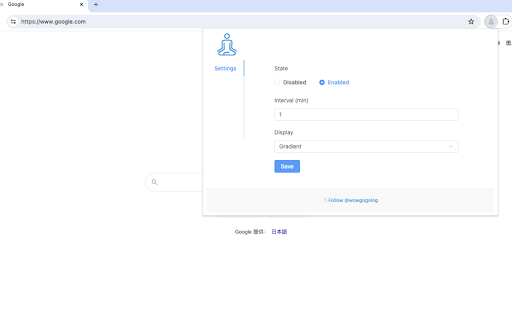
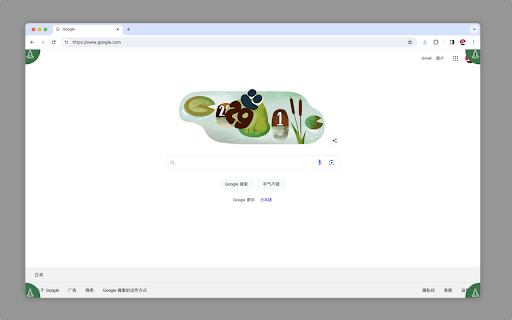
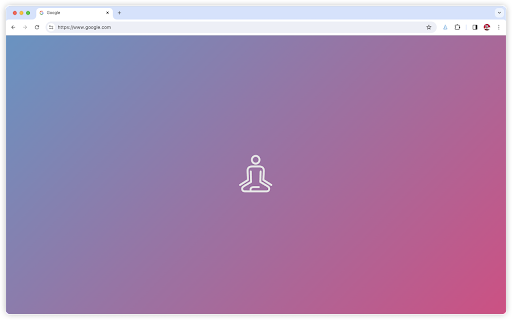
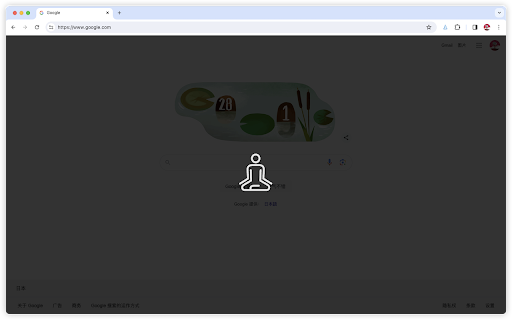
Remind yourself to take a break after spending too much time in front of a screen. This is a scheduled reminder tool. When triggered and set by you, this tool will send prompt content to your current active tab. The content of the prompt depends on the display method you set. When the reminder appears, you can click the icon to dismiss it. If you encounter any questions or inconveniences during use, you are welcome to give feedback to the author.

Circle Reader
An extension that provides immersive reading to make you fall in love with reading on the web The best free reading assistant (reader mode) that enhances the web page reading experience. Ads are too distracting, the colors are too ugly, the fonts are too small to see clearly, the typography is too messy to find the text, does it really need to be so difficult to read the web? With just one click, Circle gives you the purest reading experience, escorting you to better reading. Circle reading assistant can extract the content of the webpage and rearrange the layout into a more suitable interface for reading. Using self-developed analysis engine and typesetting engine, the recognition effect and typesetting ability are smarter, faster and more friendly. If you are looking for a lightweight and intelligent reading aid product, you might as well try Circle Reading Assistant-the best reading aid of its kind! The reading assistant browser extension Circle, which is more powerful than the Safari reading mode, is an extension and improvement of the browser's own reading mode; it is the only magical tool for computers to read web pages, read novels, and watch news; it has shortcut key support, custom styles, Custom fonts, custom themes, automatic scrolling, automatic loading of the next page, reading aloud, article outline (outline), back to the top, reading by column, printing the formatted webpage in reading mode, supporting browser translation, etc. Reading auxiliary functions. The self-developed analysis engine provides faster analysis and smarter analysis capabilities. The self-developed typesetting engine automatically blocks advertisements and noise on html, and says goodbye to the format escape. The Circle reading assistant browser extension developed by pure js has been launched on Google Chrome browser, Firefox browser, Edge browser, 360 browser, Opera browser, etc. ★ Several distinctive functions of Circle Reading Assistant: ➤ Self-developed recognition engine: With the help of self-developed recognition engine, Circle's recognition effect is smarter and the recognition speed is faster. ➤ Self-developed typesetting engine: With the help of self-developed typesetting engine, Circle's typesetting effect is more friendly and the typesetting speed is faster. ➤ Letter paper effect: a reading experience like reading a letter. ➤ Multi-page analysis: On a page with a link to the next page, the content of the next page is automatically parsed and displayed on the current page. ➤ Reading by column: Originally read the webpage by column, the welfare of large-screen users, without wasting every inch of screen space. ➤ Read aloud: Tired of reading? Why not try the content! Free your hands to do other things. With the help of "multi-page analysis", what kind of bicycle is needed for listening to novels? ➤ Preset 5 colorful themes: simple white, eye-protecting green, elegant dark gray, and deep dark. Circle has always been what you like. ➤ Custom gradient background or picture background: The preset theme is not on your aesthetic point? It's ok! Customize themes as you splash ink. ➤ Customize various styles: Just reading is not possible, I have the final say on the style of the web page! The font size is bigger, the font is thicker, and the line spacing is higher. Circle does everything for you to read. ➤ Follow the system to switch themes: only support custom themes? nonexistent. How about switching different themes at different times? . ➤ Custom css: You don't have the effect I want, you are awesome ugly! Customize css to help you, understand that css Circle is your person. ★ Keep abreast of the trends of Circle's reading assistant ➤ Subscription account 👉🏻 Senior Ranhe ★ Description of required permissions ➤ contextMenus: Use this permission to implement the right-click menu module, you can quickly access the function of Circle in the right-click menu ➤ : This permission allows Circle to access webpages, thereby realizing the recognition and layout of webpage content, as well as access to screenshots and exporting as pictures and other functions ★ Contact and discussion ➤ Contact me by email 👉🏻 wenguang.fe@gmail.com If you approve of my work, please have a cup of coffee to show encouragement and support 👉🏻 https://circlereader.com/donate The source code is hosted on github 👉🏻 https://github.com/hewenguang/circle Installing Circle means you accept our user agreement (https://circlereader.com/docs/agreement.html) and privacy policy (https://circlereader.com/docs/privacy.html)

Talking Clock
Announce the time periodically, set custom recurring reminders and display time. Talking clock provides time reminder and custom reminder functions, suitable for time and periodic task reminders in daily work and life. It can also display date and time. Reminder methods include voice announcement and system notifications. This extension is especially suitable for people who often work for a long time with desktop computer, such as writers, programmers, and people who work remotely or indoors. • Time reminder helps to manage the time while focusing on the work. • Custom reminders are suitable for periodic daily affairs, such as "Remind me to have lunch at 11:30 every day". 1. Time Reminder It announces the time periodically by voice engine and/or system notification. The time interval can be set in the options of the extension: 5 minutes / 10 minutes / 15 minutes / 20 minutes / 30 minutes / 1 hour / 2 hours / 3 hours. In addition, there are several DnD(do not disturb) settings which enabled by default, such as don't remind me time if the browser is in full screen or playing video. 2. Custom Reminder Users can add custom reminders. Supported reminder types include: • Only once: only reminds on a specific date. • Daily reminder: reminder at one or more time every day. • Weekly reminder: choose one or more days from Monday to Sunday. • Monthly reminder: choose one or more days from the 1st day to the last day every month. • Annual reminder: choose one or more days every year, such as "Birthday reminder". All types can set one or more reminder time on the reminder day. In this way, on the one hand, it can meet the needs of multiple reminders in one day for one thing. For example, "Remind me to take medicine three times (in the morning, noon and evening) every day", just create a daily reminder, which sets three reminder time. On the other hand, multiple reminder time can be set for important things to avoid missing it. 3. Clock The popup page displays current time and date by clicking the extension icon. In addition, the extension icon itself can also display the time (not enabled by default). In the options for clock settings, you can set: • Display analog clock or digital clock. • Whether to display seconds. • Whether to display the date. • Whether to display the time on the extension icon. 4. Other In the extensions keyboard shortcuts settings(chrome://extensions/shortcuts), you can set shortcuts for displaying the time and announcing the time. About Reminder Methods You can use one or both of two reminder methods: • Voice announcement: announce the time or custom content by Text-to-Speech engine. • System notification: send a desktop notification. The voice announcement will make a sound, so it may not be suitable for everyone. In addition, if you forget to turn on the speaker or the volume is too low, you will not hear it. System notification may also be missed if it disappears automatically. So: • System notification for time reminder will automatically disappear after a few seconds, because it's not very important. • Custom reminders are more important than time reminder. So to prevent missing it, system notification for custom reminders will disappear automatically after one minute by default, not a few seconds. You can set this behavior for each custom reminder separately. In summary, voice announcements and system notifications can complement each other to avoid missing reminder. About Text-to-Speech (TTS) TTS includes the TTS provided by the operating system and the remote TTS provided by the browser. The former can be adjusted in the operating system settings, while the latter depends on the network connection. The operating system comes with a general voice effect, it is available offline; the voice provided by the browser is usually better, but it requires network connection. TTS is used by time reminder and custom reminders. In the extension options, you can set TTS voice. Each voice usually only supports text in one language, and may not read text correctly in other languages. How to open extension options? • Right-click the extension icon, then click Options. • Click the extension icon, move the mouse to the popup page, then click the setting icon in the upper right corner. This extension is not an alarm clock It is suitable for daily affairs, but it is not an alarm clock. For example, if you want to catch a plane or get up early, please do not rely on this extension. Because the extension cannot issue a reminder when you exit the browser or when the computer goes into sleep. So it is not suitable for very important things. Note: due to a browser restriction, reminders/notifications may be delayed for a little time (less than 1 minute).

PostureMinder
Reminds you to sit up straight with pop-up notifications at specified time intervals. Sitting up straight while at your desk can make a big difference to your posture and overall health. This simple, elegant extension is easily customizable. Set how often you'd like to see a PostureMinder, then sit back and let it do its work! Useful features include: == Easy on/off == Turn off the extension so you don't embarrass yourself during a presentation. == Walk reminders == In addition to sitting up straight, you should also step away from your device every once in a while. Set how often you'd like to see a Walk Reminder. == Snarky == Fun, snarky messages will grab your attention and keep you entertained. ==Sync across devices== Your settings will sync if you have the extension installed across multiple instances of Chrome. Changelog: v2.1.3 Remove closing options as its no longer supported by Chrome. v2.1.0 Add "reload app" button to easily resync notifications. Fix compatibility for Firefox. v 2.0.0 Migrate to Manifest v3 and implement cross-device settings sync. v 1.3.3: Add compatibility for Firefox extensions (Thanks to @wzub for the pull request). v 1.3.2: Fix walk reminder bug v 1.3.1: Fix click close bug and add more phrases. v 1.3.0: Sounds! Optionally play a short notification sound each time your reminder runs. (Thanks to @IvanDonat for the pull request). v 1.2.0: Change enable/disable checkbox to on/off switch. 1.2.1: Small update to make all items fit within the options window nicely. v. 1.1.0: Add options to set the time for Walk Reminders and notification fade. (Thanks to @dee-see for the pull request) Submit feedback, bugs, and feature requests or simply learn more at https://postureminder.app.

Alarm clock app
Use Alarm clock app as online tool for managing time. It offers alarm app, ability to set multiple alarms, and offline mode. ⏰ Wake up happy: alarm clock app to brighten your morning. - Start your day with smiles and sunshine! - Designed to make your sleep magical, the timer transforms bleary-eyed groans into enthusiastic greetings. - Tuned finely for every sleepyhead, this handy extension ensures you'll wake up on the right side of the bed. 📅 Perfect for Every Schedule, Whether Busy Or Laid-back 🔸 Whether you're a rocketing executive or a laid-back dreamer, the alarm app molds to your daily rhythm. 🔸 Schedule snoozes or changes with a mere tap. 🔸 Never miss another appointment or morning meeting designed for ultimate usability. 📲 Advanced sleeping Technology At Your Fingertips 1️⃣ Delight in its seamless technology. 2️⃣ Set timer via innovative designs. 3️⃣ Need a nudge? Manage multiple alarms effortlessly using our intuitive interface. 4️⃣ Utilize sophistication; arm your mobile with the finest alarm clock online. 🔊 Diverse Sounds: Keep Your Ears Excited Tired of the tedious tick-tock? Choose from a rich library: nature's lullabies, jazzy tunes, or classic beep-beeps. Mold your listening experience with the perfect alarm sound that suits your vibe—a new jingle to jazz up sleepy mornings. 🕒 No More Accidental "Oops, Overslept Again!" Dread Monday mornings? With our foolproof alarm app, groggy oversleeping becomes a relic of the dark past. Calibrated to banish tardiness, it ensures waking up is as smooth as a fresh cappuccino. 💡 Customization Options to Make It Truly Yours 1) Turn dull sleep into personalized joyrides. 2) Create themes; add colors, textures, or icons that express your style and energize wakeful hours. 3) Install extension enhancements to sprinkle magic on your rituals. 🖥️ Ring Worldwide: Online and Offline 🔺 Perfect for globetrotters! As one of the superior internet alarm clock tools, it works from anywhere. 🔺 Just imagine this: a ring alarm to greet the day in Milan, Iceland, or Tokyo. 🔺 Activate it with stable internet connections, globally reliable. 👬 Family-Friendly Features to Unite and Motivate ➤ Ideal for every household, enjoy group features. ➤ Synch multiple users; coordinate wake-up time within families. ➤ Call it the tribal call! This alarm app unites, encouraging jovial mood over breakfast two seconds after waking. 🌟 Humor Your Way into the Day The software isn’t just functional; it’s fun! Enjoy quirky tones. Imagine bubbling laughter streamlining your morning ordeal. This app pulls smiles during the earliest hours, ensuring everyone's day starts on the right, humorous note. 📦 Hassle-Free Download and Install Alarm Options Get up and running in minutes—simply download alarm app without complicated setup procedures. Instantly discover how effortless mornings can become with your perfect work timer, readied promptly each time. 🚀 Revolutionizing the Work Scene Offices and busy routines beckon efficiency. Utilize the app for the daily work alarm boost. Punctuality becomes your mantra. Eradicate 'sorry, boss!' as you breeze confidently into productive chores. 🤹🏻 Multi-functional, Multi-purpose Delight 🔸 More than an extension, discover myriad uses! 🔸 Monitor sleep patterns or let it serve as a handy stopwatch. 🔸 It might even lend a helping hand with bedtime stories, adding value far beyond its original all-seeing-eye duty. 🚗 Navigate Traffic Woes by Starting Snappier Say goodbye to frantic traffic surges; set alarm to nudge you down that freeway early. Implement strategic timing effortlessly—turbo-charge your day without the need for coffee-induced urgency. 🍞 Create Day Full of Aroma and Cheer DSL’s loaded with delightful sounds—wake to toast popping or coffee brewing! Reinvent the start of each day, fill the air with warmth and fragrance alongside an efficient knowledge-offering device. 🔐 Security Features: Your Timekeeper, Guarded Smartly Our alarm clock website stores data safeguarding priorities. Trust enhanced security ensuring privacy, so any paranoia about your schedule is dutifully quelled—keeping your punctuality belt tightly fastened. 💤 Never Disturb Your Peaceful Siestas Designed intelligently—respecting nap lovers—fit plenty of peace within daily pauses. A no-ring policy maintains undisturbed breaks yet guarantees timely reactivations when activities resume. 1. Conquer snooze blues. 2. Global adaptability. 3. Superb sound selection. 4. Easy customization. 5. Secure and hassle-free. 📞 Stay in Touch: App Community Awaits Interactive support community—buzzing with tips, tricks, and friendship—fuels your enhanced alertness. Commune over shared experiences using the assorted features, awakening improved bonding. 🛌 Extending Beyond Normal Day Cycles Capable not just as a starter, it terminates night-shifts extension should the need arise anytime.
