
albpnoibahehboglkghilhljilchnfbo


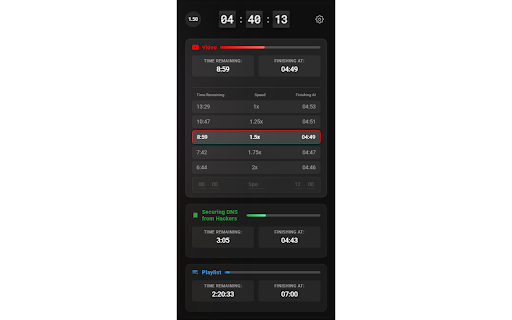


Control playback speed, track playlist duration, and estimate finish times with beautiful dashboard. The ultimate productivity tool. Stop guessing when the video ends. Take control of your time. ⏳ Chrono isn't just another speed controller. It is a powerful productivity dashboard designed for students, professionals, and anyone who values their time. Whether you are speeding through a 2-hour lecture or binge-watching a playlist, Chrono calculates exactly when you will finish based on your current speed. 🚀 WHY CHRONO? Most extensions just change speed. Chrono helps you manage it. We combined a precision speed controller with a retro-style Flip Clock and intelligent time estimation logic to help you fit more content into your day. Go beyond YouTube’s limits with speeds from 0.25x up to 16x. One-Click Presets: Instantly jump to 1.25x, 1.5x, or 2x with our interactive speed rows. Fine Tuning: Use the +/- buttons for micro-adjustments. "When will I be done?" Chrono tells you the exact wall-clock time you will finish (e.g., "Finish at 3:45 PM"). Real-Time Updates: Change the speed, and the finish time updates instantly. See the Total Remaining Time for the entire playlist. Set a Custom Target: Only want to watch the next 5 videos? Chrono recalculates the time for just those videos. 🎯 Custom Goals (The "Student Saver") Have to leave in 20 minutes? Input your Target Time (e.g., "I need to finish by 4:00 PM"). Chrono automatically calculates the exact speed you need to watch at to hit that deadline. ☕ The "Delightful" Ad Break While an ad plays, Chrono displays a relaxing, animated Coffee Break card with fun status messages like "Perfect time for a stretch!" or "Grabbing some popcorn". Keeps your time tracking accurate by pausing the timer during ads. A stunning, translucent interface that feels like a native part of your OS. Dark Mode Friendly: Includes a "Solid Background" mode for perfect contrast on any theme. Compact Mode: Automatically gets out of your way when you don't need it. 🔒 PRIVACY FIRST Chrono runs entirely on your device. We do not track your viewing history or collect personal data. Your privacy is our priority. Maximize your learning. Conquer your watchlist. Install Chrono today.

Youtube Ends At
This extension just displays what time it will be when the video ends, taking playback rate into account. Click on the label to change to "ends in" mode. This currently does not account for SponsorBlock segments.

Video Duration for YouTube™
Adjust YouTube video playback speed, save time, and navigate with ease. Whether you want to speed up a lecture or slow down a tutorial, "Video Duration for YouTube™" gives you full control over your video viewing experience. With this extension, you can easily try out different speeds and see how much time you could save or add based on your selection. Also, the remaining video length is shown so you can plan your viewing time more efficiently. 1. Video Speed - Adjust video playback speed to up to 16x - Jump to 1x speed, then switch back to the previous speed in one click - Set the default speed at which every video starts with - Change speed in smaller or bigger increments 2. Video Duration - Find out how much time will be saved or added compared to watching at 1x speed - See your watch progress in percentage - Know how long it takes to watch the rest of the video at current speed - Know your YouTube Shorts: know video length, change video speed, skip through video 3. Flexibility - Continue using your favorite shortcuts already provided by YouTube - Tailor appearance and functionalities to your liking with settings in the extension popup We respect your privacy and don't collect any data. 💥 Keyboard shortcuts 💥 Works with any keyboard layouts. Here are the QWERTY shortcuts for reference: Change speed: A / D Jump to x1 speed: S Restart video: R Rewind / advance 10 seconds: J / L Play / pause: K Mute / unmute: M Show / hide controller: V Left controller: Z Right controller: X Time to end: E Watch progress: P 😦 Troubleshooting 😦 Refreshing the video page should fix most issues. 🚨 Future Release 🚨 Please use the support form to report problems, request features, and make suggestions. If this extension is helpful to you, please leave a rating or review so more people can find it. Thank you for your support!

YouTube Speed Controller
YouTube Speed Controller, a Chrome extension designed to enhance your YouTube viewing experience by offering one-handed control over video speed. By simply pressing the up or down arrow keys, you can adjust the video playback speed in 0.1x increments, with the current speed displayed in a subtle on-screen bubble. This extension provides a convenient and efficient way to tailor your viewing experience, allowing you to consume content at your desired pace. Whether you're a student absorbing educational material, a professional staying up-to-date with industry trends, or just someone looking to make the most of their video-watching experience, YouTube Speed Controller adds a layer of control without interfering with other sites or applications.

Youtube Chapter Progress
Chrome extension that modifies the youtube video page, placing a progress bar with the remaining time under the active chapter Chrome extension that modifies the Youtube video page, and places a progress bar underneath the active chapter in the Chapters list, displaying the time remaining in that chapter. This way you'll be able to visalize not only the progress of the video in general, but also how much time is left in the chapter on its own. The extension can optionally place a permanent progress bar underneath the main video player that won't disappear when you are not interacting with the video player. You can customise the visibility of the bars, as well as if you prefer to display the chapter bar only while hovering over the active chapter, by clicking on the extension icon. Note: None of the added progress bars are interactive, therefore you can't change the video position by clicking on them. They just display the progress of the video and the chapter independently.
