
akmlgdbkdgmgjoobidmmkknmlblhjomj

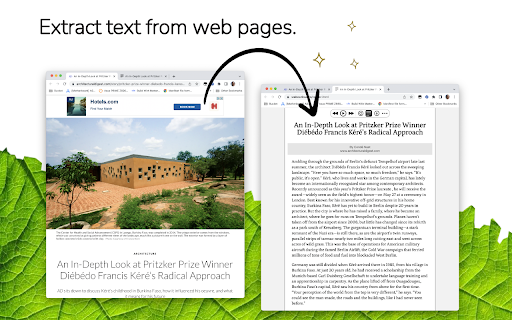


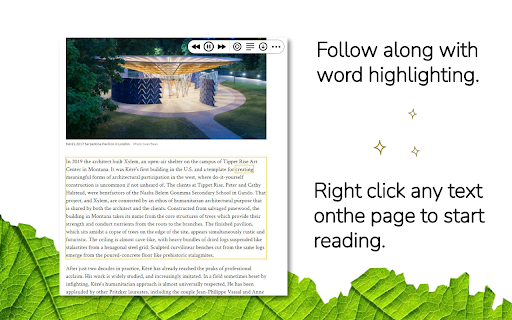
Listen to the web using text to speech. Perfect for dyslexia, low vision, students, researchers, kids, learning to read. Listen to the web using text to speech to assist with comprehension--to give your eyes a break. New in 2024 - AI-Powered website summaries (otherwise known as TLDR). This feature allows you to generate a concise summary of any webpage with a click. WebOutLoud reads websites out loud using the free voices that are already available in your web browser with the option to upgrade your experience to include Premium voices. No text selection is required. It will automatically continue reading paragraph after paragraph. Not only that, it will highlight words as it reads them and remember where you left off. Give your eyes a break! Just navigate to any web page and hit play. WebOutLoud will read web pages using text to speech. * It reads pretty much any webpage you can throw at it. * Highlights words and paragraphs as it reads. * Summarize websites with AI (requires premium subscription). * Tell the app where to begin reading using Touch Assist, or enable the powerful Reader Mode to isolate readable content automatically. * Dozens of voices to choose from (selection of free voices is dependent on operating system and extensions.) The WebOutLoud browser extension for Chrome is free to use with the voices that are built-in to your browser. Premium voices and the AI website summary feature require a premium subscription. A premium subscription also gives you access to all features of WebOutLoud's iOS and Mac apps and the browser extension for Safari (available on both desktop and mobile).

Read text out loud
Read text out loud is a Chrome extension that converts written text into clear and natural-sounding speech. 🔍 Introducing Read Text Out Loud Chrome Extension! 📖 Are you looking for a convenient way to have text read out loud? Look no further! With the "Read Text Out Loud" Chrome extension, you can transform any written content into an immersive audio experience. Whether you're a student, professional, or simply someone who enjoys listening to articles, this extension is perfect for you. 🌟 Why Choose "Read text out loud" Extension? 🔹 Enhanced Accessibility: This extension is perfect for individuals with visual impairments, reading difficulties, or those who simply prefer to listen to content rather than read it. 🔹 Productivity Boost: Save time and multitask by having web content read aloud to you while you focus on other tasks. Whether you're researching, studying, or simply browsing the web, this extension can improve your productivity. 🔹 Language Learning Aid: Use the extension to listen to foreign language content and improve your pronunciation and comprehension skills. It's a great tool for language learners of all levels. 🔹 Multilingual Support: "Read text out loud" supports multiple languages, allowing you to enjoy text-to-speech functionality in various contexts and across different websites. 🔹 User-Friendly Interface: The extension's intuitive interface makes it easy to use, even for those who are not tech-savvy. Enjoy a seamless and hassle-free reading experience with this user-friendly tool. 🔊 Text to Speech Made Easy ✨ Say goodbye to straining your eyes and let our extension do the reading for you. "Read Text Out Loud" utilizes advanced text-to-speech technology to convert written content into natural-sounding speech. Simply select the lines you want to hear and let the extension take care of the rest. 🎙️ Experience the Joy of Reading Aloud 🌟 Reading aloud has never been easier! "Read Text Out Loud" allows you to listen to your favorite articles, blog posts, and documents while you multitask. Whether you're cooking, exercising, or simply relaxing, this extension provides a seamless and enjoyable reading experience. 🚀 Key Features The Read text out loud Chrome extension offers a range of features to enhance your reading experience: 📚 Read Aloud: Simply highlight any word on a webpage and let the extension read it out loud to you. 📝 Text Reader: Copy and paste text from other sources, such as documents or emails, and have the extension read it to you. 🗣️ Language Support: Enjoy text-to-speech functionality in multiple languages, including English, Spanish, French, and more. 🎧 Customizable Settings: Adjust the speech rate, volume, and voice to personalize the reading experience to your liking. 📌 Bookmarking: Bookmark specific sections of a webpage to easily return to them later and have them read aloud. 🌐 Webpage Compatibility: The extension works seamlessly with most websites, allowing you to listen to content across the web. 🎯 Text Reader for Enhanced Productivity 💡 Boost your productivity by turning text into speech! "Read Text Out Loud" assists you in absorbing information more effectively. Take advantage of the extension's features to: 💯 Listen to important articles while commuting or taking a walk. 💯 Review study materials by listening to them repeatedly. 💯 Proofread documents by hearing the content read aloud. 💯 Easily consume online content without the need for extensive screen time. 🌐 Seamless Integration and Accessibility 💫 "Read Text Out Loud" integrates seamlessly into your Chrome browser, ensuring a smooth and hassle-free user experience. Accessible with just a few clicks, this extension brings the power of text-to-speech technology to your fingertips. 📖 A Smart Text Reader Experience the convenience of a smart text reader right in your browser. "Read text out loud" intelligently detects and reads text from various sources, including websites, PDFs, and online documents. Whether you're researching, studying, or simply browsing the web, this extension ensures that you never miss out on important information. 🔊 A World of Possibilities Unlock a world of possibilities with "Read text out loud." Whether you're a student, professional, or simply an avid reader, this Chrome extension revolutionizes the way you consume written content. Dive into the immersive experience of having a document come to life through speech and make your browsing sessions more engaging and efficient. 🥷🏻 How "Read text out loud" Works: 1️⃣ Install the "Read text out loud" Chrome extension from the Chrome Web Store. 2️⃣ Once installed, an intuitive toolbar will appear in your browser. 3️⃣ Highlight any text on a webpage that you want to be read aloud. 4️⃣ Click on the "Read text out loud" icon in the toolbar. 5️⃣ Sit back, relax, and enjoy as the extension brings the text to life with its seamless text-to-speech capabilities! 🔝 How "Read text out loud" Extension Can Benefit You: - Enhanced Accessibility: "Read text out loud" ensures that everyone, regardless of visual impairments or reading difficulties, can access and understand online content effortlessly. 🌐👨🦯 - Improved Multitasking: Listen to articles, blog posts, and other textual content while engaging in other tasks. Stay productive and stay informed with the help of this extension! 📚💻 - Language Learning: Practice foreign language pronunciation and comprehension by listening to written content in different languages using "Read text out loud." 🇺🇸 🇪🇸 🇵🇹 🇦🇪 - Efficient Proofreading: Catch errors and improve the quality of your written work by having it read back to you. Easily identify typos, grammar issues, or inconsistencies with this handy extension! ✍️🔍 With "Read text out loud," the possibilities are endless! Experience a new way of consuming online content with its unparalleled text-to-speech capabilities. Install this extension today and let the words come alive! 🎉🔊 Remember, "Read text out loud" is your reliable companion for all your text-to-speech needs. Say goodbye to eye strain and hello to effortless reading! Get the extension now and embark on an immersive reading journey like never before! 🔊🚀

Text to Speech (TTS)
A text to speech tool with natural sounding voices. Text to Speech (TTS) is a text-to-speech extension with natural-sounding voices by using two different TTS engines. The 1st engine is the HTML5 native web speech API for speech synthesis. It is active in all modern browsers by default (more info: https://webaudio.github.io/web-speech-api/). The 2nd API is the Kokoro AI engine, which uses a new artificial intelligence method to synthesize text (more info: https://huggingface.co/onnx-community/Kokoro-82M-v1.0-ONNX). Please note that when you choose Kokoro AI, the app needs to download training data (~300MB) for the AI engine. So please be patient while the app is loading. You can use this extension in a standalone interface or within web pages. If you press the toolbar button, the first interface opens up where you can enter the desired text for TTS. On the other hand, within a webpage, once you select a text, a placeholder speaker icon appears. Once you click the speaker icon, the text-to-speech starts. For the highlight feature to work correctly, please select text paragraph by paragraph. Please note that the highlight feature is still in Beta and may not work properly on all websites. There are also a few options related to the in-page text-to-speech, which can be adjusted from the extension settings page. Note 1: For TTS in webpages, the app only uses the Web Speech API. Kokoro AI engine is only available within the standalone interface. Note 2: Kokoro AI engine, once loaded, can work fully offline. Moreover, you can save the output TTS audio as a .wav file to your machine. When text-to-speech is completed, please press the audio icon on the right toolbar. To report Bugs, please visit the addon's homepage (https://mybrowseraddon.com/text-to-speech.html) and fill out the bug report form.

Read aloud with auto language detection
This extension helps you read websites aloud by using Google Chrome text-to-speech engine. It can automatically detect the language of the current sentence (currently supported for English and Russian). Also, you can manually choose any language among supported by Google Chrome text-to-speech engine: English, Deutsch, Español, Español de Estados Unidos, Français, हिन्दी, Bahasa Indonesia, Italiano, 日本語, 한국의, Nederlands, Polski, Português do Brasil, Русский, 普通话(中国大陆), 粤語 (香港), 國語 (臺灣). You can conveniently control the extension using keyboard shortcuts: go to previous/next sentence, start/pause, change speed etc. When you listen, the current sentence is always highlighted (selected) on the webpage. There is also a convenient option of auto-scrolling to follow the current sentence. How to use: Quick start: select any part of a sentence on a web page where you want to start reading and press Alt+R (or click the extension icon). Extension widget will appear and will start reading. Mouse over the widget to see all the options and keyboard shortcuts. Most commonly you will use Shift to start from current selection, Esc to stop, Space to pause/resume, left and right arrows to go to previous/next sentence.

Riddr - Text to Speech reader for Chrome
Tired of reading? Riddr is a FREE TTS extension that can read your news, favorite blogs, emails, and PDFs in 50+ languages. Riddr, pronounced as /ˈ𝗿𝗶ː𝗱ə/ (reader), is a Google Chrome extension that converts any selected text to speech. Powered by the legendary 𝗦𝗽𝗲𝗮𝗸𝗜𝘁! TTS engine and state-of-the-art artificial intelligence technologies, Riddr offers the most authentic human-like voices on the market for 𝗙𝗥𝗘𝗘. Combined with its easy to use interface you’re one click away from converting your favorite e-books, online news, documents and any other form of text into speech in more than 50 languages, so you can listen instead of reading. 1. Select the text you want to read. 2. Click the Riddr icon or use a custom keyboard shortcut. 3. Listen and enjoy. Built into Riddr's core is 𝗦𝗽𝗲𝗮𝗸𝗜𝘁!, a TTS engine that offers 50+ languages with built-in automatic language detection (https://riddr.com/faq/supported-languages), allowing seamless switching between multiple languages. Riddr also has deep integration with your favorite browser, which will allow you to interact with native, remote, or third-party TTS engines that are already available on your PC or Mac. On top of this, Riddr’s modular design and open source code allows developers around the world to expand the built-in TTS engines. For more information follow this link: https://riddr.com/developers. Riddr can read text from everywhere on the web. Read your emails, Google Drive or PDF documents before you send them. You can use Riddr to read your favorite news websites, blogs like Medium or perhaps e-books, on a daily basis, unlimited, for free. If you can see it, Riddr probably can read it, so how you use it is up to your imagination. Read all the time, even if you have connectivity issues or you’re in a remote rural area. Riddr’s offline mode makes it the ideal language learning tool for schools and teachers in developing countries. One of Riddr’s unique features, besides predefined control shortcuts such as Read (𝗔𝗹𝘁+𝗥), Pause (𝗔𝗹𝘁+𝗣), and Stop (𝗔𝗹𝘁+𝗦), is the ability to have multiple keyboard shortcuts linked to different TTS Engines / voices in different languages, which makes Riddr not only easy to use but also very fun. New shortcuts can be added and configured very easily via the options panel. The easy to use options panel gives you huge control over your Riddr extension and gives you the ability to add your personal touch to it. Here are some of the available options: - Customise your volume level, speaking rate & voice pitch; - Predefine your preferred language; - Transcribe a list of words and specify their pronunciation (ideal for teachers and student safety); - Enable Auto-Selection Mode, which automatically extracts and reads readable text from websites; - Automatic Read Mode allows website owners to specify which content should be read upon page entry, enhancing accessibility. If you’re interested in joining the project by developing a custom TTS engine or translating Riddr into your language, step up and join us: https://github.com/riddr/RiddR/tree/master/_locales If you like the extension, please don’t forget to rate it. 😍 For any questions or requests, feel free to check out our website or contact our support at support@riddr.com
