
ajhhncghjkkkfcfnbfdehjpcdkkoooem
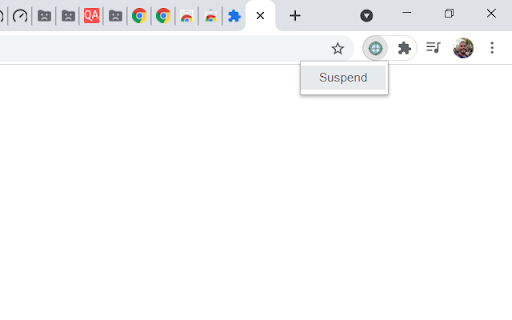
Manually suspend any active tabs to save memory and processor resources. With this extension you will be able to suspend any tab you want, the suspended tab will not consume memory and processor. To activate back your tab you just need to click in the tab that you want to make active again and it will load normally. I made this extension because I was using The Great Suspender for a long time and for security reasons it was blocked. If you are a tab accumulator like me you will use it a lot.

Tiny Suspender
Unload / suspend / hibernate idle tabs to reduce memory and cpu usage. Unload idle tabs to free your precious memory and cpu resources! Tiny Suspender will automatically suspend/hibernate background tabs for you, greatly reducing overall system resource usage without you having to take any action. You can set how long to wait before suspending idle tabs and configure a whitelist to exclude certain pages from automatic suspension. - Form Detection: Tiny Suspender will try to detect active forms to avoid automatically suspending page with unsubmitted data - Audio Detection (optional): prevent autosuspending tabs that play music in the background. - Keyboard Shortcuts: Suspend tabs without moving your hand away from your keyboard. - Optionally use Chrome's native tab discard feature to save even more resources when your background tabs get suspended. Feedback is always welcome! - Source code and issue tracking are available at https://github.com/arifwn/TinySuspender - Due to limitation of Chrome Web Store developer portal, extension developers are not automatically notified every time a user leave a feedback to report an issue. Please use email or github issue report ( https://github.com/arifwn/TinySuspender/issues ) if you need fast response. Chrome Permissions used in this extension: - tabs & activeTab: allows various tab suspension/restore features and form detection feature. - contextMenus: allows adding "suspend tab" menu item and "open link in new suspended tab" in right click context menu. - storage: allows saving extension configuration - alarm: allows centralized and more reliable autosuspension timer - chrome://favicon/* : allows retrieving suspended page's favicon. - v2.1.0: - Added dimmed favicon in all suspended tabs; updated background tabs suspension behavior (Thanks Dsouravcom for the pull request on github!) - v2.0.4: - Added new keyboard shortcut actions that applied to all windows - Keyboard shortcuts are now only applied to the last active window - Misc. bug fixes and improvements to TinySuspender's internals - v1.3.0: - Added dark mode toggle (thanks Abdusco for the pull request on github!) - v1.2.0: - Happy new year! - Added an option to skip autosuspension when offline - Added support for keyboard shortcuts - Tiny Suspender will now try to restore tab scroll position - v1.1.0: - Added option to skip pinned tabs from automatic suspension - "Suspend All Tabs" and "Suspend Other Tabs" now will skip whitelisted pages. - Added experimental support for Chrome native tab discard feature. Enable it from the settings screen. - v1.0.0: We have reached version 1! - improved autosuspension timer by using Chrome's alarm api. Requires new permission. - UI improvements. Now you can always see tab suspension status from the popup. Status is also reflected as color-coded icon - improved form detection. - added an option to enable autorestore when a suspended tab is brought to foreground. - added an option to prevent autosuspending audible tabs. Useful for online music player. - v0.1.2: switching away from unloaded page willl trigger automatic suspend timer. - v0.1.1: fixed bug in whitelisting and auto-suspension feature.

Tab Discard (Suspender)
Easily suspend inactive tabs and save up memory for your browser. Tab Discard (Suspender) is an extension that lets you easily suspend either all inactive tabs or just the active tab by clicking on the toolbar button. In principle, suspending tabs can reduce the browser memory and enhances your browsing experience. When you click on a suspended tab (make it active) it will be loaded with the previous content automatically. This addon is useful when you have several open tabs, you can suspend them all (free up the memory) with just one click and then visit them one-by-one to unsuspend. This way, your browser will use the least amount of memory and have a better performance. Please right-click on the toolbar button and then select the desired option for suspending tabs (i.e. active or inactive tabs). To report bugs, please visit the addon's homepage (https://mybrowseraddon.com/tab-discard.html) and fill the bug report form.

Smart Tab Suspender – Save RAM & Speed Up Chrome
Save memory by suspending inactive tabs. Auto-suspend after inactivity and restore with a single click. Smart Tab Suspender helps you save memory and improve browser performance by automatically suspending inactive tabs. • One-Click Suspend - Instantly suspend any tab to free up memory • Auto-Suspend - Automatically suspend tabs after a customizable period of inactivity (5 min to 2 hours) • Smart Protection - Never suspend tabs playing audio/video, pinned tabs, or whitelisted sites • Memory Savings Dashboard - Track how much memory you've saved with detailed statistics and charts • Whitelist - Add your favorite sites to never be suspended • Keyboard Shortcut - Press Alt+Shift+S to quickly suspend the current tab • Form Data Protection - Preserves scroll position and form data when restoring tabs • Memory Alert - Get notified when system memory usage is high • Data Management - Backup your settings and data, and easily export/import them across devices Each browser tab can use 50-150MB of memory. If you're a tab hoarder with dozens of tabs open, this can slow down your computer significantly. Smart Tab Suspender solves this by suspending tabs you're not using, freeing up memory instantly. • Beautiful, modern interface • Lightweight and fast - won't slow down your browser • Privacy-focused - no data collection, everything stays local • Works offline • Free and open source Perfect for users who keep many tabs open but want to maintain browser performance.

Tab Suspender by Workona
Suspend your browser tabs to save memory. Keep your computer running quickly with the Workona Tab Suspender. You can choose to suspend tabs automatically or on demand with one click. Either way, you’ll dramatically reduce your browser’s memory usage. Now you can keep all your tabs open without getting slowed down. 2/5/2021 UPDATE: Need to restore lost tabs from The Great Suspender? Workona Tab Suspender will automatically repair any broken Great Suspender tabs we find in order to restore the tabs you lost when the extension was disabled. Visit this article for instructions on how to restore these tabs: https://workona.com/pages/the-great-suspender-malicious-chrome-extension/ Save memory Dramatically reduce memory usage and keep your computer running quickly, just by adding the Workona Tab Suspender. Suspended tabs are just like normal tabs, except they don’t use memory. Keep more tabs open Tabs are where modern work gets done. Now you can work on multiple projects and keep those tabs open, all without impacting the performance of your computer. Auto-suspend tabs Choose automatic tab suspension based on how many active tabs you have or how much time has elapsed. You can rest easy knowing that suspension is working behind the scenes to free up resources. Never lose tabs Unlike other tab suspenders, you never have to worry about being locked into our system or losing your suspended tabs if you decide to stop using the Workona Tab Suspender. From a company you can trust More than 175,000 people trust Workona to keep their browser’s memory under control. Our company is venture-backed and built to last. Learn more at workona.com We believe that great software shouldn't come at a cost to privacy. Workona Tab Suspender does not store your browser data, use it for advertising, or share it with third parties. Your suspended tabs are 100% private to you, and we request the minimum permissions needed to suspend your tabs. If you ever have questions about Workona’s privacy practices, reach out to us at privacy@workona.com. Feel free to contact support at support@workona.com and we'll reply as soon as possible. By installing the extension, you agree to Workona’s Terms of Service (workona.com/policies/terms) and Privacy Policy (workona.com/policies/privacy).
