
ajgfnlfggljmdkepjeaicepbokhemmhd
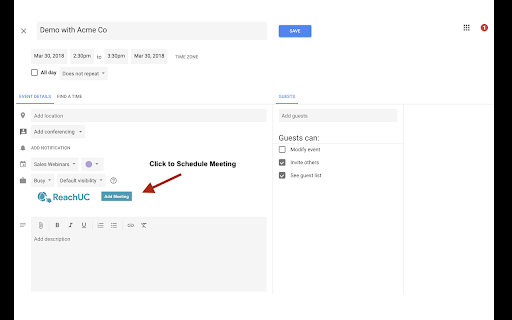

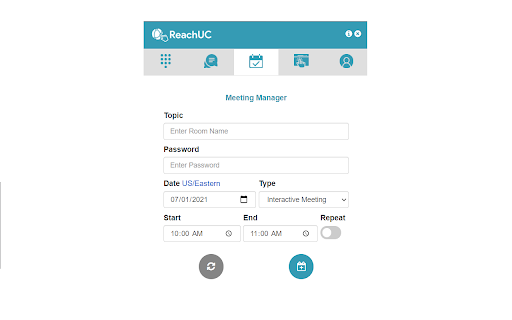
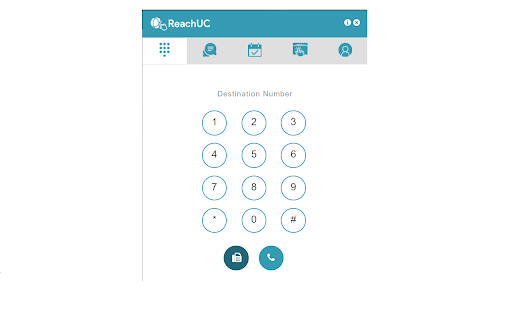
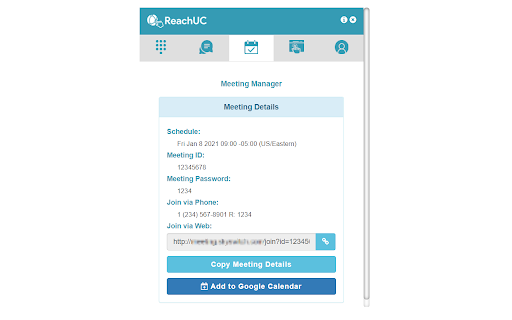
This Chrome extension allows you to Click-to-Dial phone numbers on web pages, send SMS and fax messages, and schedule web meetings. With ReachUC Complete, you have the ability to click-to-call phone numbers on any web page in addition to a suite of features designed to boost productivity. This extension enables you to track and make more sales calls by harnessing the features of your cloud PBX from within your Chrome browser. With ReachUC Complete, you can: * Initiate click-to-dial PBX calls or send SMS to any phone number on a web page * Make outbound phone calls through your desktop, desk phone or mobile phone * Call, send SMS messages and send faxes from an integrated dial pad * Schedule Meeting Manager web and video conference meetings with the option to automatically synchronize to your Google Calendar account (or vice versa) * Save contact information from your Google Contacts to your PBX Contacts list How Does the Click-to-Call Feature Work? Hover your mouse over any phone number on the web page. This phone number will be highlighted and produce a pop-up with three options available: Message, Call by WebRTC and Call. * Message: Gives you the ability to write and send an SMS on your computer without leaving the web page. * Call by WebRTC: Initiates a phone call on your computer (headphones or headset recommended). * Call: This option will first call your PBX phone. Pick up your phone and the outbound call will be placed immediately after. What Are the Benefits of ReachUC Complete? * Saves time by cutting out the manual process of dialing phone numbers * Creates a convenient workflow by allowing you to operate PBX calls, SMS messages and faxes solely through your computer with Dialpad and Click-to-Call options * Automatically synchronizes web and video conference meetings to your Google Calendar so you don’t forget important meetings NOTE: In order to use this extension, you will need login credentials from a hosted PBX provider that works with ReachUC. For more information visit http://www.reachuc.com.

FOP2 Extension
FOP2 Extension for Asterisk PBX. Manifest version 3 version. View status of your Asterisk PBX extensions directly in Chrome Shows desktop notifications and configurable popups on new or connected calls. Converts phone numbers in any web page into click to call links, using your Asterisk's PBX extension. What's new in 1.0.1: Support for panel contexts and dial prefix. What's new in 1.0.3: Add panel context and dial prefix in options What's new in 1.0.3: Better number matching to avoid dates, make unregistered extensions invisible What's new in 1.0.5: Fix deprecated desktop notifications What's new in 1.0.6: Context menu to dial selected text. What's new in 1.0.7: Shows UTF8 Characters in button labels What's new in 1.0.8: Small bugfix to make buttons display on FOP 2.28 or older What's new in 1.0.9: Improved settings: open popup link on notification click. Improved phone matching. What's new in 1.1.0: Configurable protocol handler in click to call numbers. Popup content so you can display CRM info directly in the call notification. Click to all on extension list for using it as a quick company directory. What's new in 1.1.1: Fix duplicate/triplicate context menu entries. What's new in 1.1.2: Fix utf8 decoding on desktop notification What's new in 1.1.3: Convert numbers to click 2 call now works on most dynamic content What's new in 1.1.4: Bugfixes to prevent warnings and errors on console What's new in 1.1.5: Convert numbers to click 2 call on dynamic content now follows user configuration instead of being always on. Oops! What's new in 1.1.6: Prevent double popups on connect on FOP2 server version 2.31.20 and up What's new in 1.1.7: Add ability to run javascript functions instead of opening popups What's new in 1.1.8: Fix for connected popups sometimes not being fired What's new in 1.1.9: Remove tabs and unlimitedstorage permissions from extension as they were not needed. Remove jquery dependency from background process. What's new in 1.2.0: Also converts callto: and tel: links to FOP2 click to call if no protocol handler is configured in options. What's new in 1.2.1: Fixed bug that freezed some pages when trying to detect phone numbers on them. Honour click2call setting for tel: and callto: links (do not enable them if setting is turned off). What's new in 2.0: Manifest version 3 version. Uses sidepanel. What's new in 2.1: Find phone numbers general improvements. New option "Search Links" that will keep original links on elements and add an extra click 2 call element instead of overwriting it. Fixes on call origination with empty callerid. (Thanks to Convergent Communications for these updates) What'2 new in 2.2: Improvements in Desktop notifications, popup content and variables shown. What'2 new in 2.3: Ability to dial any number by using the filter/search box.

8x8 Web Dialer
Call any phone number straight from where you are on a web page. Make calls via 8x8 * Making a call is as simple as clicking a button next to a phone number anywhere you are on a web page Once installed, the extension will automatically highlight most phone numbers in your web browser as a blue link. Popup guide: * You can enable the option to send SMS from the plugins settings * Click a phone number and you will have the option to either Call or Send a SMS via 8x8 * You will be redirected to 8x8 Work for Desktop app The 8x8 Web Dialer will save you valuable seconds on each contact you are trying to reach via phone or text message. It’s a great way to save time every day: * Call or text almost any phone number in your web browser with one click. * Save seconds per call and improve your calling accuracy. * Big spreadsheet of numbers to call? Save it as an HTML file or load it into Google Sheets and use the 'Publish to the web' feature, then open it in your browser to create a clickable dialing directory. * On web pages that don't support direct number clicking, simply highlight and right-click on phone numbers to call them. This feature also supports 8x8 Contact Center. If you use the web frequently for research or sales prospecting, this browser extension from 8x8 can save you and your employees hours per year. REQUIREMENTS * Windows 8 and newer, MacOS 10.13 and newer * 8x8 Work for Desktop application https://www.8x8.com/products/apps

N-able Passportal
You can save all your usernames and passwords to N-able Passportal, and it will automatically log you in to your websites and sync your passwords to all of your devices. Anywhere Access: - Install the N-able Passportal browser extension on all computers - Login using the same N-able Passportal account on any device Improve Your Digital Identity Security: - Generate unique and complex passwords - Create new passwords as you sign up for sites - Protect your Password App account with Multi-Factor Authentication Save Everything: - Store login usernames and passwords - Manage everything from a simple, searchable “password vault” - Add, edit, view, delete, and organize your websites Why should you use Password App? - Never forget a password - Generate strong passwords that you don't have to remember - Passwords are automatically entered for you on your websites when loaded - Share your passwords with co-workers in a secured manner - Only remember 1 password! My Password App uses AES-256 encryption with hundreds of rounds of encryption processed using SHA-256 hash keys. Our team can never see or access your passwords.

net2phone for Chrome
A net2phone browser extension to connect with net2phone features. With the net2phone | Click2Call extension, all phone numbers are displayed on web pages, and your CRM becomes clickable! When you click on a number, we connect your call directly to you. No Need to dial! net2phone for Chrome seamlessly connects to your net2phone account to provide an easy and convenient way to call from your browser. Net2phone Chrome Extension functionality: - Dial-pad to call any number right from the toolbar - Click-to-call any number on any website - See all your history, recent calls, and take action - all without leaving the page - Listen to your voicemail - Choose which of your net2phone numbers you’d like to place the call from - Use the URL Feature to create “screen pops” on incoming calls. This feature, when configured and turned on, will trigger your browser to open a new tab with a URL of your choice upon receiving an incoming call. Install net2phone for Chrome and supercharge your web browsing experience today! Click-to-Call usage: You can use the extension dial pad to call a number or call back a recent number by clicking the green phone icon. You can also type "-call" in the chrome URL box followed by a number. This will give you the option to dial directly without leaving the page. Additionally, you can place a call using the "Click to Call" feature. Click the phone icon next to any number on any web page, and the call will be connected to your selected line. URL Feature usage: By using the URL Feature located behind the gear icon, you will be able to automatically open a new browser tab with a predetermined URL. This feature will be triggered upon receiving an inbound call. When a call comes in, your browser will open “Screen Pop”, a new tab to your preconfigured URL. URL Feature usage example: You would like to have a new tab opened to your browser-based CRM using the caller info to take you right to your client’s CRM contact page. Example: https://www.google.com/search?q=&=%7Bfrom_number%7D If you receive a call from 1-212-555-1212, https://www.google.com/search?q=12125551212 will open on your screen.
