
nlagodpbpbdgiekgdjlajdgjelbjleaj

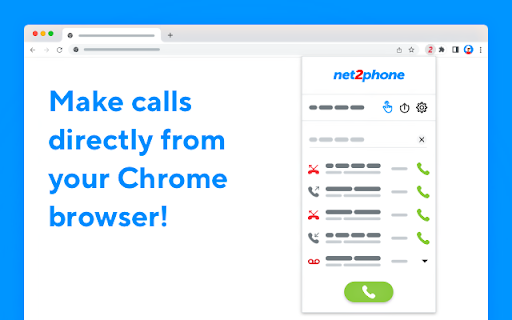

A net2phone browser extension to connect with net2phone features. With the net2phone | Click2Call extension, all phone numbers are displayed on web pages, and your CRM becomes clickable! When you click on a number, we connect your call directly to you. No Need to dial! net2phone for Chrome seamlessly connects to your net2phone account to provide an easy and convenient way to call from your browser. Net2phone Chrome Extension functionality: - Dial-pad to call any number right from the toolbar - Click-to-call any number on any website - See all your history, recent calls, and take action - all without leaving the page - Listen to your voicemail - Choose which of your net2phone numbers you’d like to place the call from - Use the URL Feature to create “screen pops” on incoming calls. This feature, when configured and turned on, will trigger your browser to open a new tab with a URL of your choice upon receiving an incoming call. Install net2phone for Chrome and supercharge your web browsing experience today! Click-to-Call usage: You can use the extension dial pad to call a number or call back a recent number by clicking the green phone icon. You can also type "-call" in the chrome URL box followed by a number. This will give you the option to dial directly without leaving the page. Additionally, you can place a call using the "Click to Call" feature. Click the phone icon next to any number on any web page, and the call will be connected to your selected line. URL Feature usage: By using the URL Feature located behind the gear icon, you will be able to automatically open a new browser tab with a predetermined URL. This feature will be triggered upon receiving an inbound call. When a call comes in, your browser will open “Screen Pop”, a new tab to your preconfigured URL. URL Feature usage example: You would like to have a new tab opened to your browser-based CRM using the caller info to take you right to your client’s CRM contact page. Example: https://www.google.com/search?q=&=%7Bfrom_number%7D If you receive a call from 1-212-555-1212, https://www.google.com/search?q=12125551212 will open on your screen.

net2phone Canada for Chrome
A net2phone browser extension to connect with net2phone features. With the net2phone | Click2Call extension, all phone numbers are displayed on web pages, and your CRM becomes clickable! When you click on a number, we connect your call directly to you. No Need to dial! net2phone for Chrome seamlessly connects to your net2phone account to provide an easy and convenient way to call from your browser. Net2phone Chrome Extension functionality: - Dial-pad to call any number right from the toolbar - Click-to-call any number on any website - See all your history, recent calls, and take action - all without leaving the page - Listen to your voicemail - Choose which of your net2phone numbers you’d like to place the call from - Use the URL Feature to create “screen pops” on incoming calls. This feature, when configured and turned on, will trigger your browser to open a new tab with a URL of your choice upon receiving an incoming call. Install net2phone for Chrome and supercharge your web browsing experience today! Click-to-Call usage: You can use the extension dial pad to call a number or call back a recent number by clicking the green phone icon. You can also type "-call" in the chrome URL box followed by a number. This will give you the option to dial directly without leaving the page. Additionally, you can place a call using the "Click to Call" feature. Click the phone icon next to any number on any web page, and the call will be connected to your selected line. URL Feature usage: By using the URL Feature located behind the gear icon, you will be able to automatically open a new browser tab with a predetermined URL. This feature will be triggered upon receiving an inbound call. When a call comes in, your browser will open “Screen Pop”, a new tab to your preconfigured URL. URL Feature usage example: You would like to have a new tab opened to your browser-based CRM using the caller info to take you right to your client’s CRM contact page. Example: https://www.google.com/search?q=&=%7Bfrom_number%7D If you receive a call from 1-212-555-1212, https://www.google.com/search?q=12125551212 will open on your screen.

CallHippo-Virtual Phone System
CallHippo - Cloud based Virtual Phone Systems for Small Business | make a call from anywhere Make calls to any phone number across the globe at a single click with the CallHippo virtual phone system. CallHippo is a cloud-based VoIP (Voice over Internet Protocol) system for businesses of all sizes. CallHippo uses cloud computing to deploy a flexible telephony network over the internet. With CallHippo, you won’t have to invest in expensive equipment. All you need is an internet connection, a computer / mobile, and a headset. Started in Jan 2017, CallHippo has customers across the globe and offers virtual numbers for more than 50+ countries. It’s easy to use interface and robust architecture help businesses set up their call center in less than 3 minutes. What is CallHippo Chrome Extension? CallHippo Chrome extension detects phone numbers on any website you visit and allows click-to-call seamlessly. With click-to-call feature as soon as you click on the hyperlinked number, a call will be placed automatically through CallHippo’s virtual phone system. You can also install CallHippo’s mobile app (Android and iOS) to use our VoIP system in your mobile. Key Features of CallHippo VoIP System ● One-click call ● Call analytics (caller details, call status, and time duration) ● Call recordings ● Get new numbers for different countries ● Set timezone based on your location ● Customize working hours according to your availability ● Power dialer ● Smart switch ● Real-time report about call status history ● Smart call forwarding ● Call conference ● Get unique numbers for different departments ● Call barging ● Call queuing ● On hold music ● Voice mail ● Automatic call logging ● Incoming screen pop-up ● Add phone numbers to your CRM ● Take notes ● Quick access to missed calls and calls not logged How CallHippo Benefits Your Business? In sales and call centers, every second matter. CallHippo scans your system and adds a link to every number. This way, you can dial phone numbers with one click, thereby saving lots of your time every day. The best part about CallHippo? It enables you to integrate seamlessly across various channels, including voice, mobile, social, chat, email, and SMS. This way, CallHippo provides insights about your operations and customers in one place, enabling you to deliver personalized experiences. Here are some more ways CallHippo benefits your business: ● Allow unsatisfied customers to raise support tickets so your agents can follow up and solve their problems ● Maintain an extensive customer database ● Provides detail information about each customer ● Find and filter agents quickly ● Know how your agents interact with customers via call recordings and improve their performance Integrate With 85+ Apps CallHippo works with almost every critical sales, CRM, ecommerce, productivity, data and reporting, marketing, ERP, and helpdesk software.

Click to Dial Phone Number
A Chrome extension to send highlighted phone numbers to the dialing program. By James Fisher Click to Dial Phone Number Google Chrome Extension. The Click to Dial Phone Number Chrome extension offers a convenient solution for effortlessly dialing phone numbers found on web pages which aren't formatted as a hyperlinks and thus are not clickable. No longer do you need to manually copy and paste phone numbers into your dialing program. With this extension, simply highlight a phone number on any web page, right-click, and select "Dial Phone Number" from the context menu to instantly initiate a call using your preferred dialing program. Seamless Integration: Easily dial phone numbers found on any web page with a simple right-click. Quick and Easy: Eliminate the hassle of manually entering phone numbers by leveraging the extension's intuitive interface. Efficient Workflow: Streamline your workflow by saving time and effort when making calls from web pages. Enhance your browsing experience and productivity with the Click to Dial Phone Number Chrome extension. Say goodbye to tedious manual dialing and hello to effortless calling right from your browser.

Call From Browser: Click-to-Call
Add a call button to every number in the browser. One click and your mobile dials the number instantly through your SIM. Stop typing phone numbers manually. Start calling with one click. Call from Browser transforms every phone number on the web into an instant click-to-call button. Hover over any number, click the call icon, and your phone rings the contact automatically using your mobile SIM—no copy-pasting, no manual dialing, no wasted time. Why Call from Browser? ✅ One-Click Calling – Hover over any phone number and click to call instantly ✅ Uses Your Real SIM – Calls go through your mobile carrier, not VoIP ✅ Works Everywhere – Detects numbers on any website, email, or web app ✅ No Desktop Phone Needed – Your smartphone does all the work Perfect For: 👉 Sales professionals making dozens of calls daily 👉 Customer support teams responding to inquiries 👉 Recruiters reaching out to candidates 👉 Anyone tired of manually dialing numbers from their screen Simple 5-Minute Setup: 👉 Install this Chrome extension 👉 Download the free WAcall mobile app (iOS/Android) 👉 Open the extension and generate your one-time verification code 👉 Enter your phone number and code in the WAcall app Done! Hover over any number and click to call How It Works: 👉 The extension scans web pages for phone numbers and adds a discreet call icon. 👉 When you click it, the WAcall app on your phone initiates the call through your regular mobile network. Recipients see your real caller ID—just like a normal phone call. Save Hours Every Week The average person wastes 2-3 seconds per manual dial. If you make 50 calls a day, that's over 2 hours per month spent just typing numbers. Call from Browser eliminates this friction completely. ✅ Your calls go through your own carrier ✅ No call recordings or logs stored ✅ Minimal permissions required ✅ Your phone number stays private
