
nakcddgmfmjmdbfahkkiijejmmfkfipc
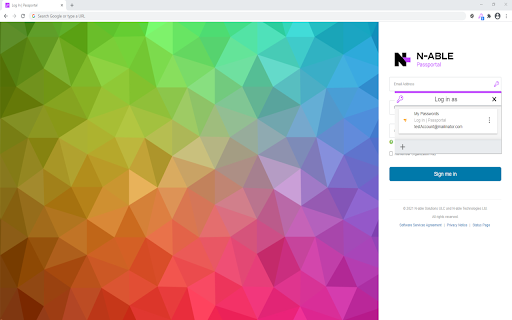
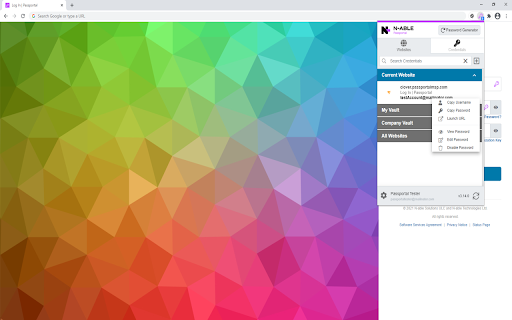

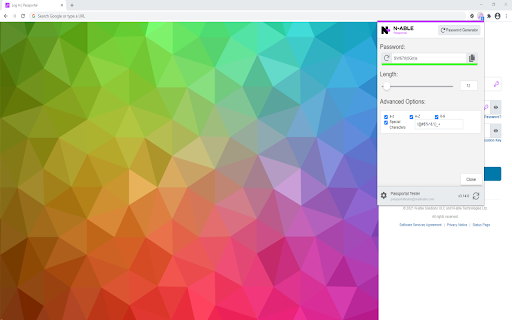

You can save all your usernames and passwords to N-able Passportal, and it will automatically log you in to your websites and sync your passwords to all of your devices. Anywhere Access: - Install the N-able Passportal browser extension on all computers - Login using the same N-able Passportal account on any device Improve Your Digital Identity Security: - Generate unique and complex passwords - Create new passwords as you sign up for sites - Protect your Password App account with Multi-Factor Authentication Save Everything: - Store login usernames and passwords - Manage everything from a simple, searchable “password vault” - Add, edit, view, delete, and organize your websites Why should you use Password App? - Never forget a password - Generate strong passwords that you don't have to remember - Passwords are automatically entered for you on your websites when loaded - Share your passwords with co-workers in a secured manner - Only remember 1 password! My Password App uses AES-256 encryption with hundreds of rounds of encryption processed using SHA-256 hash keys. Our team can never see or access your passwords.

Check by CyberDrain
Protect against phishing attacks targeting Microsoft 365 login pages with enterprise-grade detection Check is an advanced open source browser extension by CyberDrain that provides real-time protection against Microsoft 365 phishing attacks. Designed for enterprises and managed service providers, Check uses sophisticated detection algorithms to identify and block malicious login pages before credentials can be compromised. The extension integrates seamlessly with existing security workflows, offering centralized management, comprehensive logging, and CIPP integration for MSPs managing multiple Microsoft 365 tenants. Check allows management via Group Policy, Intune Management, or your RMM and is completely brandable for a white label experience. Check out the open source repository for Check at https://github.com/cyberdrain/Check

Password Boss
Remember every password and and login to websites automatically. Password Boss remembers your passwords so you don't have to, and when you visit a website Password Boss automatically logs you in. SAVES EVERY PASSWORD - Keeps all of your passwords in one place - Saves website passwords plus apps, WiFi, everything. - Securely share passwords with people you trust AUTOMATIC WEBSITE LOGIN - Visit a website and be logged in automatically with nothing to type - Saves new passwords in Password Boss automatically PROTECTION FROM SECURITY BREACHES - Creates unique, uncrackable passwords that are different for every website - Security Score shows you your weak passwords SIMPLIFIES ONLINE SHOPPING - Use Password Boss to automatically fill in online forms with a single click - Fills in payment details, shipping details and contact infoormation SAFELY STORE DIGITAL RECORDS - Save all of your digital ID's, insurance cards, notes and anything else that is important Requires the Password Boss desktop application which can be downloaded from https://www.passwordboss.com

1stream Client
Adds CRM capabilities to the browser based softphone in a side-by-side view. Without leaving your browser based softphone, you can add data to your CRM, including: Immediately improve your call center workflows because you never have to switch back an forth between browser windows.

MyGlue Chrome Extension
With MyGlue Chrome Extension, you can now quickly and securely access all of your MyGlue passwords right from within Chrome. Securely access MyGlue password, documents, and more on any Chrome extension web pages With the MyGlue Chrome extension, you’ll have instant access to MyGlue information whenever you need it. You can quickly and securely access all of your MyGlue passwords, create passwords, and preview assets right from within the browser extension. This means no more switching pages and no more copy/paste of usernames and passwords to sign in to websites and services. The extension also supports Single Sign-On (SSO), should your organization have it enabled. Passwords: - Create, access and view passwords within the browser extension - all passwords that are saved in MyGlue will be available - Password creation: ability to create business personal and team based passwords in browser extension - Password autofill: usernames and passwords stored in IT Glue are automatically populated in login fields - Password auto-creation: When creating a new password, users will be auto-promoted to add their passwords to MyGlue Search: - Quick search: access any item in MyGlue via the Search feature, not just passwords on any webpages by pressing "Q" - Globally search for any passwords your account has permission to access Security: - The extension also supports Single Sign-On (SSO), should your organization have it enabled. - At-rest and in-transit encryption of passwords keeps your data safe - Sign in once and go: Share a sign-in session between the MyGlue web app and MyGlue Chrome extension for maximum time saving
