
aiiihhpcmpabcbcgogcmbbgkjbapkfeb
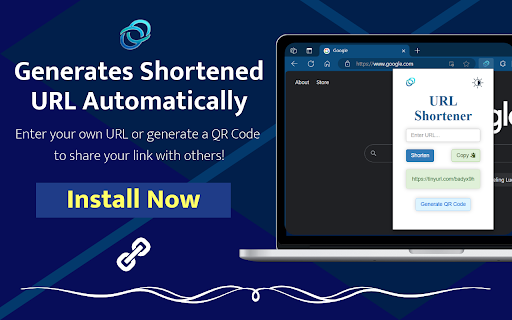
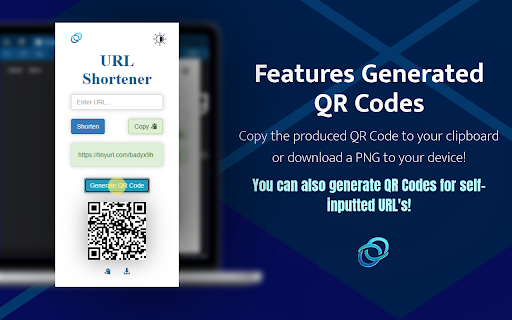


Fastest way to shorten URLs with the TinyURL API. Click the icon to shorten the current URL & generate a QR Code, or input your own. The fastest and easiest way to shorten URLs using the TinyURL API. Click the icon to shorten the current page URL, generate a QR Code, or input your own URL to shorten. ➡️ Do you want to use this easy-to-use URL Shortener in any Chromium-based browser? Click "Install" to add the extension to your toolbar. This TinyURL-based URL Shortener is the perfect solution to those looking for a simple, easy-to-use web extension. 🔗Simply click the icon to automatically shorten the URL of your current webpage. This link can also be copied to your clipboard with the click of a button! If you want to shorten a different URL, feel free to input your own link in the text entry box and click submit to generate a new TinyURL link. 📷 New Feature: Generate QR Codes for any URL with a single click! Quickly create QR codes for easy sharing of URLs. This feature is perfect for sharing links in a more versatile and scannable format. The update also features a "Copy-to-Clipboard" button and a "Download PNG" button to help share your QR Code! 🌑New Feature: Dark Mode! Enjoy a user-friendly interface with our new dark mode setting. This mode reduces eye strain, especially in low-light environments, providing a comfortable user experience for night-time browsing or for those who prefer a darker aesthetic. The application retains your preference for future usages! 💻 The extension runs on a very lightweight script saving resources and is not user-intensive for the CPU. 🔒This extension does not save or maintain any account of links provided to ensure user privacy. Start using this extension today! Thank you for your support! ✨ Features ⨀ Easily shorten any link ⨀ Uses the famous TinyURL API ⨀ Input your own URL to shorten manually ⨀ Copies the shortened URL to your clipboard ⨀ Generate QR Codes for any URL ⨀ Copy or Download QR Codes for ease of sharing ⨀ Dark Mode for reduced eye strain and a sleek look ⨀ Full user privacy ⨀ Intuitive User-Interface ⨀ Only 1 click away from a shortened URL 💼 Long, annoying links often discourage publicity. Whether sharing links to friends, or promoting your brand/business on social media, email, or even your website, URL Shortener can help increase the likelihood of growing audience!

URL Shortener - TinyURL Extension
Shorten URLs with ease. The only URL Shortener Extension that doesn't open a popup. Clicking the Extension Icon is all you need to do to shorten and copy the current URL, with no extra clutter to distract you from your browsing. The same functionality is added to Chrome's Context menu for links, right-clicking a link gives you the option to shorten and copy the clicked link with just one click. An 'OK' or 'ERR' badge is displayed on the Extension Icon to notify the user about a successful shortening and that the shortened URL is now copied to the user's clipboard, or to notify the user of an error. This extension uses TinyURL's URL Shortener Service to shorten the URLs. This extension does not store user data at any point. The current URL (or the URL from the clicked link) is the only thing that gets sent to the TinyURL API. The original URL or the shortened URL is not stored by this extension.

Url Shortener
Quickly create and share short URLs with the added option to generate QR codes for them. Shorten URLs and Generate QR code for shortened URLs You can shorten the URL of the current page you are viewing or a specific URL by clicking the extension icon or pasting it into the extension input bar. The extension has been made open source. The source code can be found at https://github.com/tonystark93/URL-shortener-extension 🔒 Privacy focused (We don't ask for unnecessary permissions or track the users while using the extension) List of features available Copy to clipboard ✔ Night Mode ✔ Right Click ✔ QR Code Generate ✔ Automatic URL shortening on extension click ✔ History of URL shortened ✔ Delete History ✔ Export as CSV option ✔ Change keyboard shortcuts

Url Shortener for Google Chrome™
Just click our extension icon on toolbar to shorten the URL of current page with TinyURL.com url shortener service. Want to use a simple URL shortener service for Google Chrome? Simply install our software and you can shorten the website URL you are on to a short simple link. To begin using our URL shortener service, you need to install our extension. Click on our software icon Choose either the QR code option or the shortened URL to share the website you are on Its extremely simple to use and your privacy is guaranteed. Our software does not save any data/website URLs which you are on. Begin using our URL shortener service today! ================================================================ ★ Features of Url Shortener for Google Chrome™: ✔ Easily shorten any link of current page with TinyURL url shortener service. ✔ Easily shorten any link that you copied and put into a special textbox ✔ Automatically copies url to clipboard ✔ Сlick to shorten url and copy to clipboard ✔ Generate QR code for this website URL ✔ Light / Dark theme switcher for more comfortable use for night time Disclaimer: Please note this extension is NOT made by Google and is made by an independent development team. All copyrights belong to their respective owners. Google doesn’t endorse or sponsor this Chrome extension. URL Shortener for Google Chrome™ is not owned by, is not licensed by and is not a subsidiary of Google Inc.

URL Shortener Plus
One Click URL Shortener. Create links with Bitly, TinyUrl, is.gd, to.ly or goo.gl. QR Code, fast copy paste for Google Chrome. ★★★★★ The best way to create a short urls 📌 using Bitly, Rebrandly, TinyUrl, is.gd and to.ly, and more 🚨 Want to quickly shorten a url in one click? Then this is the extension for you 👑 Just click the extension to shorten the current page URL or by right clicking on any link 😍 Shorten the page/selected URL (TinyURL) 🔎 Shortern URL using tinyurl.com services 💣 FEATURES ★ Easily shorten any link ⚡ ★ Automatically copies url to clipboard 🚀 ★ Right click to shorten url and copy to clipboard 🚧 ✔ Limited permissions 🤓 ✔ Generate QR code 📷 ✔ HTTPS for maximum security 🔑 No share of credentials to third party 🔓 💎 Building Apps and Extensions for Google Chrome and Android 🔥📣 📔 Available on the product page: https://jitt.wwevents.fun/project/url-shortener-plus/#changelog By installing this product you agree to our privacy policy & terms of service: https://jitt.wwevents.fun/privacy-policy/ You may consult the list of permissions and the reason why they are required on the product page: https://jitt.wwevents.fun/project/url-shortener-plus/#permissions “notifications” – Used to send desktop notification. For example when a new message arrive or App is updated. “contextMenus” – Allow to add more settings when right click in the App icon in the browser toolbar and browser context menu. “storage” – Used to save settings on your local computer. “system.display” – Used to detect the display size and position the Extension window. “unlimitedStorage” – Storage is limited to 5MB of data that may not be enough to store all configs. “host_permissions” – Permission to access to some hosts/domains that we must modify in order to provide the desired functionality detailed in the functionality. It also allows that you can share content (links or text) from other pages directly to inside the App and send it as a SMS/Android message to a friend for example. Also used to allow intercommunication with other WWEvents Apps (i.e. Emojis). “activeTab” – Permission to access the window that the extension is running and is show to the user. “tabs” - Used when the App is not in Popup mode to read the page URL in order to shorten it. “all_urls” – We cannot predict ahead of time witch hosts/domains the user want to shorten. The extension is capable to shorten any link/url/domain. This information is also available inside the App: Options -> About
