
aiblhpjnljidffmannejhglkiolpecpi
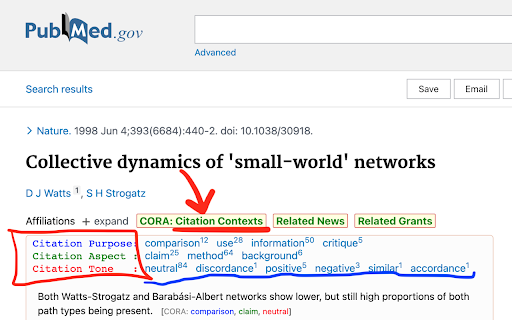

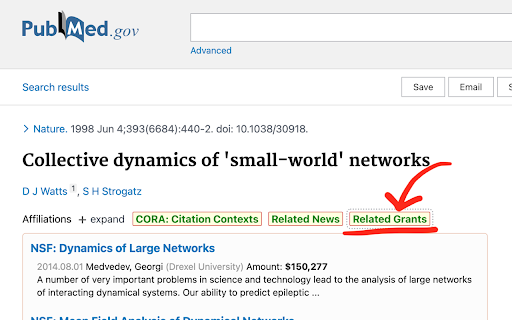
Understand citation contexts as you browse PubMed papers. This extension aims to help people better understand the citation contexts of a PubMed article. We extracted over 100 million citation contexts from semanticscholar.org (especially, S2ORC: Allen AI's Open Research Corpus), and trained a deep learning model to classify those citation contexts into different types so that readers know how an article was cited by others. In addition, we also provide users with a search function to find EurekAlert! science news releases and NSF/NIH grants that are related to a PubMed article. This project is supported by IMLS grant RE-07-14-0015. Team members: Yingya Li, Yatish Hegde, Jun Wang (chrome extension developer), and Bei Yu (PI).

Gene Info
Double click on a gene name or supported accession to retrieve information about it and links to related resources. Information can be displayed as a detailed report or as a minimal tooltip with links to outside resources. The information displayed can be customized via the extension's popup menu. Information is from UniProt, BioGRID, Compartments subcellular localization database, Cancer Dependency Map, Gene Ontology Consortium, HGNC, Human Protein Atlas, IntAct, OMIM, Pfam, ProteomicsDB and Reactome. Support is provided for human and model organism genes.

Lazy Scholar
Academic research assistant - find full-text PDFs, citations, and analyze papers Lazy Scholar automatically detects scientific articles as you browse and provides instant access to full-text PDFs, citation and journal metrics, research integrity checks, and much more: FIND FULL-TEXT ACCESS Stop hitting paywalls. Lazy Scholar searches multiple sources simultaneously: • PubMed Central (PMC) - Free official versions • Europe PMC - Open access and author manuscripts • Open Access repositories • Direct PDF links CITATION METRICS AT A GLANCE • Citation counts from Google Scholar, OpenAlex, and Semantic Scholar • Influential citations - papers that heavily cite this work • Citation percentile - see how this paper ranks in its field • Web attention - mentions on Reddit, Twitter/X, Wikipedia, news, and blogs • Related papers recommendations RESEARCH INTEGRITY • Retraction alerts - know immediately if a paper was retracted • Expression of Concern notices • Published corrections and errata • Preregistration detection • PubPeer comments - post-publication peer review • Hypothesis annotations SIDEBAR ANALYSIS PANEL • References tab - view all citations, verify they exist, check for retractions • Outline extraction - automatic section parsing (Abstract, Methods, Results, etc.) • Data & code links - find supplementary materials and repositories • Statistical extraction - p-values, confidence intervals, test statistics CONVENIENCE FEATURES • Right-click to search Google Scholar or PubMed • Omnibox search - type "ls" then your query • One-click PDF download PERFECT FOR • Graduate students and postdocs • Faculty and researchers • Librarians and information specialists • Science journalists • Anyone reading academic literature

PubMed Impact Factor Search
Confused by tons of journals? Why not speed up your research by IMPACT FACTOR! Add search words in the search box at PubMed.gov. The words are the ISSNs of the journals, which have the impact factor you specified with the slider. - Added link to InCites CSV export page (1) You need to add a csv file. From InCites Journal Citation Reports, export the list of journals as CSV. This may require your registered accout. PIFS can read your CSV if the following conditions are met. (a) Your CSV needs to have the column names in the 2nd row (b) Your CSV needs to have the columns of "ISSN", "Journal Name", "Impact Factor". Available aliases are as below. (#) InCites exports only 600 top results. If you need more results in PIFS, please concatenate the results manually. and you need to, (2) Set it in the settings tab. - PIFS can read the newer format of exported CSV - Added ISSNs are kept in the input box also on https://pubmed.ncbi.nlm.nih.gov/. - PIFS tells if the added csv file is available. - PIFS also works on https://pubmed.ncbi.nlm.nih.gov/ - PIFS asks for rating me once in every 10 times adding the query. You can disable this message by clicking "No" in the dialog. - Keep the history of queries for reuse. - Search journals from the results with keywords.

SnippIt : Your Research Assistant
Note taking while reading online simplified. Just select the text and drag it a little. The selected text is saved for future reference in a searchable manner. Many a times we do web research on various topics but making notes out of them is painful, either you have to copy paste in a separate software program or note it down. This extension allows you to take notes in a seamless way by just dragging on a selected portion of text.
