
chpgafbedmdedmmpmokcdijedjdihdio
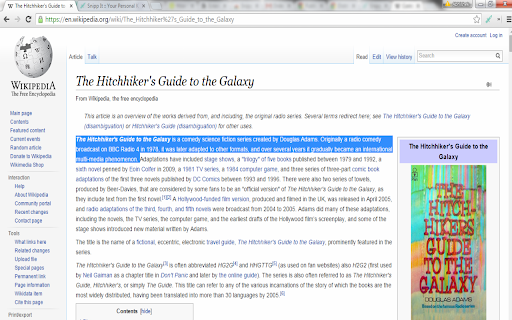
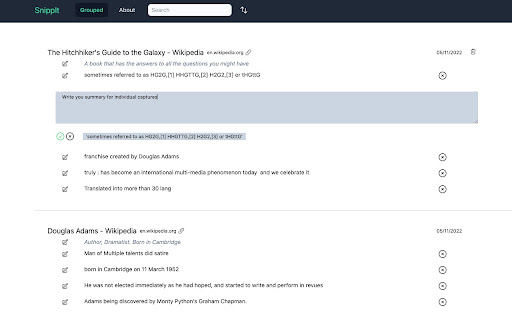
Note taking while reading online simplified. Just select the text and drag it a little. The selected text is saved for future reference in a searchable manner. Many a times we do web research on various topics but making notes out of them is painful, either you have to copy paste in a separate software program or note it down. This extension allows you to take notes in a seamless way by just dragging on a selected portion of text.

Ausum
Turn any article into a short audio summary, with just one click. Ausum is a free Chrome extension that turns every article into a short audio summary, with just one click. When you find an article you want to summarize, just click the Ausum icon and listen to the summary, instantly. * No Sign-Up Required: getting an audio summary is always a click away. * Avoid Ads: avoid all the distractions and annoying ads on the article, with a better, cleaner experience * Instant Smart Summaries: smart summarization technology ensures you get the most important, accurate highlights of any story. * Save Time: with audio, you’re free to do other tasks, listen while walking, or deep-diving the web. * Download Audio Summaries: all your articles so you could listen anytime, anywhere * Natural Voice: high-quality text-to-speech technology, for a natural listening experience. * Share: share summaries with others. Ausum turns text into lifelike speech. Users can automatically summarize any webpage into audio, as you browse. With just one click, Ausum generates a summary including the important ideas and facts of any long article, research report, document, essay into a downloadable recording you could take with you. Save time and read smarter, with audio. Next time you’re reading the news, science research journals, health reports, or sports analysis… Ausum will convert all your long text into a short-form audio summary so you can listen for the most important, accurate highlights. We are constantly optimizing and improving our text to audio summary extension, so if you see bugs or have suggestions to make Ausum better, please don't hesitate to provide feedback.

Summarize the Internet
Displays a summary of the text or article on the current page. Clicking the taskbar button will summarize the current page in a popup. This summarizer stands out from others by focusing on the writer's choice of words to extract their most important points while filtering out weak arguments, speculation and asides. (Also available for Firefox)

PowerNotes Research
PowerNotes Research Extension PowerNotes helps researchers make the leap from research to writing. First, the browser extension gives you the fastest way to save passages from the web, PDFs, and other digital materials. When you save a passage, you will also organize it and take notes. All saving will be done without leaving the source, so you won't need to copy and paste anymore! Also, the organizational structure is up to you. PowerNotes gives you a flexible organizational framework so that you can make the framework more sophisticated over time. So when you are doing research, you won't just be saving content, you will be creating an annotated outline at the same time. Everything that you gather will be saved in the Cloud. Once you've gathered your research, you can view an outline of your research in our web app, where you can assess and reorganize it. We built an interface specifically designed for reorganization. You can just drag and drop your digital note cards, move them around with a simple menu (again, no more copy and pasting), and create blank note cards to incorporate your own thoughts. You can even turn your research outline into a writing outline so that you can more easily start that first draft. You can download your research into a MS Word or Google Doc, a spreadsheet, or RIS file. For more information, visit our blog at: https://www.powernotes.com/resources/blog

Paper Of The Day
ARCHIVE NOTICE Paper Of The Day ran from 2018 to 2021. The Mendeley API that powered this extension has been decommissioned. The extension now displays cached paper data and remains available as an archive of the project. ----- Paper Of The Day replaced your new tab with trending academic papers across disciplines — from computer science and medicine to economics and psychology. Features • Browse papers by subject category • Beautiful background images from Unsplash • Keyboard navigation (arrow keys, number keys) • Swipe gestures for touch devices • Accessibility options (reduce motion, high contrast, text size) How it worked Each new tab displayed a randomly selected trending paper with its title, authors, abstract, and a link to read more. ------ Thank you to everyone who supported this project. It was a lot of fun. Created by Adrian Raudaschl
