
jggendahejbhkghnachhlomkkheomchp
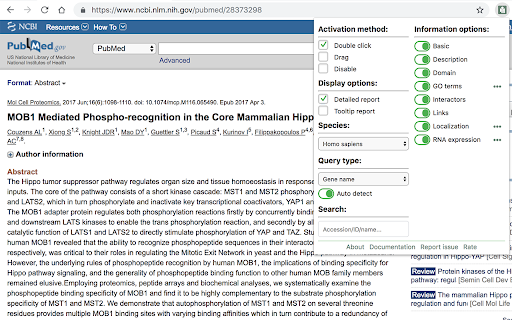
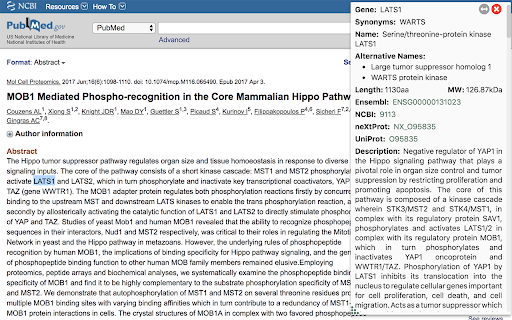
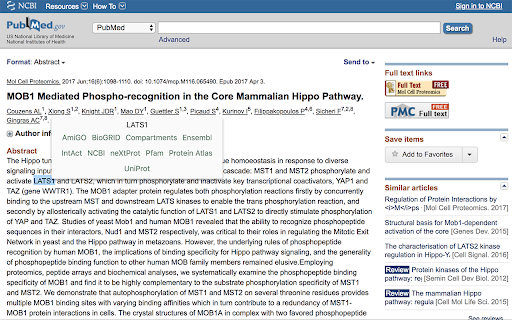
Double click on a gene name or supported accession to retrieve information about it and links to related resources. Information can be displayed as a detailed report or as a minimal tooltip with links to outside resources. The information displayed can be customized via the extension's popup menu. Information is from UniProt, BioGRID, Compartments subcellular localization database, Cancer Dependency Map, Gene Ontology Consortium, HGNC, Human Protein Atlas, IntAct, OMIM, Pfam, ProteomicsDB and Reactome. Support is provided for human and model organism genes.

Papers by ReadCube
Easily import articles and webpages to your Papers by ReadCube library. Easily import articles and webpages to your Papers by ReadCube library. The new Papers browser extension enhances the workflows in your research lifecycle: from searching and navigating to the full-text, to staying organized, reading and annotating, sharing and collaborating with colleagues, and finally citing papers and generating a bibliography in a manuscript. • Find papers as you normally would across the web, including discovery sites like PubMed, Google Scholar, Dimensions, BioRxiv and most journal websites. Our extension instantly recognizes if a paper is in a personal or shared library collection for instant access. No more downloading the same paper multiple times. • If it’s a new addition to your library, save references and PDFs, if available, directly to a personal or shared collection within your library. No more random PDFs piling up in your download folder or desktop. • If you have the paper in your library, you can enjoy the same Enhanced PDF reading experience through our streamed PDF that opens wherever you are discovering new papers. Hyperlinked inline references, annotation and drawing tools, streamed supplemental files, article metrics, high-res figure browser and more.

Science Research Assistant
Search for scientific information as quickly as possible while researching and writing scientific papers. Save notes for reference. Science Research Assistant is a powerful Chrome extension designed to assist scientists, students, journalists, and anyone seeking reliable scientific research. Whether you're writing a thesis or gathering facts, this tool ensures you find and utilize research efficiently and effortlessly. With a simple selection of any keyword or phrase on a webpage, you can instantly search relevant scientific journals. The extension also offers advanced meta-search options and other valuable tools to enhance your research process. You can easily save text from webpages or PDFs for future reference, and seamlessly export your saved records to PDF for better organization. The built-in algorithm analyzes text from any webpage, identifying the most frequently used keywords and key information, all while highlighting important details. You can even customize the algorithm with your own rules, enabling you to swiftly pinpoint the most crucial insights from lengthy papers or web content. If you're still in the early stages of exploring a research topic or formulating a hypothesis, the Science Research Assistant helps you navigate the overwhelming volume of available information. With its News and Trends feature, you can quickly gauge the popularity and future relevance of a topic, while receiving related suggestions to inspire fresh ideas. This extension is your essential tool for fast, accurate, and insightful research, helping you stay ahead in your field. Science Research Assistant will help you to: · Search and analyze the complex structure of web information · Search scientific journal articles · Search books · Search patents · Search records history · Save notes to record's history · Backup your notes · Compile reports and export to PDF · Use helpful meta-search patterns to dig deeper into the web · Track news and trends Usage: - Save selection text to notes – select text on a web page, click the right mouse button, and choose “Add .. to notes” from your context menu. - Keyword analysis – click the right mouse button and then choose “Keyword frequency analysis (beta)” from the context menu. - Keyword distribution – click on the highlighted keyword to see all its appearances in the text. - Keywords analysis settings overlay – choose the number of words in a keyword phrase (one to five) and the minimum required frequency within the text (from two to 10) you would like to get analysis for. Click the refresh button or remove the results button to remove the analysis. - Selection search – select any word in text on a web page, click the right mouse button, and choose “Science search for ..” from your context menu. This activates a search of various journals and web tools (see Settings). - Settings/Manual search – click on the extension icon in the top right corner of your web browser. - Filter saved records by keyword - Click "A+" button to resize the text - Click "📤 to PDF" button to export selected records and notes to PDF. - Click 🗑️to remove selected records and notes. We always welcome suggestions on what science sources and useful tools to include in future releases of the Science Research Assistant, so do not hesitate to contact us by using the provided form in the settings section. Thanks for all feedback!

SangerboxNote
使用桑格笔记,获取更多期刊信息 PubMed阅读伴侣,科研文献整理助手 高效,快速,全面阅读体验,安装浏览器插件即可使用 ☞影响因子、预测影响因子、分区等信息快速获取 ☞杂志精确检索、文献自定义排序、sci-hub全文链接 ☞文献收藏、整理及备注功能

Mastermind Search Companion
The Mastermind Search Companion augments your gene and variant searches with articles citing your gene or variant from Mastermind. Mastermind Search Companion is used with the Mastermind Genomic Search Engine to optimize genomic variant research and interpretation by seamlessly integrating with the sites you already use. With Search Companion, you can: Easily view helpful gene and variant information in the new sliding drawer tab with links to the evidence in Mastermind Speed up your existing workflow without having to change it with the integrated display of Mastermind data in a variety of platforms you already use Find more articles for your search when using ClinVar, HGMD, dbSNP, old dbSNP, OMIM, COSMIC, CIViC, UCSC Browser, Google Scholar, Google, VarSome, GeneCards, NCBI, Gnomad, SNPedia, and OncoKB by tapping into Mastermind data Quickly compare Mastermind search results with results from the other platforms For more information about Mastermind, visit the Mastermind Genomic Search Engine page: https://www.genomenon.com/mastermind/
