
ahecijdolccppiloabfbhpjbpelnlcea

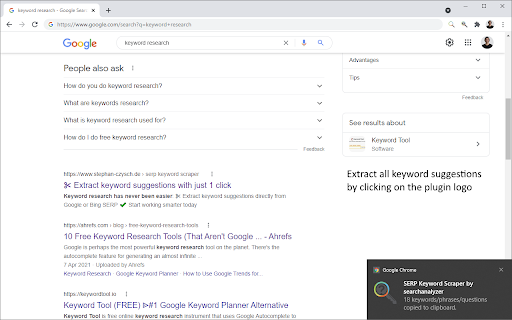

SERP Keyword Extractor simplifies your keyword research. Extract keyword suggestions and questions directly from Google or Bing. Are you looking for a way to easily extract keywords from search results of Google and Bing? SERP Keyword Scraper is here to help! It's super simple: 1. Perform your search on either Google, Google Shopping, Google Image search or Bing 2. Extract all keyword suggestions from the search result page (SERP), like related searches, people also ask and search refinements by using the keyboard shortcut CTRL + . (period) on PC or CMD + . on Mac. Alternatively, click on the plugin logo to perform the extraction 3. The data is stored in your clipboard - paste it into a spreadsheet to work with the data Everything happens on your machine! We access the source code of the search result and extract the data for you. The plugin isn't using any third party data. Find more information about the tool here: https://www.stephan-czysch.de/serp-keyword-scraper-plugin/installed

SERP Help - Extract SERP Data Easily
A multi purpose Chrome extention for SEO professionals. SERP Help is a free plugin that enhances your day-to-day SEO tasks with an array of tools. By using our extension, you can extract information from SERPs, Google Auto Prompt Suggestions, and web pages. Here's how SERP help simplifies everyday SEO work: Search engine auto suggest keywords can be extracted one by one or in bulk. You can save these keywords into a bucket before you copy them to the clipboard. You can also clear the bucket. Currently supports Google search. If you have any questions, comments or suggestions, contact us at swaraj@accustra.com We do not store this information and will not disclose it. General terms and conditions: https://serphelp.com/terms Toolbar privacy policy: https://serphelp.com/toolbar-policy

SEO Extractor
Tools to extract and analyze SEO data Update: This extension has not been updated lately. Grab SEO data quickly, right on your browser with the SEO Extractor. * Extracto SERP data like organic results or PAA * Extract headings, links, image URLS, etc. * Grab Wikipedia common terms * Grab common terms from any page * Much more

Seerobots
SeeRobots conveniently displays the meta robots information of the website you are viewing - For more info visit www.seerobots.com SeeRobots will conveniently show you the information meta robots tag in the head section of the website your are viewing at that moment. Depending on this information colors in the browserbar will change. 1. If the SeeRobots field is all green it means that this page has "index, follow" as robots attributes. 2. If the SeeRobots field is all red it means that this page has "noindex, nofollow" as robots attributes. 3. If the SeeRobots field is green on the left and red on the right it means that this page has "index, nofollow" as robots attributes. 4. If the SeeRobots field is red on the left and green on the right it means that this page has "noindex, follow" as robots attributes.

Free Link Checker by LRT
Free link checker to verify all links on a page. Finds broken, unverified, no-follow, follow, internal, external links. Analyze all links on a page in seconds - advanced and fast export of link data. This unique and free Link Checker allows you to check all links on a page and see broken links and unverified links in categories no-follow links vs. follow links, internal links vs. external links. An on-page link code browser lets you see the exact source code of any link on mouse over for quick spotting of issues. Highlighting no-follows and links from own projects are supported as well as other power-user features. Features * Live Links, Broken Links and Unverified Links * No-Follow Links vs. Follow Links * Own Network Links vs. External Links * Source Code Browser on Mouse Over * LRT Power*Trust for every link * Live Filter Link Detail Table Benefits * Built for professional SEO power-users * Replaces all other link checker extensions * "My domains" highlighting * Blazzing fast link data export feature * Ongoing development by LRT Screenshot #1 1. Count the total links the page 2. Count the number of live links 3. Count the number of unverified links 4. Count the number of live links broken links 5. Different link scope for internal, links, within same root domain and external links 6. Count the number of Follow vs No-Follow links for every link scope. Click on those numbers to traverse through code details 7. Go to fancy review and export function (see below) Screenshot #2 8. Full dynamic link detail table and export to Excel and CSV action 9. Show links by network status 10. Show links by link scope 11. Show links by Follow vs. No-Follow 12. Filter links by keyword Screenshot #3 13. Mouse over any link to see details 14. LRT Power*Trust to measure strength and trust of the target page where the link points to - if this is very low, this could be a problematic or new page 15. Full HTML Source Code to review and possibly spot spammy things 16. Blue Marker for own domains (configured in extension settings) 20180917 V0.1.2 - Initial release 20180918 V0.1.3 - Improved Export function and text labels 20190912 V0.1.5 - Added support for UGC and SPONSORED link rel attribute 20190917 V0.1.6 - Resolved issues with source code preview caused by "data-html" attribute.
