
ahdlebkckeipaidnacekiamonhjibpkm
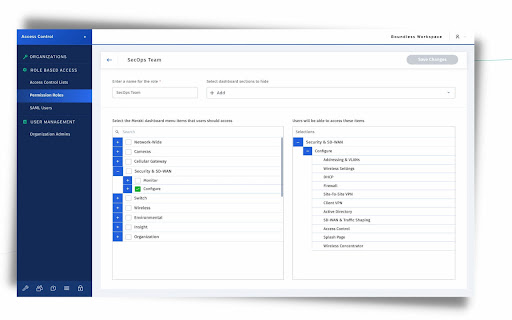

Boundless Digital for Meraki adds Role-Based Access Control to the Cisco Meraki administration dashboard. Get more control over your Cisco Meraki networking infrastructure. The Boundless Digital for Meraki extension is part of Boundless Access Control, the most advanced user access and management tool designed for Cisco Meraki. Through this extension, you can add granular Role-Based Access Control (RBAC) to the Cisco Meraki dashboard. This works by signing up for an account on Boundless Digital and creating an Access Control List within the Boundless platform. Your users will then install this extension, and use it to sign into your Meraki organization using SAML. The extension enforces the access credentials that you’ve allowed them through Boundless, ensuring that they can only access the resources which you’ve specified. With Boundless Access Control IT teams can fully control access to the Cisco Meraki dashboard resulting in minimized risks of configuration errors and sensitive data exposure.

Cisco Network Setup Assistant
Cisco Network Setup Assistant is used to connect devices securely to networks utilizing Cisco Identity Services Engine. Cisco Network Setup Assistant is used to connect devices securely to networks utilizing Cisco Identity Services Engine. Here user should install this NSP on chrome book to securely connect to corporate network.

Simple Proxy
A simple extension to manage proxy configuration (allows setting auth credentials for http/s proxies) The objective of the extension is to allow setting up a proxy. It just a wrapper of the `chrome.proxy.settings` configuration with the addition of allowing to set up proxy authentication. Credentials will be set in the URL and it will follow the basic "Proxy-Authentication" handshake.

Cisco Voicemail for Gmail
Cisco Voicemail for Gmail provides a visual interface for an enriched experience with voicemails at Gmail. Description : With this extension, you can now perform the following : ~ Compose a voicemail from within Gmail ~ Play the received voicemail without the need of any external player ~ Compose a voicemail in reply-to a received message ~ Compose a voicemail while forwarding a received message For details, please refer to: https://www.cisco.com/c/en/us/td/docs/voice_ip_comm/connection/vmg/quick_start/guide/b_cucqsvmgchrext.html

Cisco XDR Ribbon
XDR Ribbon and Investigation Widgets Cisco XDR Ribbon Extension The Cisco XDR ribbon extension offers a distributed set of capabilities that unify visibility, enable automation, accelerate incident response workflows, and improve threat hunting directly from your browser. These capabilities are presented in the form of applications (apps) and tools in the XDR ribbon. With the combination of the apps and your browser, you can: - Immediately extract observables from arbitrary browser content and get the current Cisco verdict on each observable. - Take response actions on observables via Cisco XDR and your configured integrated products. - Use the casebook app to gather information in one place as you explore sightings across multiple products. The casebook is a powerful and convenient tool for saving, sharing, and enriching your threat analysis. Use it to track notes and other information as you follow leads during your threat investigation across your product suite. - Use the incidents app to triage, investigate, and track high-confidence security incidents from integrated products. You can view the status and summary of the incidents, change the status, link incidents to snapshots, cases, and indicators, and pivot into Cisco XDR to perform investigations. - Use the Orbital app to run live SQL queries against your endpoints. You can select text on a page or select a single observable, open the context menu, and choose the Cisco XDR menu option. The selection will be inspected for observables and you will be presented with information and actions to help with your investigations. You can also quickly find observables on the page, use the Pivot menus to create judgements for the observable and associate it with indicators, investigate the observables in Cisco XDR, block or unblock domains, start isolation of endpoints, and pivot to the integrated products to perform additional threat analysis. This tool can read the text and page structure of websites you visit and collects usage analytics. Website data is only collected on user interaction from: - Context menu actions on page - Find observables on page (Ribbon bar) - Scan page for endpoints (Orbital) https://www.cisco.com/c/en/us/about/legal/cloud-and-software/software-terms.html
