
chjchnjgbbnnoonnchlipkeienmdndkn
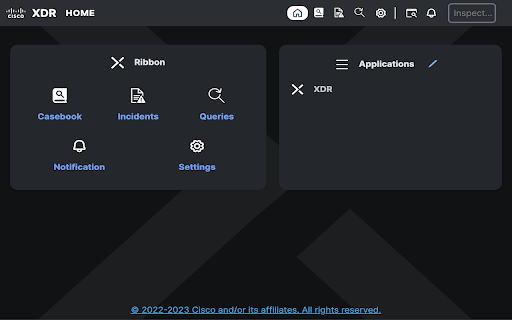

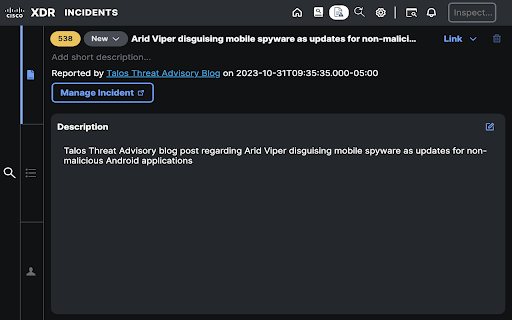

XDR Ribbon and Investigation Widgets Cisco XDR Ribbon Extension The Cisco XDR ribbon extension offers a distributed set of capabilities that unify visibility, enable automation, accelerate incident response workflows, and improve threat hunting directly from your browser. These capabilities are presented in the form of applications (apps) and tools in the XDR ribbon. With the combination of the apps and your browser, you can: - Immediately extract observables from arbitrary browser content and get the current Cisco verdict on each observable. - Take response actions on observables via Cisco XDR and your configured integrated products. - Use the casebook app to gather information in one place as you explore sightings across multiple products. The casebook is a powerful and convenient tool for saving, sharing, and enriching your threat analysis. Use it to track notes and other information as you follow leads during your threat investigation across your product suite. - Use the incidents app to triage, investigate, and track high-confidence security incidents from integrated products. You can view the status and summary of the incidents, change the status, link incidents to snapshots, cases, and indicators, and pivot into Cisco XDR to perform investigations. - Use the Orbital app to run live SQL queries against your endpoints. You can select text on a page or select a single observable, open the context menu, and choose the Cisco XDR menu option. The selection will be inspected for observables and you will be presented with information and actions to help with your investigations. You can also quickly find observables on the page, use the Pivot menus to create judgements for the observable and associate it with indicators, investigate the observables in Cisco XDR, block or unblock domains, start isolation of endpoints, and pivot to the integrated products to perform additional threat analysis. This tool can read the text and page structure of websites you visit and collects usage analytics. Website data is only collected on user interaction from: - Context menu actions on page - Find observables on page (Ribbon bar) - Scan page for endpoints (Orbital) https://www.cisco.com/c/en/us/about/legal/cloud-and-software/software-terms.html

Cisco Network Setup Assistant
Cisco Network Setup Assistant is used to connect devices securely to networks utilizing Cisco Identity Services Engine. Cisco Network Setup Assistant is used to connect devices securely to networks utilizing Cisco Identity Services Engine.

YouTube Bookmarker
Bookmark your YouTube video timestamps Keep track of your timestamps with this handy little tool. No need to forget where you left off in that lengthy YouTube video anymore. Just click on the plus button in the player options and you can access that timestamp anytime using the extension. Features: - Easy to Use - Fast and minimal package size - Unobtrusive UI - Easy way to track all the timestamps you have saved - Theme based on your preference. Leave a star if you liked my work. https://github.com/nirzon47/youtube-bookmark-extension/

Apiary - Web Highlighter & Annotator
Highlight and take notes directly on what you read online and instantly share them with friends and colleagues. Easily highlight and take notes on what you read online and then easily save them for later and share them with friends and colleagues in one click. Apiary is a free to try chrome extension based product that allows you to easily highlight and take notes on what you read online. After you have annotated something online it will be saved to your Apiary account where you can then organize in any way you like with our folder system. You can than easily share directly from the website where you took the notes or from your Apiary account later on with anyone you want. Just highlight and get a shareable link you can send to anyone with one click. When using Apiary on a website or email online you have two options. You can choose to just highlight some text or you can highlight and add a comment to that highlight. Allowing you to save and share you favorite parts and current thoughts while reading it with others. You can view your annotations live by clicking the chrome extension and having the Apiary sidebar appear showing all the highlights and notes you have made on that page. Or you can view them later in your Apiary account where we save all the contents of what you were reading and the highlights and notes you took. Allowing you to get the full context of whatever you were taking notes on. Annotate, save, and share what you read online instantly today. ----------------------------------------- Key Features: Web and Email Highlighting Take Notes On What You Read Online Apiary Account Access With Organization Systems Quick and Easy Shareable Notes Private Notes That Only You Can See Automatically Saving Notes ------------------------------------------- How To Use: In order to use the Apiary Chrome Extension you will need an account with Apiary. Please visit www.myapiary.io to create an account today. 1) Create An Account On Apiary (www.myapiary.io) 2) Download Chrome Extension 3) Sign Into Chrome Extension w/ Your Apiary Account 4) Select Text (Left Click & Drag) You Wish To Annotate 5) Click On Apiary Popup To Either Highlight Or Take Note On Selected Text 6) Delete An Annotation By Clicking On A Highlight And clicking Delete Icon 7) Share Your Notes For A Page By Clicking The Apiary Share Button On Bottom Left Corner Of Window 8) View A Note By Either Visiting Your Apiary Account Or By Clicking View On A Currently Annotated Web Page ------------------------------------ Pro Tips: 1) Make Sure You Are Logged Into Apiary Chrome Extension If You Are Having Issues Annotating 2) Organize Your Notes Into Folders On Apiary To Easily Find Notes Later 3) Share Your Notes With Friends By Clicking Share Button And Sending Link To Friends. --------------------------- Got Feedback? Please reach out to us at support@myapiary.io If you find bugs please let us know at https://forms.gle/rHvoLZwaXfVcbAMJ7. If you have a feature request please let us know at https://forms.gle/vguFD2Rxi2FCsSQi8. By installing the extension, you agree to Apiary's Terms of Service, Privacy Policy, and Community Guidelines (which can be found here: https://www.myapiary.io/term-services and https://www.myapiary.io/privacy-policy)

OpenText Core SCA Select Extension
Open Source Select will help developers find and use the right open source and reduce friction between organisations and developers Open Source Select helps you find and use policy compliant and great open-source for any development project. The OpenText Core SCA Select Extension is a free plugin created with developers in mind, enabling you to check the health metrics and license information of an open source project at a glance. If you need more granular data, the extension can lead you to Open Source Select for more detailed information. The three types of metrics you can examine are: Community - How healthy the community around a project is. Popularity - Is it used by many? Is the usage declining? Security - How well does the maintainers apply security best practices. The extension now supports Start Left Policies. This lets you immediately see if the open source you are browsing is compliant with your company’s open source policy, without the need to import and scan code with Software Composition Analysis tools and common source code repositories and package registries such as GitHub, pypi, npmjs, nuget and many others are supported.
