
nmcghbabafcoggabllejaeeiglifbjjj

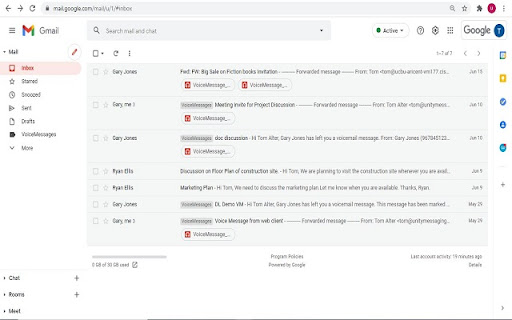
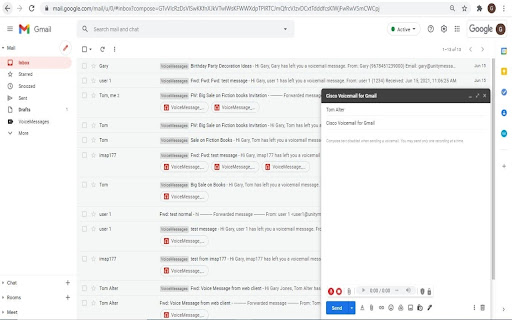
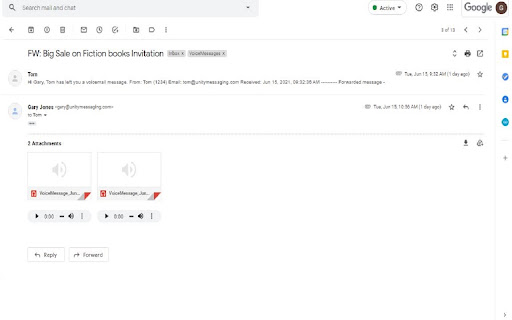
Cisco Voicemail for Gmail provides a visual interface for an enriched experience with voicemails at Gmail. Description : With this extension, you can now perform the following : ~ Compose a voicemail from within Gmail ~ Play the received voicemail without the need of any external player ~ Compose a voicemail in reply-to a received message ~ Compose a voicemail while forwarding a received message For details, please refer to: https://www.cisco.com/c/en/us/td/docs/voice_ip_comm/connection/vmg/quick_start/guide/b_cucqsvmgchrext.html

Gmail App - Mail Application for Gmail™
Use Gmail app for Windows and Mac to boost productivity. Get notifications and read emails in Gmail desktop app for macOS and PC. 🔥 Optimize your email with Gmail apps, a Chrome extension for Windows & Mac. Get it now to boost your email management. 🔐 Your data is strictly protected by Google Security mechanisms: Encryption, Multi-factor Authentication, and Regular Audits. 1️⃣ Effortless Access: ● With just a click, access your Gmail inbox messages directly from your desktop. ● Eliminate the need to open a browser window. 2️⃣ Download and Installation: ● Download Gmail Apps for Mac or Windows - it is quick and easy! ● Visit the Chrome Web Store, search for "Gmail App" and click on the "Add to Chrome" button. ● When Gmail com app download is finished within seconds, you'll have access to all the features you need to manage your emails effectively. 3️⃣ Seamless Integration: ● Once installed, the gmailapp seamlessly integrates with your desktop environment. ● Whether you're on Windows 10, 11 or Mac, enjoy a consistent experience across all your devices. 4️⃣ Powerful Features: ● From accessing your inbox messages to composing new emails, this Google email app offers a wide range of features to enhance your productivity. ● Mark all emails as read with a click. ● Organize your inbox with labels and filters, and more. ● Do Not Disturb Gmail app mode. ● Listen emails, translate mail and customize account. ● Gmail Dark Mode is now available! ● Save Email in PDF! 5️⃣ Gmail AI: ● AI Summary: Instantly generate gmail summaries for long or complex emails. ● AI write E-Mail: Create polished emails using gmail app AI compose email tools. ● AI reply Gmail: Get context-aware responses tailored to your message tone. ● AI Inbox Assistant: Automatically highlight priority emails using intelligent AI sorting. 📨 Efficient Email Management. 1. Archive Emails: Declutter your inbox by archiving addressed or non-essential emails. 2. Delete Unnecessary Emails: Keep your inbox tidy by removing unwanted messages. 3. Star Important Emails: Prioritize crucial emails for quick retrieval and attention. 4. Summarize Emails: Get brief AI summary of your Gmail AI mails. 5. Save Emails to PDF easily! 🔔 Real-Time Notifications. - Stay Informed: Receive instant notifications on your desktop for important emails. - Prompt Response: Respond promptly to incoming messages, enhancing communication efficiency. - Work Flexibility: Stay updated even when taking breaks, ensuring timely responses. 🚀 Instant Access. 📌 Single-Click Launch: Access the Gmail com ap instantly from your desktop or taskbar with just one click. 📌 Efficiency Boost: Enjoy immediate access to your inbox without opening a browser window, saving valuable time. 📌 Streamlined Workflow: Enhance productivity by eliminating unnecessary steps and simplifying sendemail management. 🔕 Do Not Disturb Mode - Schedule Your Peaceful Time 1. Take control of your Gmail web app's notifications by scheduling Do Not Disturb mode on any day and at any time. 2. Choose between muting just sound or silencing all notifications, ensuring complete focus or tranquility from any pc. 3. Customize your schedule to fit your lifestyle and enjoy uninterrupted time on your device, whether for work, relaxation, or sleep thanks to the Google Mail application's reliable functionality. 🔝 Enhanced user experience. ➤ Quick and efficient access to all features: Enjoy immediate access to the Google Mail app's functionalities without delay. ➤ User-friendly interface for effortless navigation: Navigate seamlessly through the Gmail desktop version app's intuitive interface with Gmail Dark Mode. ➤ Unique email features: listen mail and translate emails, change account colors and labels, save email to PDF in just one simple click. ❓How secure is the Gmail App? 💡The Gmail Apps adheres to strict security standards to ensure the safety of your email data. It utilizes encrypted connections to Gmail servers and follows Google's security best practices to protect your information. ❓Is the Gmail App user-friendly for beginners? 💡Absolutely! This application of Gmail for macbook offers a user-friendly interface that's intuitive and easy to use. Whether you're a seasoned Gmail for desktop user or new to email management, you'll find the app straightforward and accessible. 👆🏻 Download Gmail App for Windows or Mac to enhance your email management. ❗ Extension provides additional features like entire functionality will work only if you have a paid subscription.

GMass: Powerful mail merge for Gmail
A powerful mass email and mail merge system for Gmail. The easiest way to transform Gmail into a cold outreach, email marketing, and mail merge platform. ** Join the 400,000+ others who’ve given us an average of 4.8 out of 5 stars ** No credit card required + try all features during your free trial! ----------------------------------------- Key features ----------------------------------------- * Send cold email, email marketing messages, and mail merges to thousands of addresses without ever leaving Gmail * Unlimited contacts, campaigns, AND emails * Also: Unlimited email verification and unlimited spam solving (find out and fix issues before you send) * Mail merge personalization with data from Google Sheets * Personalize each mass email (even send personalized images and attachments) * Break Gmail's limits (and we'll help you do it with our in-house sending servers for both opt-in and cold outreach campaigns) * With GMass MultiSend's inbox rotation feature, you can distribute your campaign across multiple accounts * Hit the inbox, not the spam folder. 99% of GMass users report the best deliverability they’ve ever had * Spam Solver - test messages before you send to find spam rates, then use suggested tweaks to improve * Send auto follow-ups based on opens, clicks, and replies. * ChatGPT campaign creation generates an entire email campaign, creates a follow-up sequence, and handles your GMass settings * Automatically skip sending emails and automations on holidays, and choose custom days of the week to send/not send a campaign * Send triggered emails that go out automatically when a recipient opens or clicks — reach your prospects when you know they're in their inbox * Automate your outreach by automatically sending to new contacts in your Sheet * Connect your CRM or other apps using the GMass API or Zapier * Track opens, clicks, and replies. With instant reply and bounce detection and some of the most accurate open rates you'll find anywhere * Free email verification verify email addresses before you send your campaigns * Help with the Google/Yahoo bulk sender requirements is here. We've also created a one-of-a-kind system to help users with free Gmail addresses sending campaigns via a SMTP server pass DMARC - https://www.gmass.co/blog/gmail-smtp-dmarc/ * Emails can be sent as replies to the last conversation you had with each recipient * Unsubscribe and bounce management to automatically process unsubs/bounces, suppress future messages to those addresses, and more. * Hundreds of other features: Schedule emails, throttle sending speed, custom tracking links with SSL, A/B testing, spintax for varying up your copy (and AI's SpinMax to vary up every message), quick email polls with custom landing pages, add a countdown timer to emails, drip campaigns, HTML editing, 1-click replies, reusable templates, template sharing for teams, and so much more * And yet, even with all these features... sending an email campaign with GMass is just like using regular Gmail ----------------------------------------- Keep up with GMass ----------------------------------------- Website: https://www.gmass.co ----------------------------------------- How does GMass compare to other Gmail extensions? ----------------------------------------- Mixmax: cool extension, but you have to use its external web portal to send campaigns. (Also, Mixmax is much more of a sales team management platform than an email sending platform.) With GMass, the magic happens inside Gmail, using just the red GMass button. Yesware: similar to Mixmax, you can't send campaigns inside Gmail. You have to use their web interface. Plus, both Mixmax and Yesware are more expensive than GMass. Mailtrack and Snov.io: Lets you track individual emails, but with GMass, you can eliminate Mailtrack and Snov.io because GMass can track both individual emails and campaign emails. (Use the GMass button on both one-on-one emails and campaigns.) Copper: Good CRM system, but not meant for sending email campaigns. Same for Gmelius and Streak CRM. Lastly, GMass works seamlessly with Grammarly to ensure your campaigns contain perfect prose and are error-free.

Gmail reverse conversation
The add-on reverse emails in conversation view. Gmail reverse conversation (thread) view. Do you like newest message on the top in conversation view? You can do it with this simple add-on. It reverse email order in thread. Somethings not working? Try refreshing the Gmail page before submitting an issue.

Vocal: Send voice notes in Gmail
This Chrome extension adds a microphone to Gmail and allows you to record your voice and send audio messages through email. Recipients can listen to your voice message directly in their email client or on a personal web page where you can display a transcription and more. Welcome to Vocal.email! 🎉 Your innovative Chrome extension that takes your Gmail and Outlook communication to a whole new level. 🚀 Personal, intimate, and super-efficient, Vocal.email lets you speak your mind and heart, literally! 🗣️ Why just write when you can speak? 🎤 With Vocal.email, transform your emails from monotonous text to dynamic voice messages. Emote, express, and connect on a deeper level. 🤝 👋 Hello user-friendly interface! With just a click, start recording. 📂 And what's more? Your voice note magically turns into a shareable web page! 🕸️ Goodbye downloads, hello convenience! 🙌 Your recipient can listen to your voice message right inside their Gmail or Outlook. Smoother, faster, and simpler! 🚀 🎧 Plug in your custom mics and speak up! Whether in-built or professional, Vocal.email has you all wired up. No more long emails! 🚫 Vocal.email isn't just a tool, it's your ultimate productivity hack. Just speak your thoughts, hit send, and voila! Time saved is productivity gained. 🕓⏫ Not just for Gmail or Outlook. 🌐 Vocal.email loves all major email clients and platforms. It doesn’t matter if you are on your laptop or your phone, Vocal.email works everywhere. 📲 🛡️ Control your content. Sent something by mistake? No worries! Delete voice messages after sending. Your communication, your control. Get more done with Vocal.email. Zip through your inbox, answer clients on-the-go and declutter your communication. Work smarter, not harder. 💼🔝 Calling all coaches, executives, business owners and more! 📣 Connect personally, build relationships, and turn customers into friends with Vocal.email. 🤗 Listen easy! 🎵 Your recipients need no new downloads to hear your voice messages. As MP3 attachments to emails, listening is a breeze. Customize away! 🎨 Add a profile picture, change your signature, and more. Make your Vocal.email experience truly yours. Supercharge your communication with built-in shortcuts. ⚡ Use the 30-second Gmail or Outlook demos to get started. In short, Vocal.email is your comprehensive solution for voice messages. Simple, fast, efficient, and transformative! 🥇 One-click voice recording 🎙️ Quick sending of voice messages 💌 Compatible with all major email clients 🌐 Full control over voice messages 🛡️ Boost productivity 🚀 Smooth integration with Gmail and Outlook 🔄 Customizable interface 🎨 Safe communication environment 🏰 Built-in shortcuts for lightning-fast communication ⚡ MP3 attachments for hassle-free listening 🎧 Mobile-friendly 📲 Web version available for easy listening 🕸️ 30-second Gmail and Outlook demos 📺 Ready to voice out? 🗣️ Get started with Vocal.email today and redefine your online communication! 🌟
