
agleiimpggapjekcdhdjbmegjbbkleie


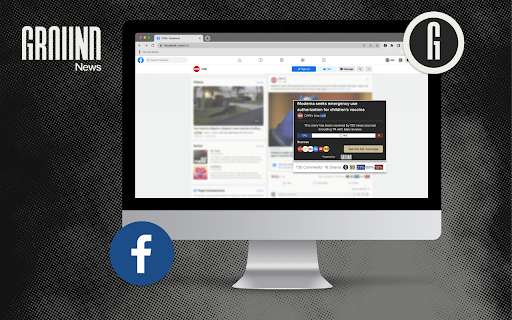

Explore the web and lookup articles you find on Ground News Get a second opinion on the news you’re reading. Whenever you come across a news article online, the Ground News Bias Checker shows you which news outlets are reporting on that story so you can easily compare coverage and make sure you’re seeing the full picture. The Ground News Bias Checker can: 1. Instantly show you how 50,000+ worldwide news outlets are reporting on the same story. Easily compare related articles from different publishers to verify information. 2. Reveal bias and factuality ratings for news sources reporting on a story. Quickly see whether a story is receiving balanced coverage, or if it's mostly being reported on by news sources at the extremes of the political spectrum. 3. Integrate with your personal social media accounts, including Reddit, X, Bluesky, Linkedin and Facebook, to uncover media bias hidden in your newsfeeds. 4. Save articles to read later and automatically generate in-text citations to support your research. Developed by a former NASA engineer, Ground News helps readers think critically about the news they consume by providing context about the source of the information. For more in-depth analysis, we also offer a website, mobile app, and newsletters to help readers see the full story. For support or general inquiries, please contact feedback@ground.news

Bias Finder
Find the bias of any news site you go to! When reading the news, it can be easy to get trapped into thinking there's only one viable perspective. In reality, all different groups from across the political spectrum may perceive the same event in a completely different light. For example: This extension won't tell you what to believe, or what is the "correct" way to perceive an issue. However, it will help inform your own perspective so that rather than accepting the first thing you see as fact, you'll think about who is saying it. Following that line, Bias Finder is not intended to say whether a source is trustworthy or not. Just because a news site has a bias rating of left or right doesn't mean it's any less accurate than a site located in the center, or vice versa. Rather, it just tells you how the analysis is likely to be shaped by political opinions and biases. Two completely factual stories may have very different perspectives: Neither headline is strictly incorrect, but both convey a very different tone about the events.

Readwise Highlighter
Save a page to Readwise Reader This is the official Reader browser extension made by and maintained by the Readwise team. You use the Reader Highlighter extension to: • Save articles to Reader – the first ever read-it-later app built for power readers. If you’ve ever used Instapaper or Pocket, Reader is like those, except it’s built for the modern era and brings all your reading into one place including: web articles, email newsletters, RSS feeds, Twitter threads, PDFs, EPUBs and more. You can get started with Reader here. • Highlight and annotate the open web. All highlights that you make using this extension will be synced with the Readwise ecosystem and, optionally, to your note-taking app of choice such as Obsidian, Notion, Roam Research, Evernote, Logseq, and more. Note: You must have an existing Readwise account to use this extension. If you are not already a subscriber, you can get a free 30-day trial with no credit card upfront. At the end of the trial, you will not be charged unless you choose to subscribe.

DeArrow - Better Titles and Thumbnails
Crowdsourcing titles and thumbnails to be descriptive and not sensational DeArrow is a browser extension for crowdsourcing better titles and thumbnails on YouTube. The goal of DeArrow is to make titles accurate and reduce sensationalism. DeArrow is a paid (if you want) browser extension. You can purchase an unlimited-use license key for 1$. However, if you cannot, or do not want to pay, you can use the extension by clicking the "I can't/don't want to pay" button. Titles can be any arbitrary text. Thumbnails are screenshots from specific timestamps in the video. These are user submitted and voted on. By default, if there are no submissions, it will format the original title to the user-specified format, and set a screenshot from a random timestamp as the thumbnail. This can be configured in the options to disable formatting, or show the original thumbnail by default. If the original thumbnail is actually good, you can still vote for it in the submission menu, and then it will act like a submission. No more dealing with clickbait, arrows, or annoying faces. Users can submit better titles and thumbnails for each video and vote on them. How does DeArrow differ from Clickbait Remover for YouTube - Unlike Clickbait Remover, DeArrow's main purpose is for crowdsourcing better titles and thumbnails - When a crowdsourced title is not available, DeArrow will auto-format it according to your setting, but does it in a more sophisticated way than Clickbait Remover. Instead of only setting all words to lower case, or capitalizing every word, DeArrow supports casing systems such as "Title Case" and "Sentence case". These will still allow acronyms and proper names to remain capitalized. - When a crowdsourced thumbnail is not available, DeArrow by default shows a screenshot at a random timestamp in the video. Clickbait Remover's thumbnails use YouTube auto-generated thumbnails, and while they are seemingly random, they are chosen by a machine learning algorithm to favor faces with expressions, and other overstimulating features. DeArrow uses truly random timestamps generated by its own server. DeArrow will also check the SponsorBlock database to ensure the randomized thumbnail is not inside of a sponsor segment. Access your data for youtube.com, www.youtube-nocookie.com: - Used to modify the YouTube webpage

Archive Page
Archive webpage with Archive Today Adds a button to the Chrome toolbar. When clicked, it sends the URL of the current tab to Archive Today to preserve a snapshot of the page, and opens the result in a new tab. ✅ Direct action Shortcuts (with optional Tabs permission) ✅ Customizable Toolbar Button Choose your preferred action for the toolbar icon: • Dropdown Menu: Quick access to Search, Archive, and Options. • Direct Search: Instantly search the current page URL. • Direct Archive: Instantly archive the current page. Features: • Archive Today Integration: Sends the current tab URL to Archive Today to preserve a snapshot and opens the result in a new tab. • Context Menus: Includes Link context menu to Archive or Search, and a Page context menu to Search. • Customizable Behavior: Options to control if the new tab opens adjacent to the current tab, at the end of the tab strip, or replaces the current tab (archive only). • Tab Activation: Control whether new Archive or Search tabs are activated immediately. • HTTPS Security: Uses HTTPS for all archival and search transmissions. • Keyboard Shortcuts: A custom shortcut can be created to archive the current page instantly. (Archive Today is a time capsule for web pages. It takes a 'snapshot' of a webpage that will always be online even if the original page disappears. It saves a text and a graphical copy of the page for better accuracy and provides a short and reliable link to an unalterable record of the web page.) Consent: By using this extension, you consent to sharing your Archive or Search URL with Archive Today when initiated by you. This extension does not otherwise collect or share any user data. Notes: 1. If you get an error, try again later. It's NOT an extension issue—Archive Today sometimes gets overwhelmed. 2. CloudFlare DNS may not resolve Archive Today; if you experience DNS errors, try a different DNS server (e.g., Quad9). 3. For similar functionality on Android, check out Share2Archive in the Play Store. What's New in 1.6.3: * Fix rare menu race condition. * Improve Options screen. What's New in 1.6.1: * Verify limited permissions update. What's New in 1.6.0: * Restore more limited permissions! What's New in 1.5.1: * Fix Activate Option * Fix Startup Options What's New in 1.5.0: * Direct action Shortcuts (with optional Tabs permission) * Squash some small bugs. Disclaimers: • Use at your own risk. No liability is accepted for any loss or damage. • This extension is not affiliated with Archive Today. • Trademarks are the properties of their respective owners.
