
afphlhklnamnlglgnmnidbcpiigodhaj
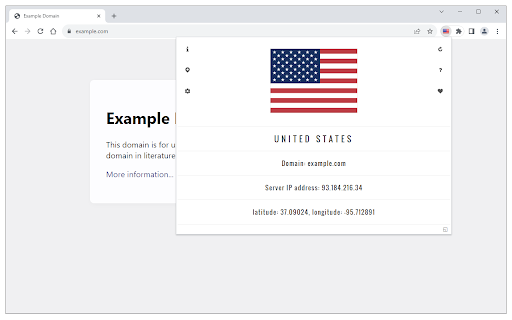

Shows country flag based on the server location for any website. Country Flag extension displays a flag based on the location of the website's server (active tab's URL). Pressing the toolbar icon (flag) shows you a popup with detailed info about the server, including the country name, server IP address, and coordinates metrics (latitude and longitude). Within the options page, you can change the toolbar icon size (available in 3 different sizes). Moreover, the flag icon's tooltip text shows brief info about the server's geo location. Note: To get the flag and location of the website's server, this add-on uses only a local database which is stored in the add-on's package. Once you open the popup, it will show you details about the current flag. To report bugs, please visit the addon's homepage (https://mybrowseraddon.com/flag-plus.html) and fill out the bug report form.

IP to Country Flag & MY IP - WhatIsMyIP.click
Display the IP and Country information of the currently viewed website and also quickly obtain your external IP address. Display the IP and Country information of the currently viewed website and also quickly obtain your external IP address. Shows -The IP and Country Flag of the website you are currently on - Your IP address - RDNS information

uDomainFlag
Receive information of a domain directly in the browser when browsing a website. See the physical location of a website while you are browsing - right in your browser without having to open another page. uDomainFlag is an open source extension for your web browser. This extension shows you automatically where the server of a website is located while you visit a website. If you want more details about the location, just click on the displayed flag. You can see the approximate location (country, state and city), the IP addresses behind the website you have called up and the description of the operator of the IP network. If you want to see more information, you can call it up by clicking on "Additional information". With this extension, you can see where your browser is communicating and which country you are connecting to. The country information is always up to date and is only requested when required. You can find detailed instructions on how uDomainFlag works at https://domainflag.bella.network/howitworks. The functionality of uDomainFlag is explained at https://domainflag.bella.network/extension, which permissions are used, encryption measures for data transfer, measures for data protection, change history and answers to other frequently asked questions. If you have found a bug, please report it at https://github.com/Thomas2500/uDomainFlag/issues.

IP Whois - IP Address and Domain Information
Get all the details for the web page's IP address, including geolocation, network, ASN, and more. Gives you the full IP address information about the server of the website you're visiting. It also shows you the map with the approximate distance between the website server and your location. Here's the list of the data points displayed: By design, your data stays at all times on your Google account, never saved in our database. Your data aren’t shared with anyone, including the add-on owner. We complies with privacy laws (especially GDPR & California Privacy Act) to protect your data.

IP Whois
View info about IP, DNS records, SSL, country flag, domain whois, location, stats and more of any website. This extension is designed to be fast and lightweight, allows you to view all information of any website: - Display the country flag of the website in the current tab. - Show the map, IPv4 and IPv6 adresses, hostname, and the hosting company/organization. - All DNS records. - Whois owner information. - Geolocalization (down to the city). - A fast link to the Wayback Machine. - SSL check tools. - White and dark theme support. - ... and much more Support the extension development! https://github.com/sponsors/SergiX44
