
afmnhehfpjmkajjglfakmgmjcclhjane
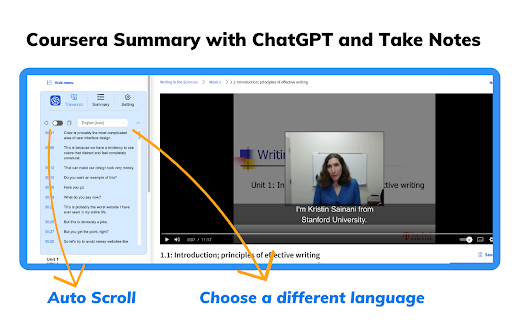


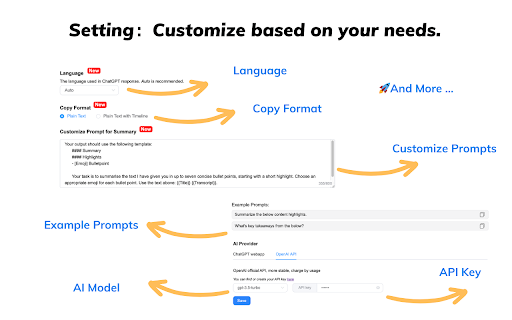
Coursera videos transcript and summary with Chat GPT. Summary generator for Coursera videos. Coursera Summary with ChatGPT and Take Notes - Your Summary generator for Coursera courses Chrome Extension 🚀Features: ChatGPT with Coursera courses summary generator is the ultimate companion for learning through Coursera courses. It allows you to swiftly summarize courses content and generate summaries by utilizing transcribed text with timestamps, enhancing your learning efficiency. Experience the following features: ● Instant Timestamps: Click timestamp icons to easily locate the transcript of the current moment in courses videos. ● Auto-Scroll Transcripts: Enable auto-scroll to have transcripts follow along as you watch courses. ● One-Click Copy: Seamlessly copy entire automatically generated transcripts, summaries and Coursera notebooks. ● Customizable Settings: Personalize output language, ChatGPT prompts, text formats and more based on your needs. 🚀How to Use : ● Go to the Coursera website ● Select a course video that you are interested in ● Click the "Transcript & summary" button. If subtitles exist for the video, they will be shown to you. ● If you are logged into chat.openai.com, click the View Summary with ChatGPT button to get a courses summary ● Click the "Copy" icon, then you can easily get a summary for the Coursera course video 💡 Q&A Q1: What is ChatGPT? A1: ChatGPT is an OpenAI-developed artificial intelligence chatbot based on OpenAI’s Generative Pre-trained Transformer (GPT) series of large language models (LLMs). ChatGPT can engage in conversations, respond to user requests, write stories, debug programming code, creative writing, and much more. Q2: What is a Coursera summary? A2: A Coursera summary is an AI-written overview of the relevant content contained in any courses video on the Coursera platform. The summary provides the user with the video's overall topic and important information without the user having to watch the entire video. Q4: Do I need to create a ChatGPT/OpenAI account to use this extension? A4: Yes, you must have a ChatGPT account to generate video summaries. You can create a free account at chat.openai.com, where you can also locate or generate your OpenAI API key. 📢Note: Coursera is a trademark of Coursera, Inc., registered in the U.S. and other countries. Coursera Summary with ChatGPT and Take Notes is an independent project and has no relationship to Coursera or Coursera, Inc.

NoteGPT: YouTube Summary, Chat with AI Assistant, ChatGPT DeepSeek Claude
Summarize YouTube videos and turn transcripts into notes with AI. Generate captions, then translate, copy, or download subtitles. NoteGPT Extension is your all-in-one AI tool for YouTube summary, YouTube transcript, and content creation. Instantly extract, summarize, and translate video content—even without subtitles. Whether you want to summarize YouTube videos or generate accurate YouTube transcripts, NoteGPT Extension helps you learn faster and work smarter by turning videos into clear notes, mind maps, slides, and podcasts. Key Features ✅ Instant YouTube Summary & Transcript Get precise AI YouTube summary and transcripts in seconds—even for videos without captions. ✅ Transcribe Long Videos — Even Without Subtitles (Up to 2 Hours) Easily transcribe and summarize YouTube videos with or without captions. For videos without subtitles, we support up to 2 hours in length. Just one click to get your full transcript and download it instantly. ✅ Free Subtitle Download Easily download subtitles in multiple formats (TXT, SRT) for all your YouTube videos—free and fast. ✅ Translate YouTube Transcripts into 40+ Languages Break language barriers with AI-powered translation of transcripts and summaries, perfect for global learners. ✅ AI Chat to Explore Video Content Interact with your videos by asking questions, clarifying concepts, or diving deeper into topics using AI chat. ✅ Turn Notes into Mind Maps, Slides & Podcasts Convert AI-generated notes into visual mind maps, ready-to-use presentations, or narrated podcasts with one click. ✅ Dark Mode & Browser Sync Choose light, dark, or follow your browser’s theme for a seamless user experience. ✅ Prompt Library for Smarter AI Summary GenerationUse our built-in prompt library to get better AI summaries and explanations. Whether you're using NoteGPT as a YouTube video summarizer or exploring other content, these smart prompts help you get high-quality results—without typing prompts yourself. ✅ Custom Settings for YouTube Summary and AI OutputEasily customize your YouTube summary with options to set length, tone, or format. Whether you want a brief AI overview or a full in-depth YouTube video summary, NoteGPT adapts to your workflow and learning style. How to Use ● Install NoteGPT Extension from the Chrome Web Store ● Open any YouTube video ● Click the NoteGPT Extension icon or summary panel on the right ● Choose to: ○ Transcript ○ Summary ○ AI Chat ○ AI Mind Map ○ AI Podcast ○ AI Presentation ● One-click download or translation of video transcripts. ● View or manage all your notes in the NoteGPT workspace (opens in a new tab) FAQs Q1: What is NoteGPT Extension? A: NoteGPT Extension is an AI-powered Chrome extension that helps you summarize, transcribe, and repurpose YouTube videos, webpages, and PDFs. It turns long-form content into structured notes, mind maps, slides, or podcasts — all in one click. Q: Is NoteGPT Extension free to use? A: Yes! You get 15 free quotas per month with permanent storage. Upgrade anytime for unlimited use. Q: Can I summarize videos without subtitles? A: Yes. Even videos without captions are supported (up to 120 minutes). This requires 1 quota per 10 minutes. Q2: How long of a video can NoteGPT Extension summarize or transcribe? A: There’s no length limit for videos with subtitles — NoteGPT Extension can summarize and transcribe them regardless of duration. For videos without subtitles, the maximum supported length is 2 hours. Q5: What else can I use NoteGPT Extension for? A: Beyond YouTube, you can summarize webpages and PDF documents, translate transcripts into any languages, and generate visual mind maps, podcasts, and slide decks from your content. Contact Us Have questions, feedback, or need support? We’d love to hear from you. Join our user group on Discord: https://discord.com/invite/wzNfuks8Qk Or email us at support@notegpt.io 🐦 Twitter/X: @NoteGPT_AINote Learn more: https://notegpt.io/

Translate and Speak Subtitles for YouTube
Extension convert text subtitles for YouTube into natural-sounding speech using AI technologies. Here is a solution that helps you read subtitles for YouTube videos. It utilizes a Text-to-Speech (TTS) engine to convert text subtitles into natural-sounding speech. This solution is powered by Google and Microsoft AI technologies, providing over 100 voices in multiple languages and variants. 🚀Features: ** Easy to use: Turn on/off with a single click. ** Multiple languages: Supports voices in many languages. ** Multiple subtitles: Supports multiple subtitle formats. 🚀How to use: *Pin the 'YouTube Subtitles Speaker and Translator' extension to the browser toolbar. Click on the extension icon in the Chrome toolbar and navigate to the YouTube video details page. *If the YouTube video has subtitles, a voice icon will appear. *You can then select the UI language and the voice language.

Article Summary with ChatGPT and Take Notes
Summarize any webpage or article using ChatGPT. Summary generator for article. Summarize any webpage or article using ChatGPT. Summary generator for article. 🚀Features: ChatGPT with the Article Summary Generator is a free Chrome Extension that harnesses the power of OpenAI technology. With this extension, you can quickly access concise summaries of articles and webpages, saving you time and enhancing your learning experience. Give it a try today to streamline your reading and knowledge acquisition! Experience the following features: ● One-Click Summarization: Quickly generate article summaries by clicking the logo. ● Customizable Settings: Personalize ChatGPT prompts, login preferences, and more as needed. ● Unrestricted Summaries: Summarize any webpage or article, significantly saving you time. 🚀How to Use : ● Log in to https://chat.openai.com. ● Pin the extension and click on the logo. ● Obtain the Article Summary or Website Summary. ● If you encounter an error, try reopening openai.com. The service may be experiencing high demand. 💡 Q&A Q1: What is ChatGPT? A1: ChatGPT is an OpenAI-developed artificial intelligence chatbot based on OpenAI’s Generative Pre-trained Transformer (GPT) series of large language models (LLMs). ChatGPT can engage in conversations, respond to user requests, write stories, debug programming code, creative writing, and much more. Q2: What is an Article summary? A2: With the official support of OpenAI, an article summary is created to assist users in summarizing content while reading any article or webpage. This significantly saves time and enhances learning efficiency. Q4: Do I need to create a ChatGPT/OpenAI account to use this extension? A4: Yes, you must have a ChatGPT account to generate article summaries. You can create a free account at chat.openai.com, where you can also locate or generate your OpenAI API key.

NoteGPT: AI Flashcard for Quizlet and Cram
🚀Features: Study smarter with NoteGPT. Create personalized flashcards powered by AI, designed to enhance your memorization process through active recall and spaced repetition. With seamless Quizlet integration, you can import your flashcards with ease and study efficiently. Key features include: ● One-click import: Easily import Quizlet flashcard decks with just one click. ● Knowledge integration: Automatically identify key points, important facts, and concepts from your materials. ● Convenient studying: Start reviewing your flashcards anytime, anywhere with minimal distractions. 🚀How to Use : ● Install the extension. ● Pin the extension and click on the logo. ● Navigate to the flashcard details page on Quizlet (must enter the flashcard page, unable to import card decks from Quizlet homepage). ● After successful import, visit the NoteGPT website to review your flashcards anytime, anywhere. 💡 Q&A Q1: What is Flashcards? A1: Flashcards are a tool for active recall, used to help with memorization and review. Each card typically has a question on one side and an answer on the other, helping to reinforce memory retention through repetition. Q2: What is an Article summary? A2: With NoteGPT, you can generate flashcards from articles, videos, PDFs, and more, saving time and improving study efficiency. NoteGPT:The intelligent learning tool that helps you study smarter. We're continuously expanding our integrations with other flashcard platforms to bring you even more ways to enhance your learning experience!
