
aejdgjfpimlamfapdgjhdeblibhophma
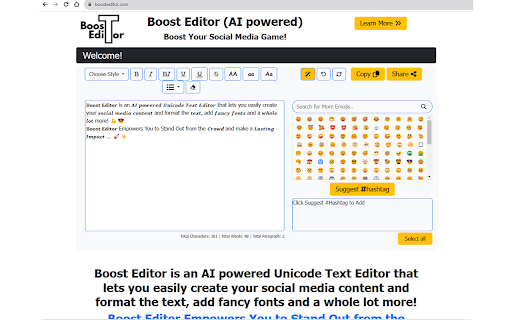
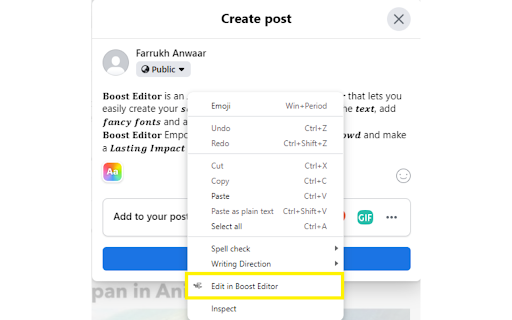


Your Chrome extension to copy text from Social Media Post textbox and Boost in Boost Editor Simply right-click on your favourite social media platform to continue editing in Boost Editor (https://boosteditor.com). By selecting the "Edit in Boost Editor" button, you can continue editing your post without losing any previously typed content. The Chrome extension will automatically copy and paste your text into the AI-powered Boost Editor for a smooth editing experience to boost your social media game. Boost Editor is an AI powered Unicode Text Editor that lets you easily create your social media content and format the text, add fancy fonts and a whole lot more! Boost Editor Empowers You to Stand Out from the Crowd and make a Lasting Impact ... BoostEditor allows you to break free from the limitations of social media platforms like LinkedIn, Twitter, or Facebook. Now, you can effortlessly add style to your posts by using 𝗯𝗼𝗹𝗱, 𝐼𝑡𝑎𝑙𝑖𝑐, and u̲n̲d̲e̲r̲l̲i̲n̲e̲ text, along with thousands of eye-catching 𝓕𝓸𝓷𝓽𝓼, Emojis 😀 , AI powered Emoji Selection and Hashtag Generator, all available within a powerful Unicode text editor. Boost Editor is the best 𝓕𝓪𝓷𝓬𝔂 Font Generator... Boost Editor offers a seamless and user-friendly experience, making it the ultimate choice for transforming your plain text into captivating and stylish content, guaranteed to leave a lasting impression.

LoadFast: Lightning-Fast Text Expansion
The best text expander for Chrome. Expand text with lightning speed. Insert snippets and templates with ease. 🚀 LoadFast – The Ultimate Text Expander for Speed Demons If you type it twice, you’re wasting time. Tired of retyping the same phrases, emails, or responses like a trained monkey? LoadFast is the fastest, smartest text expander designed to save you hours every week by instantly inserting saved text snippets. No subscriptions. No bloat. No nonsense. Just speed. ⏳ Save 30% of Your Workday Instantly Every day, you waste hours typing the same things over and over—emails, meeting links, customer replies, spreadsheets, addresses. LoadFast lets you summon saved text in seconds, so you can focus on what actually matters. 🔥 Trigger your snippets with simple shortcuts 🔍 Find any saved text instantly with a built-in search bar 📂 Organize everything with categories & favorites 🔄 Sync across devices—one purchase, unlimited computers ☁️ Secure cloud backup—your snippets are always safe 🏆 The Only Text Expander You’ll Ever Need Why settle for overpriced, outdated text expanders that force you into monthly subscriptions? LoadFast is a one-time purchase with lifetime updates. 👔 Please The Boss (Trigger: :boss) “On it! Just finishing up now.” (Translation: I forgot, but now I look like a genius.) 🔮 Google Spreadsheet Formula (Trigger: =magic) No more searching for that complicated formula—just expand it instantly. 💰 Unsubtle Venmo Request (Trigger: /payup) Because sometimes, people "forget" to pay you back. 💳 Lazy Online Checkout (Trigger: 42) Autofill your card details in a flash—because hunting for your wallet is overrated. ✅ Unlimited snippets & custom shortcuts ✅ Sync across multiple devices ✅ Lifetime free updates & new features ✅ Priority support for paid users ✅ Secure, encrypted cloud backup ⚡️ Built for Speed. Designed for Productivity. Unlike bloated competitors, LoadFast is lightweight, blazingly fast, and works right inside Chrome. No performance issues. No lag. Just instant text expansion. 🔒 Your Privacy is Non-Negotiable Your snippets are securely stored and encrypted. LoadFast never tracks what you type or sells your data. ⚡ Get LoadFast Now – Type Less, Do More Stop typing the same things over and over. Save time. Boost productivity. Work smarter. ❓Who Needs LoadFast? Everyone Who Types (So, You). 🦸♂️Support Heroes: Zap canned responses on Zendesk or Intercom in milliseconds. 🧑💻Marketers: Crank out social posts or ad copy without breaking a sweat. 🎒Freelancers: Bill more hours by typing less. 🧑🎓Students: Ace assignments faster—focus on the ideas, not the keystrokes. #️⃣Anyone Online: Emails, Slack, Google Docs—LoadFast works everywhere. 👉 Install LoadFast now and start saving hours instantly!

Your Note Taking
Your Simple note-taking extension Your Note Taking is a simple and efficient note-taking extension designed to help you stay organized and productive while browsing the web. Whether you want to jot down quick thoughts, make to-do lists, or save important information, our extension provides a convenient way to capture and manage your notes.

Data Analyzer
This is a personal project for reading data from certain columns of a table from a particular site. Only the user of the particular site will use it.

ChatGPT Search Bar & Send With Command Enter
ChatGPT Search Bar & Send With Command Enter Mandarin & English Description ChatGPT Search Bar & Send With Command Enter Mandarin & English Description ChatGPT Search Bar & Send With Command Enter Providing smooth chat title search functionality and a more user-friendly messaging experience. Version 2.1 has fixed the issue that line breaks can not be inserted on the UI. Still working on a better approach. Version 2.1 has fixed the issue of the plugin not working due to a URL change. (2024/6/29) In Version 2.0, we introduced a new "Express Search" mode, which allows you to find your desired chat titles immediately after you type it. Regardless of the date, it supports all your past conversations. Are you like us, managing your chats through their titles? Come and try it! We have also added terms of use to the settings page. To fully respect your wishes, we need your explicit consent to our terms of use in order to use the "Express Search" feature. In Version 1.2, we introduced a settings page, where you can choose to enable or disable certain features, as well as set your preferred key combinations for sending messages. In Version 1.1, we have added a chat search function. Now, you can perform chat title searches using keywords, with support for conversations up to 30 days old. Give it a try by clicking our button! If you're curious about how the search function works, feel free to refer to our screenshots. The default behavior of the Enter key has been changed. Instead of directly sending messages, it now adds a line break: - For Mac users, use `Command + Enter` to send a message - For Windows users, use `Ctrl + Enter` to send a message You can choose your preferred key combination on the settings page, or turn off this feature if you wish. The purpose of changing the Enter key's behavior is to prevent accidental message sending when editing prompts, especially given the current rate limits of GPT-4! By using our extension, enjoy a more user-friendly, error-free experience chatting with ChatGPT and take advantage of the convenient chat history search function! Our future plans include: 1. Allowing users to customize key combinations for sending messages, providing greater flexibility. (Partially completed) 2. Introducing customizable prompt templates to facilitate faster message composition. 3. Adding functionality to organize sent and received messages daily, for more efficient tracking and management of chat content. 4. Extending the search function to chat contents. 5. Scheduling batch messages to GPT-4, allowing you to handle AI-assisted tasks even while you're sleeping. Change Log: - Version 2.2.1: Fixed the issue where line break logic failed when sending messages. - Version 2.2.0: Fixed line break logic issue from interface changes. - Version 2.1.0: Fixed plugin not working due to URL change. - Version 2.0.0: Introduced "Express Search" mode and added terms of use. - Version 1.2.0: Added extension settings page. - Version 1.1.2: Improved search functionality, enhancing user experience. - Version 1.1.1: Enhanced user experience for search functionality. - Version 1.1: Added chat title search feature. - Version 1.0: Changed behavior of the Enter key.
