
hncfmojnlhdnejeapjaciolidjebpoel
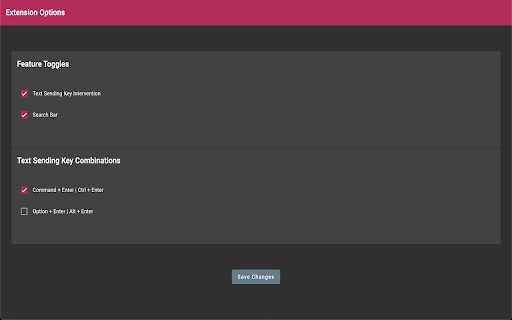
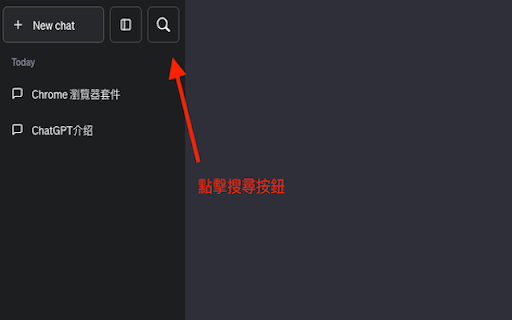
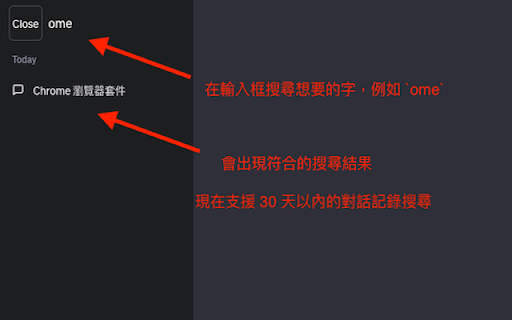
ChatGPT Search Bar & Send With Command Enter Mandarin & English Description ChatGPT Search Bar & Send With Command Enter Mandarin & English Description ChatGPT Search Bar & Send With Command Enter Providing smooth chat title search functionality and a more user-friendly messaging experience. Version 2.1 has fixed the issue that line breaks can not be inserted on the UI. Still working on a better approach. Version 2.1 has fixed the issue of the plugin not working due to a URL change. (2024/6/29) In Version 2.0, we introduced a new "Express Search" mode, which allows you to find your desired chat titles immediately after you type it. Regardless of the date, it supports all your past conversations. Are you like us, managing your chats through their titles? Come and try it! We have also added terms of use to the settings page. To fully respect your wishes, we need your explicit consent to our terms of use in order to use the "Express Search" feature. In Version 1.2, we introduced a settings page, where you can choose to enable or disable certain features, as well as set your preferred key combinations for sending messages. In Version 1.1, we have added a chat search function. Now, you can perform chat title searches using keywords, with support for conversations up to 30 days old. Give it a try by clicking our button! If you're curious about how the search function works, feel free to refer to our screenshots. The default behavior of the Enter key has been changed. Instead of directly sending messages, it now adds a line break: - For Mac users, use `Command + Enter` to send a message - For Windows users, use `Ctrl + Enter` to send a message You can choose your preferred key combination on the settings page, or turn off this feature if you wish. The purpose of changing the Enter key's behavior is to prevent accidental message sending when editing prompts, especially given the current rate limits of GPT-4! By using our extension, enjoy a more user-friendly, error-free experience chatting with ChatGPT and take advantage of the convenient chat history search function! Our future plans include: 1. Allowing users to customize key combinations for sending messages, providing greater flexibility. (Partially completed) 2. Introducing customizable prompt templates to facilitate faster message composition. 3. Adding functionality to organize sent and received messages daily, for more efficient tracking and management of chat content. 4. Extending the search function to chat contents. 5. Scheduling batch messages to GPT-4, allowing you to handle AI-assisted tasks even while you're sleeping. Change Log: - Version 2.2.1: Fixed the issue where line break logic failed when sending messages. - Version 2.2.0: Fixed line break logic issue from interface changes. - Version 2.1.0: Fixed plugin not working due to URL change. - Version 2.0.0: Introduced "Express Search" mode and added terms of use. - Version 1.2.0: Added extension settings page. - Version 1.1.2: Improved search functionality, enhancing user experience. - Version 1.1.1: Enhanced user experience for search functionality. - Version 1.1: Added chat title search feature. - Version 1.0: Changed behavior of the Enter key.

Peek for YNAB
Check on your YNAB category and account balances, and quickly add transactions. The Peek for YNAB extension gives you a snapshot of your current YNAB category and account balances. You can pin your favorite categories and accounts, view recent transactions, and add transactions right from the extension. Split transactions and transfers are fully supported. You can also setup customizable notifications and alerts for each budget. Peek for YNAB is a third-party extension, and is not maintained or supported by YNAB (the company). Please do not reach out to YNAB's official support channels for help or issues related to this extension. Instead, please refer to the extension's help page: https://peekforynab.com/help

PageTrail
This Extension tracks your daily surfing activity PageTrails is designed to enhance productivity by tracking time spent on various websites. It records active browsing time, aggregates it at the domain level, and provides a concise summary of web activity. This extension is ideal for users seeking to monitor their web usage patterns and optimize their online time.

Anti FeR toolkit
Adds features and extensions for the bushtarion web game (formerly Canola toolkit formerly Antisback's bushtarion toolkit) This adds some functionality to the Canola toolkit, which it is forked from. Fixes the regex for Company name matching (no more oddities with names that include '@', '~', or '^'), adds information about who someone has attacked, includes stealth mobs in the activity chart, and maybe more! 1.2.22 Changes: Defaults for options set to "on" 1.2.21 Changes: Additional options for the military page and supply depot 1.2.18 Changes: Includes an options page, navigate by right-clicking the icon and selecting "Options" 1.2.13 Changes: Displays development information for technologies unlocked for a given dev/construction Shows troop count on a hack Shows a horribly formatted estimate on the flak needed to land on a target given the visible units Display information about what you are 30% and 70% of in the score breakdown overlay Show gov defense in spy report incoming (but doesn't account for when it recalls) 1.2.12 Changes: Fixes seed/income calculation Adds a button to hack from the search page in a new tab Spy report incoming/outgoing is now sorted by ETA Spy report incoming/outgoing displays original mob ETA Adds an input so that dynamic AR calculation can be done from the spy report 1.2.11 Changes: Attacks on an HQ don't show a huge number for ETA Stealth mobs sent now default to ETA 5 sent New "Plant Max" feature calculates how many seeds you are able to plant given how many gards you have home. Updates grass seed bonus in Spring 1.2.10 Changes: Fixes single person mobs not showing up on spy reports Fixes HQ incoming/outgoing not showing HQ outgoing mobs stay in the outgoing screen "until recalled", which I don't know when it is recalled so take the info as an alert more than a reality Alerts if the user does not have enough harvesters to cover the max needed (in total, not at home) 1.2.9 Changes: Reverting mob notes and loving on Alci 1.2.8 Changes: Makes mob notes on alliance incoming screen more interesting for some :) 1.2.7 Changes: Fixes score evaluation for players with public ID's Fixes military mob calculations for "all" Income calculator now reasonably accounts for exponential seed loss and nighttime seed penalty Search results include a "Total" row for acres and score 1.2.6 Changes: Fixed spy report when spying a member of your own alliance Finished searching by Public Name Added full Hack output to console debugger when hacking from Alliance incoming page Added troop cost calculation on Military page 1.2.5 Changes: Fixes score calc for insurance that is "claimable early" Alliance incoming "Defend" and "Retaliate" links are now buttons Added "Hack" button on alliance incoming to make a best guess at route and fill out incoming notes Added "Recall" button on alliance incoming to recall from alliance page 1.2.4 Changes: Add Land Fat percentage to search results Fix Alliance page incomings when AHQ! is targeted Add Unit Stats quick link in side panel Add ID list generation with search results (in console debugger output) Add "Has Attacked" information on news page 1.2.3 Changes: Alerting when the user has uncultivated acres Maintenance page additionally displays the seeds you can grow with troops home Alliance page has quick links to setup defensive or offensive mobs from the incoming screen

Meta-Press.es
Explore the press from your computer, with no middlemen between the newspapers and you. Discover millions of results within seconds, and explore the last ones in your browser via this WebExtension. Select your press review and export it in a few clicks.
