
aefmpomeojdaegmpddinpfifebnccmgi

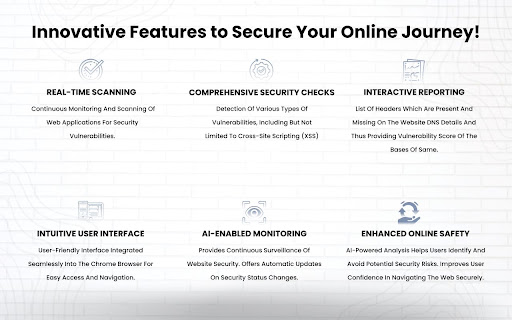


Security Chrome Extension users can effortlessly evaluate critical security parameters Defendly: Real-Time Security Scans for Websites. Overview: Defendly is a extension engineered to perform real-time scans on websites, precisely identifying vulnerabilities. By harnessing advanced inhouse ML algorithm, Defendly offers clear insights into application security, enabling users to make informed decisions and secure their online presence. Key Features: - Real-Time Scanning: Continuously monitor and evaluate the security of web applications, detecting vulnerabilities as they emerge. - AI and ML Algorithms: Employ advanced AI and ML algorithms to derive critical security insights from website headers in real-time. - Comprehensive Security Grades: Produce clear, comprehensive security grades for each scanned website, supplemented by detailed reports. - Automated Vulnerability Assessment: Automatically identify and prioritize website vulnerabilities, providing actionable insights. - Advanced Threat Detection: Quickly detect and counter sophisticated cyber threats in real-time with enhanced AI capabilities. - Cross-Platform Compatibility: Extend compatibility to various browsers and devices, ensuring consistent security across platforms. - Intelligent Risk Scoring: Utilize AI-driven risk scoring to evaluate website security and offer personalized remediation suggestions. - Interactive UI: Enjoy a user-friendly and interactive interface for a seamless user experience. - Downloadable Reports: Access and download real-time detailed reports for further analysis and record-keeping. - Schedule and Rerun Scans: Schedule and rerun scans to maintain continuous security monitoring. How It Works: 1. Retrieve URL: The tool retrieves the website's URL to initiate the scanning process. 2. Initiate Scan: A designated button triggers a series of backend operations. 3. Backend Request: A request is sent to our backend infrastructure, initiating the extraction of network payloads from the target website. 4. AI-Based Scoring: The AI-based scoring algorithm categorizes headers based on contextual importance. 5. Generate Grade: A comprehensive website grade is generated, accompanied by detailed reports offering granular insights into performance metrics. Advanced Capabilities: - Automated Vulnerability Assessment: Continuously monitor and assess security vulnerabilities with minimal manual intervention. - Intelligent Risk Scoring: Provide personalized risk assessments and remediation recommendations to enhance website security. - Cross-Platform Compatibility: Ensure security across various browsers and devices, making it accessible for a wide user base. - Interactive and Intuitive UI: Designed for users with varying levels of technical expertise, offering a seamless and engaging experience. Benefits: - Proactive Threat Detection: Identify and mitigate threats before they cause harm. - Comprehensive Security Insights: Gain clear and actionable insights into the security status of web applications. - Cost-Effective Solution: Reduce the need for expensive manual security assessments and minimize costs associated with data breaches. - Regulatory Compliance: Aid in meeting regulatory requirements with thorough security assessments and reports. - User-Friendly Interface: Simplify the process of vulnerability assessment, making it accessible for users with varying levels of technical expertise. Join the Defendly Community: By installing Defendly, you are taking a significant step towards ensuring the security of your web applications. Join our community of developers, security professionals, website owners, and IT administrators who trust Defendly for their cybersecurity needs.

Guardio Protection for Chrome
Experience complete security across your digital life. Guardio protects every part of your digital life across your browser, email, accounts, and devices. It detects and blocks scams, phishing attempts, malicious sites, and harmful downloads before they cause harm. With real-time alerts, proactive monitoring, and cross-device sync, Guardio keeps your browsing and personal data safe without slowing you down. Designed for Chrome and seamlessly synced with the Guardio mobile app, Guardio provides protection across devices. Both solutions operate continuously and update automatically. Users can access 24/7 email support. How It Works • Install the Guardio browser extension • Run a quick security checkup to scan for risks • Choose a plan that fits your needs • Recommended: Download the Guardio mobile app for full cross-device protection What’s Included Free (Basic) plan: • Fake website alerts in your browser Premium plan includes: • Real-time blocking of phishing, scam, and fake AI-generated sites • Email and account monitoring across desktop and mobile • Protection from malicious and risky downloads • Identity monitoring for up to 5 email addresses • Easy-to-understand overview of your security status • Guidance to fix issues and stay protected • Critical security alerts when severe threats are detected • 24/7 customer support via email • VIP security specialist support (select plans) Cross-Platform Coverage Guardio protects your identity, accounts, and devices with real-time threat blocking and intelligent monitoring, wherever you are. • Real-Time Protection: Active scam and phishing protection while you browse on Chrome or use your mobile device • Email & Account Monitoring: Get alerts about breaches, weak account settings (like missing 2FA), and suspicious activity, visible on any device • Critical Alerts: Guardio connects the dots across your online activity to highlight urgent risks, so you know when it’s time to act • Mobile Features: Scam text filtering (iOS only) and full visibility into your protection status, on the go Why Guardio Guardio doesn’t just block threats. It gives you visibility into your online exposure, alerts you when action is needed, and helps you take control of your digital safety, no deep technical knowledge required. • USA TODAY (Jan 2025): “Guardio provides a comprehensive cybersecurity experience that goes beyond traditional protection… ensuring a smooth and secure online experience.” • PCMag: “Perfect phishing protection.” For all questions and support-related issues, email support@guard.io By installing this extension, you confirm and agree with Guardio's Privacy Policy (https://guard.io/privacy) and Terms & Conditions (https://guard.io/terms)

Extension Shield
Free security check for installed Chrome extensions: risky permissions, privacy signals, and a simple score. No account required. ExtensionShield helps you scan, review, and manage Chrome extensions with more confidence. It checks installed extensions for risky permissions, privacy signals, and security concerns, then shows a simple score so you can quickly understand which extensions deserve attention. With ExtensionShield, you can: - Scan installed extensions and see clear risk labels - Review requested permissions to spot extensions with broad or sensitive access - Check privacy signals before trusting an extension - Scan a Chrome Web Store URL or extension name before installing - Refresh scans anytime to review the latest results - Enable, disable, or uninstall extensions directly from the popup - Manage all your extensions in one place without opening Chrome’s extension manager ExtensionShield is built for people who want a simpler way to understand browser extension risk and keep their browser cleaner, safer, and easier to manage.

Easy Extension Manager
Effortlessly Manage Your Chrome Extensions Easy Extension Manager is your all-in-one tool for optimizing and organizing Chrome extensions. Easily search, sort, snapshot, export, and import your extension setups in JSON format—all with a user-friendly interface. ☆ Complete List: View all your installed extensions from a single popup. ☆ Snapshot: Save and load your extension setups with a single click. ☆ Export & Import: Backup or restore your extension configurations in JSON format ☆ Toggle Extensions: Easily enable or disable extensions to improve performance. ☆ Sort Options: Sort extensions alphabetically or by enabled/disabled status for quick access. ☆ Quick Search: Find specific extensions quickly and easily. ☆ Dark Mode: Switch between dark and light themes for better viewing. ☆ Context Menu: Right-click for powerful options ☆ Disable All Extensions to temporarily boost performance. ☆ Enable All Extensions with one click. Effortlessly back up and restore your extension snapshots in JSON format. Export & Import Highlights: ☆ Backup Snapshots: Export your extension setups as JSON files for safekeeping. ☆ Restore Setups: Import your saved configurations and apply them instantly. ☆ Auto Save Snapshots: Automatically back up your latest extension setup, ensuring it's always up to date. ============================== Why Choose Easy Extension Manager? Easy Extension Manager simplifies managing Chrome extensions. Stay organized, perform backups and restores easily, and streamline your workflow. With powerful search and sorting with features like Snapshots, Export & Import, and Auto Save, managing extensions has never been simpler. Take control of your extensions today with Easy Extension Manager—the smarter way to manage Chrome.

Chrome Password Setting
This extension is designed to enable you to set secure passwords for Chrome users. Protect your Chrome credentials with a password extension! This simple utility will help you generate a master password and store your bookmarks, history, and saved logins. Search “Chrome password setting” extension in the Chrome Web Store for the list of the most reliable providers and continue surfing without worries! You can do this quickly, making your online privacy a lot better. Some key Features of Chrome Password Setting Chrome Extension Easy Password Generation: It is very easy to generate powerful and distinctive passwords within a few clicks. Secure Storage: Restore, history, and saved login credentials with encrypted storage. Master Password Protection: This means you need to safeguard all your credentials using this one master password. Quick Setup: Easy to install and set up in a matter of minutes to protect you instantly. Type Chrome Web Store in your browser, look for the “Chrome password setting” app and click the “Add to Chrome” button. Step 2: Setting Up the Master Password It is advisable to install the extension and form a secure master password to access the extension. This will protect all the stored credentials. Step 3: Save Your Credentials Start storing your bookmarks, histories, and login information inside the extension. For your security all your data will be encrypted. To create new passwords, you can use the extension and when you next log into the websites, the extension will safely input the passwords for you. Q1: What can I do if I forgot my master password? No, the master password cannot be recovered for security measures taken against a hacker or a malicious individual. Either it must be remembered, or it should be kept safely. Q2: This extension works on other browsers? It also will not work in other browsers as the extension is made for Google Chrome only. Q3: Is my data saved in cyberspace? No, all your data is stored locally on your device and your data is encrypted to prevent unauthorized access.
