
aeacdnjbenoheafihciobeabjicpphfl
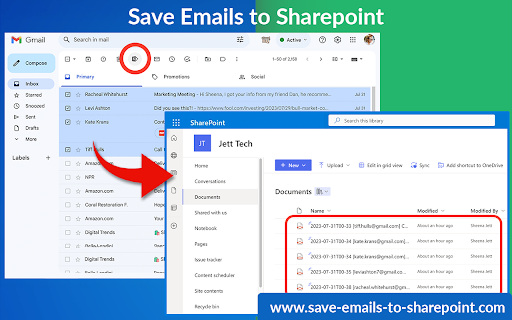
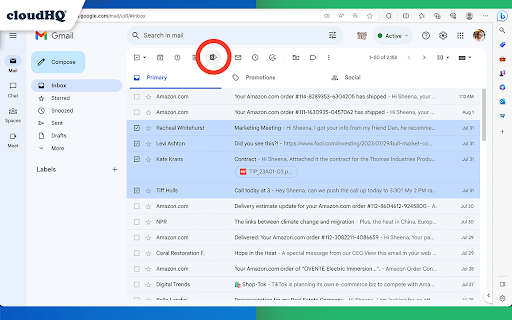
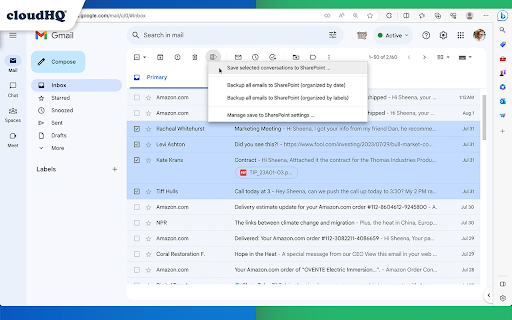
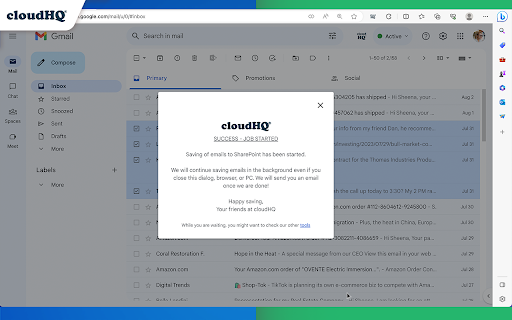
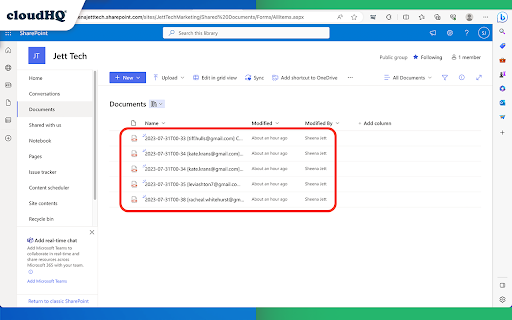
This extension allows you to save your Gmail messages or labels directly to Microsoft 365 SharePoint with just one click. This tool offers various functionalities like saving individual emails or in batches, archiving all emails at once, continuous automatic saving, and organization-wide email backup. Here’s what you can do: - Save individual emails, or in batches - Label backup - Archive all your emails - Continuously save emails automatically - Setup email backup Here is how to use this extension: 1. Select the emails you want to save. 2. Click on the "Save Emails to SharePoint" icon, and select the SharePoint Site, Document Library, and folder. 3. Choose the email export options. 4. Click on "Save". Key features: - save any email to a folder in SharePoint Document Library - save entire Gmail label to a folder in SharePoint Document Library - setup real time backup of entire Gmail account to a folder in your SharePoint Document Library Choose your saving preferences: - Consolidate email conversations into a single document or separate them - Decide whether to place attachments within the email body or in separate files - Save your emails in various file formats - Customize the way your files are named to suit your organizational needs By saving Gmail emails to Microsoft SharePoint, you gain: * Enhanced Information Security: Keep your sensitive email information secure and managed within SharePoint’s robust platform. * Streamlined File Management: Organize your emails seamlessly alongside your SharePoint documents. cloudHQ. Helping your productivity, one click at a time. Visit our Website: https://www.save-emails-to-sharepoint.com/ Explore Pricing: https://www.save-emails-to-sharepoint.com/pricing Need Help? Support Page: https://support.cloudhq.net/?s=sharepoint Discover Insights. Blog: https://blog.cloudhq.net/ Google Workspace, Google Sheets, Google Drive, Google Alerts and Gmail are trademarks of Google LLC. Use of this trademark is subject to Google Permissions.

Export Emails to Sheets by cloudHQ
Back up, export or parse your Gmail email messages and labels to Google Sheets EXCELLENT for business: The data sitting in your Gmail™ emails can be a goldmine. This tool will extract any data (such as invoice#, amount, etc.) from your Gmail™ messages and save it your Google Sheets™ spreadsheet. ✅ Extract specific information from their emails, such as dates, numbers, or names, and use that information in other applications or tools. ✅ Organize and classify their emails based on specific criteria, such as sender, subject, or keywords. ✅ Backup and archive their emails in a more structured and searchable format, such as a Google Sheets™ spreadsheet or a database. ✅ Share or collaborate on their emails with other people, such as team members or clients, in a more efficient and secure way. Overall, email parsing can be a useful tool for anyone who wants to better manage, analyze, and share their email data. ~~~What to Use an Email Parser for?~~~ ✔️ Email discovery / email backup ✔️ Collect all invoices and receipts ✔️ Email analytics ✔️ Email list builder ✔️ Applicant tracking system ✔️ Shipping and delivery report ✔️ Order status and customer feedback ✔️ Collect real estate report ✔️ Identify all bounced emails ✔️ Collect Google Alerts™ (about your name, your company, the industry that you're in, etc) ✔️ Email marketing campaign statistics ✔️ Export emails from foreign-language customers so that you can get them translated ✔️ Share incoming support issues from customers with the rest of your support team And so much more. ⭐ Real time export of all emails in your Gmail™ label, and any new incoming emails to Google Sheets™ ⭐ Pre-built rules to export all contact information like: phone#, email addresses, url links from email body ⭐ 1-Click wizards ⭐ Powerful email parser editor to define the exact information you want exported to Google Sheets™ (how to extract data from your email message) ⭐ Email messages can be exported to PDF and saved in Google Drive™ ⭐ Attachments (like invoices, receipts, etc.) saved as a PDF in Google Drive™ ⭐ Artificial Intelligence rules are used to detect what to export from your email body, like amount paid, order #, or other patterns it can detect. ⭐ Export all email headers (including X- headers) ⭐ Google Workspace™ team support (control export of emails from admin console) Try it today and stop wasting your precious time. We have this application that does this monotonous job for us! Our goal is to give you the tools to make the best strategic decisions for you. Once your data is presented in a way that can be more easily understood, you hold the power of knowledge to make those strategic decisions. Google Sheets™ will help you understand the bigger picture of whatever you need to keep track of in an up-to-date spreadsheet report of parsed email data. 1. Install the extension 2. On the left side, select the label to export and select "Save label to spreadsheet" in the label menu 3. The options dialog will open 4. Select columns to export (Subject, sender, etc.) and options (continuous export, name of a spreadsheet, etc.) 5. Our user-friendly editor will help you define what information you want to parse from your emails, and extract that information into Google Sheets™ (like order#, user comment, etc.) 6. Start the export cloudHQ. Helping your productivity, 1 click at a time. cloudHQ website: https://www.cloudhq.net/ App website: https://www.emails-to-sheets.com/ Pricing: https://www.emails-to-sheets.com/pricing Support page: https://support.cloudhq.net/category/browser-extensions/export-emails-to-excel-csv-or-google-sheet Blog: https://blog.cloudhq.net Demo: https://www.cloudhq.net/demo Google Workspace, Google Sheets, Google Drive, Google Alerts and Gmail are trademarks of Google LLC. Use of this trademark is subject to Google Permissions.

Gmail™ Email Templates by cloudHQ
Beautiful email templates for Gmail. Design your templates or import templates from Mailchimp. With team sharing! Create and share beautiful email templates! With this Chrome extension, you can: 1) Select any template from our free library of pre-designed email templates 2) Use our intuitive email design creator to create your own email (equipped with free stock photos!) 3) Copy someone's email template to make your own by clicking on a button from any email that you received in your inbox 4) Upload your own email templates from Mailchimp or HubSpot 5) Share your email templates with your team 6) Use our HTML editor in cases where you know how to code in HTML 7) Access and send your email templates from your mobile phone Great for: ✅ Newsletters ✅ Discount sales ✅ Party invitations ✅ Congratulations ✅ Holiday greetings ✅ Event emails (like when you need to send a client a reminder to pay their bill) ✅ Common email responses (like asking a potential customer to fill out an intake form, troubleshooting instructions, etc) Open a template directly in your Gmail email compose window. Once you’ve personalized your template you’ll be able to send it out like any other email in Gmail. The email templates library is FREE to use, and we’re adding new templates all the time. 📲 Do you also want to access your email templates on your mobile phone? Just install our mobile add-on and send your email template responses while on-the-go: https://workspace.google.com/marketplace/app/email_templates_by_cloudhq/183322770515 If you are a designer and would like to showcase your email templates, please contact marketing@cloudhq.net and include "Influencer program" in the subject line. NOTE: For easy access to your settings and other cloudHQ apps, look for the cloudHQ icon in the top right corner of your Gmail inbox. Click on it to get started! NOTE: To access Hubspot and Mailchimp templates, simply click on the Hubspot or Mailchimp tab in the template browser to install the necessary extensions. cloudHQ website: https://www.cloudhq.net/ App website: https://www.email-templates.com/ Pricing: https://www.email-templates.com/pricing Support page: https://support.cloudhq.net/category/gmail-email-templates/ Blog: https://blog.cloudhq.net Gmail, Google Shared Drive, Google Drive, and Google Workspace are trademarks of Google LLC. Use of these trademarks is subject to Google Permissions.

Save Email Template by SendPulse
Capture and save any email from Gmail™ and Microsoft Outlook as a template in one click. Perfect for email marketing inspiration, analysis, and template creation. Key Features: ► Multiple Save Formats: Save emails as PDF, full-length screenshots (JPEG/PNG), HTML templates, or directly to SendPulse ► One-Click Capture: Open any email and click the download button to choose your preferred format ► Direct SendPulse Integration: Save templates directly to your SendPulse account for immediate use. Perfect for: - Email Marketers: Build a collection of inspiring email designs and layouts - Business Professionals: Easily share important emails with colleagues and teams - Template Creators: Convert any email into reusable HTML templates - Campaign Managers: Import proven email designs into your marketing software Create beautiful email campaigns using proven templates from your favourite brands and newsletters. Whether you need inspiration for your next marketing campaign or want to preserve important communications, this extension makes email capture effortless. Get started today - install the extension and begin building your email template library immediately. Create a free SendPulse account to unlock direct template imports and remove watermarks from screenshots. Frequently Asked Questions Q: Which email services does this extension support? A: The extension works with both Gmail™ and Microsoft Outlook web interfaces. Simply open any email in either platform and use the capture feature. Q: What file formats can I save emails in? A: You can save emails as PDF files, full-length screenshots in JPEG or PNG format, HTML templates, or send them directly to your SendPulse account. Q: Why would I want to save an email as HTML? A: HTML templates allow you to view and edit the email's source code, make customisations in any HTML editor, and import the template into email marketing software for your campaigns. Q: What is SendPulse, and why save emails there? A: SendPulse is a multichannel marketing platform offering email, SMS, web push, and chatbot services. Their free plan includes 15,000 emails monthly. Saving templates directly to SendPulse lets you edit them in their WYSIWYG editor, replace logos, modify content, and send professional emails immediately. Q: Is this extension free to use? A: Yes, the extension is completely free. Creating a SendPulse account is also free and removes watermarks from screenshots while enabling direct template imports. Q: How is this different from other email capture extensions? A: This extension offers unique dual-platform support for both Gmail™ and Outlook, multiple export formats, and direct integration with SendPulse. It's completely free with no limitations on basic features. Q: Do I need a SendPulse account to use the extension? A: No, you can use all capture features (PDF, screenshots, HTML) without an account. A SendPulse account is only needed for direct template imports and watermark removal. Q: Will this extension slow down my Gmail™ or Outlook? A: No, the extension is lightweight and only activates when you're viewing an email. It doesn't affect the performance of your email interface. Most of the extensions below require a monthly subscription. ➊ Save Emails to PDF Helps you save emails as PDF directly from your inbox. It can save multiple emails as a PDF document with all of the emails in a thread, a zip file with emails as a PDF, as an excel spreadsheet or CSV file, a text file with all of the emails, or as one ➋ HTML document with all emails ➌ Save Emails to Google Drive With this extension you can save emails into following formats: PDF, TXT, HTML, and EML (email archive). ➍ Save Emails to Dropbox This extension lets you save Gmail™ emails to Dropbox™ with one click. It includes a real-time save of emails in the label, saving any email directly from Gmail, lets you package email messages in one PDF or have each email in a separate PDF, makes a real-time backup of all emails to Dropbox and offers Dropbox for Business integration for teams. ➎ Save Emails to Box Lets you save any Gmail™ email to Box with one click. This GDPR compliant extension lets you save your Gmail email messages and label to Box with one click. All saved emails will include the entire email contents, metadata (when it was sent, how large it is, etc) and any attachments your email has. ➏ Save emails to OneDrive In just one click, you can save your Gmail emails (and their attachments) directly to your OneDrive account without complicated downloads. ➐ Save emails to SharePoint This extension lets you save Gmail™ emails and attachments to Office 365™ SharePoint with one click. ➑ Save emails to Salesforce This extension lets you save Gmail™ emails and attachments to your Salesforce account ➒ Save emails to Slack This extension lets you easily save Gmail™ emails to Slack channels. The service works right out of Gmail™. ➓ Save and Backup My Emails With this tool, you'll get all your emails, email threads, and any attachments in a PDF format that you can download to your hard drive or your USB stick.

Save Emails as PDF by cloudHQ
Export, convert and save Gmail™ emails as a PDF document This extension lets you easily save Gmail emails and labels as a PDF document. Our service works in just 3 clicks, and you're done! With this extension you can: ✔️ Create a hard copy backup of messages for your own records ✔️ Merge multiple emails into one PDF ✔️ Backup multiple messages into separate PDFs ✔️ Save only the attachments of your Gmail messages into PDF ✔️ Great to upload your correspondence and: - Upload them into your CRM, like Salesforce, Zoho, etc. - Send it to your lawyer for legal proceedings - Send your bills, receipts, or invoices to your accountant - Send it to your human resources department for any internal issues This this extension is great for: 1. Real estate agents: 🏡Package all your Gmail messages regarding your sales transactions and upload them into SkySlope or another CRM that you're using. 2. Lawyers and legal professionals: ⚖️ Save, organize and sort all Gmail messages into one document and submit it to court. ⚖️ Convert all online conversations (sent documents, received documents, etc.) into a single file that you can then easily Clio or another CRM that you're using. 3. Project Managers and Team leads: 🚧 Archive all project communication as one document and keep it organized. 🚧 Setup an automatic saving of Gmail labels with project-related conversations to your Google Shared Drive for collaboration with your team. 4. Business owners: 💼 Get all your Gmail messages with receipts and organize them by date, customer, etc. 6. Contractors: 👩💻 Archive all communication with your clients. 7. Anybody who needs to convert, save and archive important online conversations, this is FOR YOU! 🕵️👮🏾♀️👨🎨🧑🎤👨💻🤵🏻♀️👩🔬🧕🏽🧑💼🧑🔧👩🏿🏫🧏👷 Here's everything you can do with this Convert Gmail to PDF Chrome extension: 1. You can save: - A single message or conversation - Multiple messages or conversations - An entire Gmail label - Messages and conversations matching filters - Your entire account 2. To any of these platforms: - A downloadable PDF to your local hard drive - Google Drive - Dropbox - Box - Egnyte - OneDrive 3. Feature Options you can choose to: * Include or exclude attachments * Append emails to an existing PDF document * Save your attachments only (not the body itself, but just the attachment) * Add page numbers * Condensed format (all signatures, quotations and other unnecessary data is removed) * Select an appropriate page size for printing purposes * Encrypt your file with password protection (highly encouraged for legal documents) * Forward your Gmail mails as a pdf attachment to someone else * Save your online conversation as one document with your selection * Convert and save your online conversation as a zip file with each Gmail message or conversation in separate PDF files * Convert and save your online communication one text (TXT) file * Convert and save your online communication as one HTML document * Share packages with your online conversations using secure share links We know that not one size fits all—especially when it comes to your Google e-mail, but with these flexible features, you should be covered with this extension. cloudHQ. Helping your productivity, 1 click at a time. cloudHQ website: https://www.cloudhq.net Website: https://www.save-emails-as-pdf.com Pricing: https://www.save-emails-as-pdf.com/pricing Support page: https://support.cloudhq.net/category/browser-extensions/save-emails-to-pdf/ Blog: https://blog.cloudhq.net Gmail, Google Calendar, and Google Workspace are trademarks of Google LLC. Use of these trademarks is subject to Google Permissions. cloudHQ is trademark of cloudHQ LLC. https://tsdr.uspto.gov/documentviewer?caseId=sn97775615&docId=ORC20250405001500&linkId=2#docIndex=1&page=1
