
ibpbagbedfnlepijbnjeanihpoohkocm

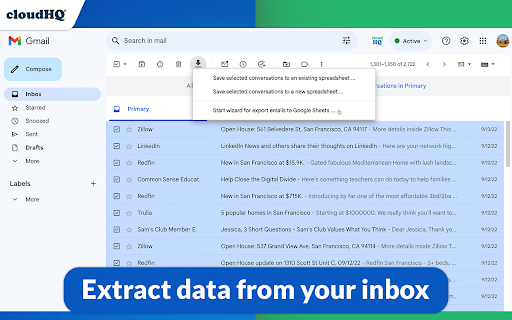

Back up, export or parse your Gmail email messages and labels to Google Sheets EXCELLENT for business: The data sitting in your Gmail™ emails can be a goldmine. This tool will extract any data (such as invoice#, amount, etc.) from your Gmail™ messages and save it your Google Sheets™ spreadsheet. ✅ Extract specific information from their emails, such as dates, numbers, or names, and use that information in other applications or tools. ✅ Organize and classify their emails based on specific criteria, such as sender, subject, or keywords. ✅ Backup and archive their emails in a more structured and searchable format, such as a Google Sheets™ spreadsheet or a database. ✅ Share or collaborate on their emails with other people, such as team members or clients, in a more efficient and secure way. Overall, email parsing can be a useful tool for anyone who wants to better manage, analyze, and share their email data. ~~~What to Use an Email Parser for?~~~ ✔️ Email discovery / email backup ✔️ Collect all invoices and receipts ✔️ Email analytics ✔️ Email list builder ✔️ Applicant tracking system ✔️ Shipping and delivery report ✔️ Order status and customer feedback ✔️ Collect real estate report ✔️ Identify all bounced emails ✔️ Collect Google Alerts™ (about your name, your company, the industry that you're in, etc) ✔️ Email marketing campaign statistics ✔️ Export emails from foreign-language customers so that you can get them translated ✔️ Share incoming support issues from customers with the rest of your support team And so much more. ⭐ Real time export of all emails in your Gmail™ label, and any new incoming emails to Google Sheets™ ⭐ Pre-built rules to export all contact information like: phone#, email addresses, url links from email body ⭐ 1-Click wizards ⭐ Powerful email parser editor to define the exact information you want exported to Google Sheets™ (how to extract data from your email message) ⭐ Email messages can be exported to PDF and saved in Google Drive™ ⭐ Attachments (like invoices, receipts, etc.) saved as a PDF in Google Drive™ ⭐ Artificial Intelligence rules are used to detect what to export from your email body, like amount paid, order #, or other patterns it can detect. ⭐ Export all email headers (including X- headers) ⭐ Google Workspace™ team support (control export of emails from admin console) Try it today and stop wasting your precious time. We have this application that does this monotonous job for us! Our goal is to give you the tools to make the best strategic decisions for you. Once your data is presented in a way that can be more easily understood, you hold the power of knowledge to make those strategic decisions. Google Sheets™ will help you understand the bigger picture of whatever you need to keep track of in an up-to-date spreadsheet report of parsed email data. 1. Install the extension 2. On the left side, select the label to export and select "Save label to spreadsheet" in the label menu 3. The options dialog will open 4. Select columns to export (Subject, sender, etc.) and options (continuous export, name of a spreadsheet, etc.) 5. Our user-friendly editor will help you define what information you want to parse from your emails, and extract that information into Google Sheets™ (like order#, user comment, etc.) 6. Start the export cloudHQ. Helping your productivity, 1 click at a time. cloudHQ website: https://www.cloudhq.net/ App website: https://www.emails-to-sheets.com/ Pricing: https://www.emails-to-sheets.com/pricing Support page: https://support.cloudhq.net/category/browser-extensions/export-emails-to-excel-csv-or-google-sheet Blog: https://blog.cloudhq.net Demo: https://www.cloudhq.net/demo Google Workspace, Google Sheets, Google Drive, Google Alerts and Gmail are trademarks of Google LLC. Use of this trademark is subject to Google Permissions.

Get My Receipts by cloudHQ
Extract digital receipts and invoices from your email Managing digital receipts and invoices should not be a headache. Yet inboxes are full of them, and too often they get lost or forgotten when it is time to prepare tax returns, claim deductions, or file expense reports. Get My Receipts by cloudHQ is the simplest way to automatically collect, organize, and export receipts and invoices directly from Gmail™. With 99.2% accuracy, powered by artificial intelligence and machine learning, this app scans your inbox and generates a clean, well-structured spreadsheet. How it works: 1. Open Gmail™ and click on Get My Receipts. 2. The app instantly finds receipts and invoices across your inbox. 3. A spreadsheet is created for you with two tabs: one for receipts and one for invoices. The spreadsheet is stored for you in your Google Drive account to edit and share as you see fit. Each entry is organized into useful columns: ✅ Date ✅ Amount ✅ Taxes ✅ Merchant ✅ Subject line ✅ Email text ✅ PDF copy of the receipt Perfect for: - Tax planning and capturing every deduction - Audit-ready expense reporting - Small business owners, freelancers, and contractors - Anyone who wants receipts and invoices organized in seconds Stop wasting time searching your inbox when you need receipts most. With Get My Receipts, you will always have an accurate, audit-ready record of your expenses. cloudHQ. Helping your productivity, 1 click at a time. cloudHQ website: https://www.cloudhq.net/ App website: https://www.get-my-receipts.com/ Pricing: https://www.get-my-receipts.com/pricing Support page: https://support.cloudhq.net/category/browser-extensions/get-my-receipts/ Blog: https://blog.cloudhq.net

Copilot for Gmail™ by cloudHQ
Mini CRM for your Gmail Copilot for Gmail™ is a mini CRM that lets you see a snapshot view of your email contact's profile information, and any past emails conversations you've had. This is crucial to have so that you can respond intelligently, and help you dramatically cut down your search time when you're looking for a past email conversation you had with your email contact. Right within Gmail, you can: ✔️View profile information of the person you're emailing, or who emailed you ✔️Create private notes about this contact (For example: This client has needed support for over 4 hours last week) ✔️Set up a reminder alarm for this contact (For example: Follow up with client on a specific date/time) ✔️A list of all the email conversation history you have with that email contact ✔️A list of all documents and attachments related to that email contact This is great for anyone who wants to appear more professional, and have everything neatly organized in their email. Key features: ⭐️ person and company profile info ⭐️ easy access to all email messages ⭐️ easy access to all attachments ⭐️ notes (private or shared with the team) ⭐️ reminders cloudHQ. Helping your productivity, 1 click at a time. cloudHQ website: https://www.cloudhq.net/ App website: https://www.gmail-copilot.com/ Pricing: https://www.gmail-copilot.com/pricing Support page: https://support.cloudhq.net/category/browser/gmail-copilot Blog: https://blog.cloudhq.net Demo: https://www.cloudhq.net/demo Google Workspace, Google Sheets, Google Drive, Google Alerts and Gmail are trademarks of Google LLC. Use of this trademark is subject to Google Permissions.

Email Reply Status
Stop wasting time sorting through emails: Instantly know which of your emails needs a reply back. Never drop the ball again. Now you can know exactly which emails need a reply with Email Reply Status. You'll have an inbox indicator that will tell you: 1. Which emails you need to reply to 2. The emails that you already replied to 3. Those that you don't need to reply to at all *NOTE*: For best performances set Gmail page size to 50 emails or less. It's a perfect tool for: ✅ Small business owners ✅ Sales people ✅ Business people who are just too busy to keep track of emails ✅ Customer service representatives ✅ Customer support personnel With Email Reply Status, never miss another opportunity again! cloudHQ. Helping your productivity, 1 click at a time. cloudHQ website: https://www.cloudhq.net/ App website: https://www.email-reply-status.com/ Pricing: https://www.email-reply-status.com/pricing Support page: https://support.cloudhq.net/category/browser-extensions/gmail-reply-status/ Blog: https://blog.cloudhq.net

Sort Gmail Inbox by cloudHQ
Find an email in seconds with free preset filters Find an email in seconds with these free preset filters We know how much you hate having to spend time searching for email. We hate it too! No more searching for the emails you need to find quickly—have the most popular filters set up in your Gmail label area so that you can easily find what you need in seconds. With this free Chrome extension, you'll be able to sort your Gmail inbox by: ✅ Unread emails ✅ Contacts who you need to respond back to ✅ Contacts who need to respond back to you ✅ Received Date organized by year, month, or exact date ✅ A specific person ✅ A specific company, like anyone with emails that have the domain "@youtube.com" ✅ Attachment size, and attachment type, too (no more searching for your presentation when you're about to present!) You'll also be able to: ✅ Save your contacts' emails to a PDF doc for backing them up for safekeeping ✅ Save your contacts' emails in a Google Spreadsheet to view them easily as a report ✅ Set up SMS text alerts for when important contacts email you If you're looking for a way to methodically work through your emails, this is the most effective way to get through them in an organized way that will help you get your work done, lightening bolt fast. cloudHQ. Helping your productivity, 1 click at a time. cloudHQ website: https://www.cloudhq.net/ App website: https://www.sort-gmail-inbox.com/ Pricing: https://www.sort-gmail-inbox.com/pricing Support page: https://support.cloudhq.net/category/browser-extensions/sort-gmail-inbox/ Blog: https://blog.cloudhq.net Demo: https://www.cloudhq.net/demo Google Workspace, Google Sheets, Google Drive, Google Alerts and Gmail are trademarks of Google LLC. Use of this trademark is subject to Google Permissions.
