
adbmoofdncnefcbapchcjbmiafgghoka
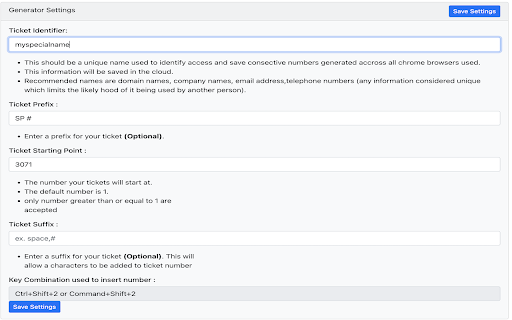
This app allows you to generate consecutive numbers This application will generate a series of consecutive numbers and paste them in any editable field. Ex. 1,2,3,4

Google Result Counter
Automatically counts your Google search results and displays the number of results in the title of the result. ✅ Don’t forget to enable the counter after installation! 🚀 Features: ➜ Adds a ranking number beside each search result ➜ Works for regular results and image results ➜ Skips ads and sponsored links ➜ Lightweight and easy to use ➜ Includes a small banner for Collabwriting - our main tool. Feel free to give it a try as well 😄 This started as a small internal tool to help our marketing team track rankings and competitors. It worked so well, we decided to share it with everyone. It’s not our main product, but we’d love to hear your thoughts or feedback.

Google Forms Autocomplete
Extension that enables the autocomplete system on Google Forms Optimize your forms and have a more productive work cycle with a fully customizable forms autocomplete. The extension have two windows: "fields" and "data". The "fields" window is where the user will select which fields should trigger autofill. In addition, in this window the user selects which data collection will be triggered for that field. The "data" window is where the user will create the data collections. A "data collection" is basically a set of values that will appear when a field is triggered. For example, if I want to autofill my emails in forms, I would first go to the "data" window and create an email data collection. In this data collection I would define my emails, such as "john@gmail.com" or "silvia@hotmail.com". After that I would go to the "fields" window and create a field called "email", and select the email data collection. The data collection system allows you to trigger the same data collection for multiple field names. For example, the form field could be named "phone", or "phone number", or "mobile". To allow the extension to trigger autocomplete on all of them, you just need to create a data collection and bind it to all the different ways of naming the same field.

QuickForm - Autofill & Form Filler
QuickForm is a free form autofill Chrome extension and form filler that lets you fill out any online form in one click. Unlike browser autofill or other auto fill extensions, QuickForm works on complex web apps: React, Angular, Vue, dynamic SPAs, internal tools, staging environments, and enterprise portals. 🔴 How It Works: 1. Activate Record Mode on any web form 2. Fill it out naturally - QuickForm saves every field automatically 3. One click to autofill that form anytime, instantly and accurately 🔥 Record Mode - Automatically detect and capture form fields. No manual configuration needed. 🖱️ Auto-Click - Automate clicks between form steps, buttons, and navigation. ⏳ Smart Delays - Set timed pauses for pages with loading states or dynamic content. ✅ All Field Types - Input, textarea, checkbox, radio buttons, select dropdowns, date pickers, and more. 🏎️ Multiple Profiles - Create different profiles for different forms or environments. 📄 Duplicate Profiles - Clone and modify profiles for similar forms. 🔗 URL-Specific Profiles - Link profiles to specific websites for automatic form filling. 📥📤 Import/Export - Backup, share, and transfer profiles between devices. 🎨 Autofill Animation - Customize the speed of form filling. ⚡ Fast Access - Fill forms from the toolbar icon or right-click context menu. 🎯 Built For: - QA testers who fill the same test forms hundreds of times - Developers working with admin panels, staging forms, and internal tools - Job seekers filling out repetitive application forms across multiple sites - Data entry teams who need fast, accurate, repeatable form filling - Anyone who's tired of typing the same information into forms - Works where others fail - Supports React, Angular, Vue, and dynamic web apps that break generic autofill tools. - Record Mode means zero setup - No CSS selectors, no field mapping, no technical knowledge needed. - 100% free - No premium tier, no paywalled features, no usage limits. - No account required - Install and start using immediately, no sign-up. Note: Profiles are stored in plain text locally, so ensure your device is secure to prevent unauthorized access. Automate form filling in Chrome today. Download QuickForm, the fast, free, and private form filler and autofill extension trusted by 30,000+ users 🌟

AutoFill Forms
One-click form filler that supports multiple profiles and regular expression rules The "AutoFill Forms" extension is a user-friendly tool for automatically filling web forms, supporting multiple profiles. Features: 1. Easily create or update profiles by detecting user-inserted data in filled forms. - This feature simplifies the process of creating multiple profiles or updating stored data. 3. Request the extension to generate a random password, conveniently stored on your clipboard. 4. Manage multiple profiles. - Duplicate or modify existing profiles on the options page. 5. Import and export preferences. 6. Locate element positions based on their physical location within the form. 7. Supports both dark and light themes. Notes: Your profile data is securely stored in your browser's profile directory, with no backup created by the extension for security reasons. --- Changes (0.3.0) 1. The extension now operates in event background page mode, consuming no resources when not in use. 2. The extension is enhanced to fill forms that don't perfectly match the predefined fields. --- Changes (0.3.2) 1. Resolved the issue where multi-line text was not being inserted from the context menu.
