
oijjnonbajbomjimdmfchfjadndnhfgp

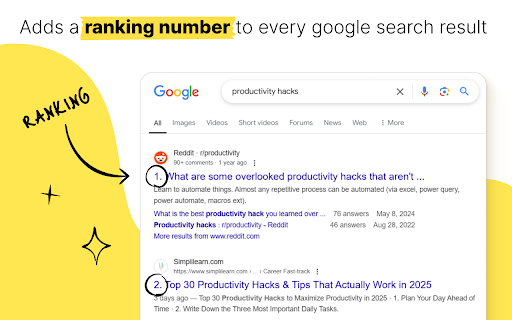


Automatically counts your Google search results and displays the number of results in the title of the result. ✅ Don’t forget to enable the counter after installation! 🚀 Features: ➜ Adds a ranking number beside each search result ➜ Works for regular results and image results ➜ Skips ads and sponsored links ➜ Lightweight and easy to use ➜ Includes a small banner for Collabwriting - our main tool. Feel free to give it a try as well 😄 This started as a small internal tool to help our marketing team track rankings and competitors. It worked so well, we decided to share it with everyone. It’s not our main product, but we’d love to hear your thoughts or feedback.

Show SERP Count - Restore Google Search Result Count
'Show SERP Count' is a Chrome extension that brings back the total number of search result pages count in Google. Show SERP Count is a powerful Chrome extension designed to enhance your Google search experience by restoring the total number of search result pages count. Whether you are a researcher, marketer, SEO professional, or casual internet user, this extension helps you gain better insights into your search results, allowing for more effective data analysis and decision-making. - Easily view the total number of search result pages directly in your Google search interface. Provides a quick and accurate count, ensuring a clear understanding of the search landscape. User-Friendly Interface: - Seamlessly integrates into the Google search results page without disrupting your browsing experience. - Clean and intuitive design makes it easy for everyone to use. Real-Time Updates: - Automatically updates the search result count as you modify your search queries. No need to refresh or reload the page to get the updated count. Lightweight and Fast: - Minimal impact on browser performance, ensuring a smooth and fast browsing experience. Efficiently coded to deliver results without slowing down your search activities. Customizable Settings: - Turn the extension on or off with a simple toggle. Adjust settings to fit your personal preferences and needs.

MST SERP Counter - SEO Free SERP Checker Tool
SERP Counter is a free checker tool that allow you to fastly check google rank. Using the MST SERP Counter Google Chrome extension, you can examine the live numerical search results to see where you currently stand in the rankings.

News Storyline
Know Thy History and Be Notified About Future A Chrome sidebar extension and companion newsletter that gives you an unbiased, context-rich timeline of any news story and quietly watches for what happens next—so you never miss a beat (or waste time scrolling). 📖 On-Demand Timelines in Your Sidebar • One-click access while you’re reading any article: hit the extension icon to slide open a concise, chronological view of past reports on that story. • Facts, not opinions: we aggregate across dozens of reputable outlets, stripping out commentary bias so you see the unvarnished sequence of events. • Top highlights only: instead of drowning you in every mention, we surface a handful of the most relevant milestones—headlines, timestamps, and sources—so you instantly understand “what led here.” 🤖 Background Story Scanning & Positive Alerts • Hands-free monitoring: once you’ve opened a timeline, our service continues scanning in the background for new developments on that very story. • Positive-only notifications: you decide what matters—receive alerts only when something significant (and positive) happens, so your inbox isn’t full of noise. • Peace of mind: no more endless manual refreshes or fear of overlooking a breaking update. 📰 Daily Newsletter & “New Developments” Bulletin • Daily digest delivered each morning: a simple roll-up of every event we tracked across your subscribed stories in the past 24 hours—no grouping, no spin. • On-demand “New Developments” email: when fresh updates arrive mid-day (for critical beats), we’ll ping you separately so you stay in the loop around the clock. 🔔 Story Subscriptions & Future Tracking • Subscribe in one click: any timeline can be turned into a “watched” story. From that moment on, we’ll keep you posted on each follow-up report. • Tailored alerts: choose your stories—finance, politics, tech, climate—and we do the rest, surfacing only the most impactful next chapters. 🔧 Platform & Integration • Chrome-based browsers supported (Chrome, Edge, Brave, Opera). • Privacy-first: minimal permissions, no tracking beyond the stories you opt in to follow. • Lightweight: sits quietly in your toolbar, loading only when you ask. Who It’s For • Journalists & analysts who need quick, neutral context before filing next headlines. • Researchers & students chasing down backstory and evolution of key events. • Curious readers who want more than a single outlet’s perspective—and zero surprises when the story moves on. Why Know Thy History? • Context at your fingertips—instantly see what happened before. • Stop missing updates—positive alerts mean you’ll always catch the next big development. • Save time & mental bandwidth—no more endless feeds or biased roundups. Install now and start each story with the past in view—and the future on your radar.

Google Search Results Counter
Displays the total number of search results on Google pages, which is hidden by default. Displays the number of Google search results by default. Since Google no longer shows the number of search results, this extension allows you to see them again.
