
acidoblgnoinmcobmdfpeoepdkmfoebn
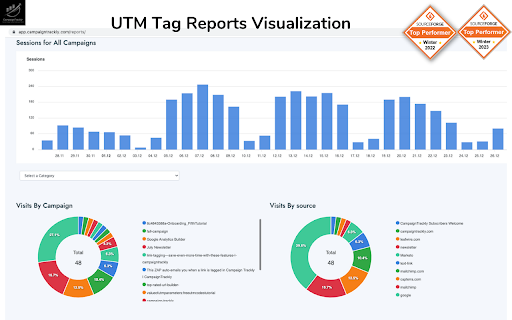


Fully automated UTM generator, URL builder & link shortener makes your life easy: GA & Bitly integration, campaign dashboard CampaignTrackly's Chrome Extension is an automated page link grabber that lets you add tracking tags to any page in seconds. It is part of our comprehensive UTM tracking suite with a fully automated all-in-one UTM generator, campaign link builder, URL shortener dashboards and reporting, and more. You need to register to get started. We recommend that you start with our FREE registration to experience all of the benefits that the web app + Chrome extension can offer. We use automation to speed up significantly the error-free generation and management of: - standard and custom UTM tags, - long and shortened tracking links, and - marketing campaign tracking info storage and reporting. The Chrome extension always works with the web app, where you can go back to find all your campaigns stored alphabetically, by date or by number of clicks they generated. If you connect the app with Bitly and Google Analytics, you can tag and shorten multiple links in under a minute and you can visualize traffic, clicks and goals in our no-brainer dashboards. The "tag-anywhere" link auto-grabber Chrome Extension enables marketers to tag instantly any page they are on without the need to interrupt their creative process. The web app + extension combo offers enhanced productivity benefits for any marketing team focused on improving campaign performance and driving better budget spend. 1. Add to Chrome 2. Navigate away from Google Chrome Store and onto a website of your choice. 3. Click the extension and make sure you create your free account 4. Go to a page of your choice 5. Right-click anywhere on the page or click on the CampaignTrackly Chrome Extension icon to auto-grab the link and to generate your tracking campaign links. 5. If you want the tool to auto-shorten your links, use app.campaigntrackly.com>Settings to auto-connect with your Bitly account. For SUPPORT we offer several options: Please visit this page: https://groups.google.com/forum/#!forum/campaigntrackly-chrome-extension-support-group Or, you can contact us at support@campaign-trackly.com, @CampaignTrackly on Twitter or https://www.facebook.com/leafwiredigital/ on Facebook. Please note that this extension requires registration, which is FREE.

Link Research SEO Toolbar
Enjoy looking at the most advanced SEO metrics while you search the Web. You can use the Link Research SEO Toolbar to customize your searches in Google, Bing and Yandex. You can also enable it as a page toolbar, so you look at advanced SEO metrics for every page. Here’s what you can do with the Link Research SEO Toolbar: • See the Power and Trust of a domain or page • Discover great places to get links from • See how successful a page is on social media • Understand user engagement • See the strongest pages by Keyword Ranking • Spot drastic changes in the number of links • See how many backlinks a page has. All this is possible by looking at a set of powerful SEO metrics: • LRT Power*Trust for domains • LRT Power*Trust for pages • Buzz - social media signals • Impact - long-term user engagement metrics • Keyword Ranking • Link Velocity Trends • Number of Backlinks Why LRT Power*Trust? Because LRT Power*Trust is a precise, reliable and stable metric built by LinkResearchTools shortly after the first Google Penguin update in 2012, as a result of many years of research and calculations. Forget about Google’s Toolbar PageRank. Google stopped updating it many years ago and completely removed it from their toolbar in April 2016. You can think of LRT Power*Trust as a replacement for Google’s toolbar PageRank, but it’s so much more. LRT Power*Trust is the metric to look at when you want to assess the quality and trustworthiness of a page, domain or top domain. Why Keyword Ranking? The Link Research SEO Toolbar’s “Keyword Ranking” metric allows you to take a quick look at your competitors’ keyword rankings. By evaluating the keywords your competitors rank for, you will easily come up with new ideas for your content optimization. Why Buzz? Buzz is Impactana’s aggregate of social media signals, divided into shares and likes. By using the Link Research SEO toolbar to sort the search results by Buzz, you can quickly find out what sort of content is “HOT” on social media. You can use Google’s time filter to see only the pages indexed in the past year, month or week. Why Impact? The Impact metric helps you discover strong content that people linked to a lot and engaged with by commenting or downloading it. This metric measures user engagement for any content, not only for the one that goes viral on social media. A good article about construction will not get shared on social media, but it may get many links or comments if it’s great. Why link velocity trends? A website needs to have a steady link growth. Search engines can interpret unnatural link growth as a negative signal, which can lead to a loss in the rankings. Google uses link growth trends to detect any algorithm manipulation attempts. If your backlink profile grows too fast, you’re out. If you’re too slow, you won’t ever get on the first page. Why backlinks? Google confirmed links to be a top ranking factor. That's a very strong reason to look at links whenever you analyse the strength of a page or domain. Update 0.0.3 - Now with option to follow REL-Canonicals for Metrics of pages (requires fetch) - Loading animation Update 0.0.4 NEW: SEO Toolbar for every page with all the important metrics - three different toolbar styles mini, bulky and skyscraper - drag&drop the toolbar around where you need it - open backlink checker right from the toolbar (requires LRT account) NEW: Fetch results from SERP to resolve redirects and show real SEO metrics SERP overlay - Backlink count shown for every SERP result - Sorting by backlink count in the SERPs Update 0.0.5 - Domain exclusion feature: you can now choose to disable the Link Research SEO Toolbar for certain domains. Update 0.0.9 - Minor layout fixes and improvements. - Added knowledge graph hint. Update 0.1.2 - Fixed issues with Google reCAPTCHA Update 0.1.3 - Fixed issues with Google SERP overlay

Elink - Bookmark Manager
Best visual Bookmarker for creating content for your Gmail Newsletters, HTML Newsletters, Website/Blog and Social bio links. elink bookmark extension for Chrome is the best bookmarking tool for saving & organizing visual bookmarks in one place. When you save a bookmark or a link you can can choose an image, capture a screenshot or upload your own image. You also have the ability to edit the title and description to add your own voice or notes and even bundle links together and share your link collection with others. More than 70,000 users use elink everyday to collect and share digital information professionally. From these bookmarks you can create beautiful Gmail newsletters, HTML email newsletters, content for your websites and blogs, RSS Feed powered website content, bookmark powered website content, social bio links, automated content publishing and more. Elink bookmarking tool is a must use tool for just about everyone. • Simple - Click the elink logo in the browser or right-click on any web page, link or image and save it as a bookmark with elink’s Chrome Extension. It’s a fast and easy way to collect and organize your bookmarks while you browse. • Multiple Templates– elink lets you choose from 50+ beautiful modern templates with single, grid, masonary, e-commerce, carousel, etc. style layouts to display your visual bookmarks. • Real-Time Editing – Quickly edit or update any information you have published and it will update in real-time. • Unlimited elinks - There are no limits to how many elink web pages and newsletters you can create. • Analytics – You can track engagement levels, referral sources and the location of your audience for each of your elinks. • Responsive Templates – Our responsive templates make your web page, newsletter, and website embed look great on all devices. Display your bookmarks professionally when sharing with others. • Bookmark Any Web Content – elink’s powerful tool allows you to curate and share any online content that has a link. Which includes articles, websites, videos, webinars, podcasts, articles, pictures, infographics, PDF’s, Google Docs, Dropbox files and more. You can pretty much bookmark anything on the web. How Does elink’s Bookmarking Extension Work? Use elink’s bookmarks icon or right click your mouse to collect any type of web content. You can right-click on any web page or link and save it as a bookmark with elink’s Chrome Extension. It’s a fast and easy way to collect and organize anything while you browse! Don’t just save bookmarks for yourself anymore, start collecting and sharing them with your customers, teammates, followers or whoever your audience is. • Websites • Articles • Videos (YouTube, Vimeo, Ted, etc.) • Slideshares • Google Docs • Dropbox Files • PDF’s • Images • Any content with a weblink can be saved and shared with elink! • You can even create image galleries by bookmarking photos from your Google Drive, Dropbox etc. Creating email newsletters can be time-consuming. With elink you can quickly curate and turn your elinks into email newsletters in minutes. Simply collect links around any topic and export them to Gmail, MailChimp or copy and paste the HTML code to your 3rd party email platform. elink works with nearly every email provider. You never have to worry about the design of your newsletter and can easily switch between various newsletter templates with a simple click of a button. Share the best online resources, products, tools, videos, news articles and much more with your audience. Curated email newsletters are a fantastic way to communicate with your clients, teammates, and followers. Catch their attention with a stunning email newsletter that you can send in minutes! It’s the fastest way to create a email newsletter on the planet. Elink bookmarks browser extension makes it a breeze to save and organize your content for the newsletters while you browse the web. ---------------------------- Can I Use elink for Content Curation? elink is the best tool for your content curation needs. Content curation in simple terms means finding the best content online and then sharing it with your audience in a professional manner. With elink you can save your bookmarks and curate content on the go. There are tons of content curation tools out there. However, there are some key features you must look for when choosing the right platform: How easy to use is the content curation tool? How is the curated content presented? Can you add your notes to the content you're curating? How can you share your curated content? The ease of use and the ability to present content in various formats makes elink the best content curation tool for any industry. Who Can Use elink Bookmarks for Curation? elink.io is great content curation for any industry – tech, retail, finance, health, real-estate, travel, legal, manufacturing, arts, construction, education, agriculture, governments, etc. elink.io is great for content curation nearly in every profession: marketers, management, techies, brokers, bloggers, website builders, realtors, administrators, human resources, accountants, lawyers, educators, engineers, insurance agents, etc. Even though elink.io is considered the Pinterest for business, you can also use elink's bookmarking tool for your personal needs! Download Elink Bookmarking Extension Today and Start Saving Your Bookmarks! If you have any questions on how to use elink bookmarks or want to get in touch with us, email us at info@elink.io. * Quick Save Panel * Choose the image for your bookmarks from a gallery of images like Pinterest. * Capture a screenshot for your bookmarks * Add tags to your bookmarks * Organize bookmarks in folders & subfolders * Smart search for your bookmarks in the link library * Advanced filter options for your bookmarks (time duration, used in post, tags, etc.) * Add bookmarks to collections directly from the bookmark extension * Edit images when saving bookmarks * Customize the text and description for your bookmarks * Faster uploading of images for your bookmarks * Save bookmarks directly to your published posts * Create automated scheduled content from bookmark folders. * Create website powered content from bookmark folders.

Express UTM-Builder
No more messy spreadsheets: Create UTM-Links & track your campaigns! Quickly and precisely create UTM-tagged links to track your content. Our click-based interface removes typing errors from your UTM process. Perfect for teams of marketers and content creators. -- Try our demo, with no need to sign up. -- Express UTM-Builder can create links compatible with Google Analytics, as well as Adobe Analytics, Matomo/Piwik, Amplitude, Mixpanel, Kissmetrics or any other analytics tool on the market. Express UTM-Builder ensures speed along with precision when creating trackable links. Make no mistakes when it comes to UTM Tracking. You can also say goodbye to your messy UTM spreadsheet. Express UTM-Builder Features: - Use a button interface to create links - Tag the current URL or input a URL of your choice - Ensure your UTM convention is followed by the whole team, every time - 0 training time for new team members - Define and share a convention across the whole team - Define complex rules and taxonomy to match your business - Collect more than the standard UTMs (utm_source, utm_medium, etc.) - Bit.ly integration - Bulk create links - Complete history of all created links - Link shortening and custom vanity domains - Replace hard-to-manage spreadsheets - Restrict and control access (perfect for agencies!) - Share parts of your convention externally (great for affiliate programs, customer support etc.) - Integrate everything with your data stores, via our API - Use ID based UTM tagging, so that urls are not publicly readable Save time and improve data quality by generating tracking links/UTMs right inside your Chrome browser. Improve your teams performance by leaving the Google URL builder behind.

SocialPilot
Expand the reach of quality content—whether your own or from others—by sharing it on social media in just a few clicks! With SocialPilot’s browser extension, you can share any content from a webpage, including blogs, product listings, videos, and more, across multiple social media platforms effortlessly. You can create custom posts, use Craft with AI to generate publish-ready content, or share an image post in one click. Save posts, publish instantly, or schedule them for the best engagement. All you need is a SocialPilot account to use the browser extension seamlessly! 2) Craft with AI: Get ready-made posts with captions and visuals perfectly aligned with the content in one click. 3) Generate AI-powered captions: Manually add captions to your posts or let SocialPilot’s AI do the work. 4) Customize posts for maximum impact: Add hashtags, mentions, geotags, emojis, and image tags to get maximum reach on your posts. 5) Upload, edit, and perfect your visuals: Upload images or videos from your own repository or use media fetched along with the content, editing as you go. 6) Keep all brands organized in one place: Schedule or share the post to all the accounts under one group or belonging to a client. 7) Reshare with automation: For evergreen content, set up schedules for it to be repeatedly posted, drawing eyes and engagement to your profile. 8) Stay consistent with scheduling: Simply select the best date and time for maximum engagement while scheduling. Your content will be published automatically—no extra steps required.
