
acbjeolbnaiecolebdcopocflkljjmhi
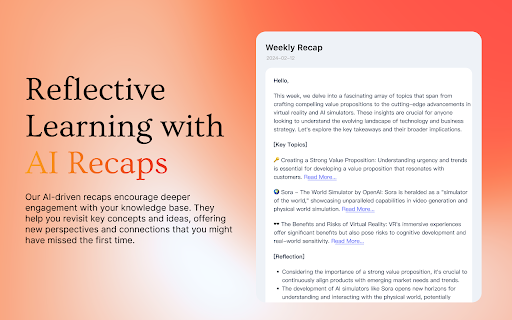
MyMemo Chrome Extension 🚀 Introducing the MyMemo Chrome Plugin — Your Smart Digital Knowledge Hub Save, organize, and reflect on valuable web content effortlessly — all in one place. !New updates: Now supports saving directly from X (Twitter) and Gmails, seamlessly integrated into your browsing experience. ✨ Key Features: 🌐 One-Click Save – Instantly capture webpages, YouTube videos, tweets, and even emails to your MyMemo library with just one click. 🧠 Reflective Learning – Save with AI-powered summaries. Review key points and truly retain what matters. 🔍 Quick Access & Smart Search – Say goodbye to digging through bookmarks. Easily find saved content with powerful tags and filters. 📁 Workspace Selection – Choose where your content goes. Keep work, study, and personal life neatly separated with multiple workspaces. 🎧 MemoCast – Turn your saved content into audio playlists. Learn on the go by listening to summaries and highlights. Add MyMemo to Chrome today and take control of your digital knowledge. Smarter browsing starts now. Update: Reliability improvements. Server-side error messages now surface correctly. Sign-out and session expiry sync across every open tab. Saved summaries are now rendered with stricter HTML sanitization. Fixed an issue where Login could appear unresponsive on a fresh install, and silenced repeated "summary still processing" notifications.

Fabric web clipper - save anything from the web
🍱 All your stuff in one place. 👋 Collaborate on anything. **Get started free with your Fabric account A beautiful personal explorer for your digital world, trusted by 300k+ researchers, creators, and thinkers. Save your inspiration and research to fabric — an intelligent workspace for collecting, organizing, and discovering web content. Find anything instantly with AI search and collaborate in real-time. UNIVERSAL SAVE 🌎 – Save anything: articles, images, videos, PDFs, and entire web pages – More than a bookmark manager — capture complete content with visual previews SMART ORGANIZATION ⚡️ – AI-powered automatic tagging and organization – Spaces, custom tags, and filters keep everything findable AI SEARCH & DISCOVERY 🔍 – Natural language search across all your content – Just describe what you're looking for — it's like having a perfect memory – Get AI summaries and insights from your saved content REAL-TIME COLLABORATION 👥 – Work together with live updates and shared cursors – See instant notifications as your team contributes – Skip the back-and-forth of email chains and group chats AI CHAT ASSISTANT 💬 – Chat with your knowledge base using natural language – Get answers and insights from your saved content – Connect with Google Drive, Notion, and more [Coming Soon] CROSS-PLATFORM ACCESS 📲 – Use Fabric anywhere — browser, mobile, desktop – Everything syncs automatically across all your devices • • • PERFECT FOR • • • – Finding inspiration & references for creative projects – Organizing research materials and sources – Building a searchable team knowledge base – Saving articles to read later with AI summaries – Creating visual collections for any project Your data security is our priority. All content is encrypted at rest (AES-256) and in transit (SSL/TLS). Learn more about our privacy commitment: https://fabric.so/privacy – Works with Chrome, Edge, and other Chromium browsers. We don't officially support Arc, Dia or Brave yet. – Compatible with Windows, Mac, and ChromeOS – Mobile apps available for iOS and Android • • • CONNECT WITH US • • •

Chat with Desksense AI Powered by GPT4
The Ultimate AI Assistant with GPT-4 powered responses. Answers any queries, summarize articles, create emails, content & AI images. Desksense ChatGPT AI app provides Free Chat GPT & GPT-4 access, AI writer for Email, Blogs, Articles, Tweets, Linkedin posts, Facebook Posts, Replies and more. Desksense AI uses OpenAI ChatGPT to summarize Youtube videos & Blog in one-click. Desksense AI app revolutionizes your online search experience by integrating Open AI ChatGPT alongside your Google search engine. With Desksense you can access instant AI-generated responses, providing valuable insights and information right alongside the search results you're browsing. With just a CMD+ I OR CTRL+ I Desksense makes it easy for you to access the ChatGPT on any website. Use "Shortcuts" for Advanced users. 👉👉 Save ANY ChatGPT, GPT-4, Claude3 OR Genini Pro response to your Desksense Account in one-click. 👉 [New Update] Desksense comes with new Chat GPT models like; GPT-4-o-mini and other LLM's like Claude3, Gemini Pro & Llama 3version. 👉 [New Update] Desksense comes AI Image Analyzer 👉 Desksense iOS App is now live in App Store. 👉 New AI Summarizer is now live with upload file feature. 👉 AI Writer for ANY content with ChatGPT-4, GPT-4-o-mini, Claude 3 & Gemini Pro option (Emoji, character limit included with a different lanuage model.) 👉 FREE AI Chatbot integrated with ChatGPT & GPT-4 in web app 👉 Get ChatGpt AI response or replies with 'Tone' and 'Emoji' 👉 Unlimited AI response on Google Search 👉 One-click AI summarizer for Youtube videos 👉 One-click AI summarizer for ANY website 👉 ChatGPT AI Image generator using Dall-E 👉 Save ChatGPT response in your account for later use. 👉 Save your frequently used prompt(s) 👉 List of 100+ preset prompts and option to edit and save in your account. 👉 Easy Access with CMD + I OR CTRL + I on ANY website 👉 Grow your Social Media presence using Desksense AI response in LinkedIn posts, Twitter & Facebook posts. 👉 Write faster and smarter emails on Gmail, Tweets, Linkedin Posts and Facebook posts 👉 Generate online content, video script, hashtags & keywords and topics for blog posts, articles and socials using Desksense AI ChatGPT App. 👉 Share your saved response to social media using our Desksense Web App 👉 Copy to clipboard, Save, Favorite and add tags to ChatGPT responses as Card. 👉 Desksense Chat GPT & GPT 4 Android Mobile App 👉 Auto Dark/light mode 👉 Change the Tone of your response and include emoji when needed. 👉 AI Chatroom Collaboration with your Team 👉 AI Chatbot in Extension 👉 AI Content Generator - AI Email Writer, AI Article Writer using ChatGPT, GPT-4, GPT-4-o-mini, Claude3 and Gemini Pro., AI Code Generator, AI Social Media Post Generator and more... Are you a busy professional juggling multiple tasks? A student striving for academic excellence? Or someone seeking to optimize their daily routines? Look no further! Desksense is here to revolutionize your digital experience. Desksense is a powerful chrome extension that leverages the ChatGPT API to enhance your productivity. It provides a range of AI applications, including ChatGPT & GPT-4 AI chatbot, summarizers, AI writers, and more, accessible on any website. Yes, Desksense is completely free to download and use. Every free user gets 5000 Word limit for month. No, you do not require a separate ChatGPT account. Simply sign up for free at Desksense.com to access the extension. Yes, Desksense chrome extension works seamlessly in all countries, ensuring that users worldwide can benefit from its features. To install Desksense on your browser, you will need to follow these steps: 1) In your browser open the browser's app store or extension store 2) Search for the Desksense in the browser's app store or extension store (or click for : Google Chrome | Edge) 3) Click on the "Add to Browser" or "Install" button to begin the installation process. 4) Follow the prompts to give the extension permission to access certain parts of your browser, if prompted. 5) Once the installation is complete, you will be redirected to our onboarding page 6) That’s it ! you are done :) Please pin the ext. on top bar to get on-time updates. If you have any questions, please feel free to reach us at support@desksense.com === VERSION 1.0.13 ==== * NEW FEATURE: AI Writer for ANY content with newest version of GPT models (Emoji, character limit included with a different lanuage model.) * NEW FEATURE: AI Image Analyzer that analyses any image and gives you response describing the image. * File Summarizer: Upload any file & summarize in one-click * Minor Bug fixes

Stepsy: create step-by-step guide with screenshots
Struggle to describe your every step with screenshots in the browser manually? Welcome to Stepsy, your free AI-powered go-to solution for generating powerful, yet easy-to-understand step-by-step guides, SOPs, process tasks, or manuals, and sharing them with your colleagues and customers. Our software features have been proven to deliver exceptional results. With our intuitive interface and robust functionality, you can streamline your processes and achieve greater efficiency. Stepsy is free to use, along with Personal and Team plans to fit any team's needs. BENEFITS OF USING STEPSY: 📈 Increase data processing efficiency 📊 Improve workflow documentation accuracy ⚙️Ensure consistency across instructions ⏳ Save time of tedious work for each guide 🎯 Simplify the training and onboarding process STEPSY’S FEATURES: 📸Record your steps with screenshots on clicks: Just do your work, and we will automatically capture the screenshots with auto-generated descriptions. ✨Customize your screenshots: No need for other tools, we have a built-in image editor. ⚙️AI-tuned step descriptions and document summaries: Eliminate the need for manual repetitive text input, let us care about it. 📥Export and share via GDrive: Your guide quickly becomes shareable online via your own GDrive. 🔐Keep your screenshots safe: Your screenshots never leave YOUR space. Everything happens in YOUR browser and then gets exported directly to YOUR GDrive or YOUR local workstation. HOW TO USE STEPSY: Step 1. Get started Begin by downloading our extension for free. Step 2. Capture the process Navigate to the website you want to document. Then, open the Stepsy icon in your Chrome toolbar and click the “Record a Guide” icon to initiate the process. Once you've captured your process, you can edit and customize it with a built-in toolset. Step 3. Publish your results Simply click the “Finish and share” button and publish it as a Google Docs document directly to your Google Drive. WHO'S STEPSY FOR WHAT YOU CAN CREATE WITH STEPSY ✔️ Any documentation you need! What used to take hours, now takes seconds with our free step-by-step guide creator — empowering you and your team's productivity as well as allowing you all to focus on what truly matters: innovation and growth.

Kaptr.me - Web Dashboards with Live Snapshots
Kaptr.me - #1 Chrome Extension for Live Screenshot Dashboards 2025 Eliminate tab chaos: Kaptr.me consolidates all your data into intelligent dashboards with auto-refreshing snapshots. Instant access to key info, no dispersion. Outperform FireShot, GoFullPage, Awesome Screenshot with personalized dynamic dashboards. 1. Visit any app/site 2. Activate Kaptr.me 3. Capture snapshots of sites/apps/dashboards to track 4. Select your target dashboard 5. Refresh everything via "Refresh All" or auto-refresh 6. Share with team/clients or keep private. Dashboards dynamically customized: Freely place snapshots for a command center reflecting your priorities. Always fresh info: Live auto-refreshed captures for immediate data-driven decisions. Secure collaborative sharing: Dashboards shared without sensitive logins; real-time view for all. No-code centralization: Drag & drop varied sources into responsive layouts, no tech skills needed. - Create snapshot - Auto-refresh & manual refresh data - Snapshot duplication + moving - Snapshot history - Edit snapshot - Draw & annotate directly on snapshots - Quick annotation and editing tools - Multiple dashboard - Fully responsive dashboards - Customizable themes + custom folder icons - Custom URL slugs - Public or private dashboard sharing - Embed snapshots & dashboards anywhere - PDF export (captures + dashboards) Personal Dashboard: Google Calendar, Stripe payments, analytics, HubSpot marketing, Gmail, weather/news in auto-update. Weekly Meeting Dashboard: Microsoft Teams/Slack agendas/notes + Asana/Trello live, no login sharing. Team Data Library: Auto snapshots of Salesforce forecasts, marketing analytics for total transparency. Client Reports: Google Analytics/social/finance/project metrics in secure environment. Kaptr.me stores ZERO logins/sensitive credentials; reopens URLs via existing browser session for seamless access. Data confidential, authorized views only. Responsive support team for quick assistance.
