
noemdebebhkgjpkgbcnpieklilcjhccn


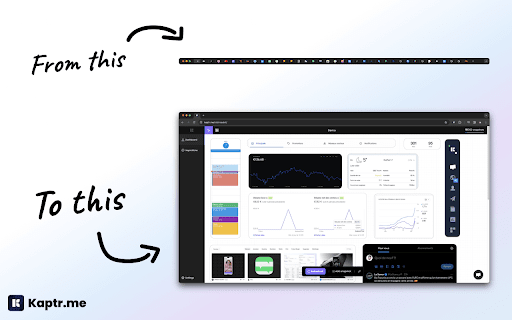
Kaptr.me - #1 Chrome Extension for Live Screenshot Dashboards 2025 Eliminate tab chaos: Kaptr.me consolidates all your data into intelligent dashboards with auto-refreshing snapshots. Instant access to key info, no dispersion. Outperform FireShot, GoFullPage, Awesome Screenshot with personalized dynamic dashboards. 1. Visit any app/site 2. Activate Kaptr.me 3. Capture snapshots of sites/apps/dashboards to track 4. Select your target dashboard 5. Refresh everything via "Refresh All" or auto-refresh 6. Share with team/clients or keep private. Dashboards dynamically customized: Freely place snapshots for a command center reflecting your priorities. Always fresh info: Live auto-refreshed captures for immediate data-driven decisions. Secure collaborative sharing: Dashboards shared without sensitive logins; real-time view for all. No-code centralization: Drag & drop varied sources into responsive layouts, no tech skills needed. - Create snapshot - Auto-refresh & manual refresh data - Snapshot duplication + moving - Snapshot history - Edit snapshot - Draw & annotate directly on snapshots - Quick annotation and editing tools - Multiple dashboard - Fully responsive dashboards - Customizable themes + custom folder icons - Custom URL slugs - Public or private dashboard sharing - Embed snapshots & dashboards anywhere - PDF export (captures + dashboards) Personal Dashboard: Google Calendar, Stripe payments, analytics, HubSpot marketing, Gmail, weather/news in auto-update. Weekly Meeting Dashboard: Microsoft Teams/Slack agendas/notes + Asana/Trello live, no login sharing. Team Data Library: Auto snapshots of Salesforce forecasts, marketing analytics for total transparency. Client Reports: Google Analytics/social/finance/project metrics in secure environment. Kaptr.me stores ZERO logins/sensitive credentials; reopens URLs via existing browser session for seamless access. Data confidential, authorized views only. Responsive support team for quick assistance.

Loom – Screen Recorder & Screen Capture
Record your screen and camera with one click. Share that content in an instant with a link. Loom is the industry leading screen recording tool. Join more than 14 million people across 200,000 companies who use Loom to record their screen, share their thoughts visually, and provide asynchronous feedback. With Loom you can record your screen and instantly get a link to share with anyone. It’s the fastest and easiest way to screen capture and stay connected with your team. Whether you’re screen recording a product demo, giving feedback, or simply sharing your thoughts, Loom makes it simple to stay in the loop with async video. KEY FEATURES 📽️ Record your screen, camera, microphone, and internal audio 💾 Automatically save videos to the cloud and share them instantly with a link 💬 Get notified when someone views, reacts, or comments on your video 😀 Leave time-based comments and emoji reactions 📚 Manage your Loom video library on-the-go and across devices 🔒 Choose who can see your video with security and access controls ⏬ Download recordings to your camera roll 📽️ Screen Recorder 📽️ - Record your screen, camera, or both for free - iOS and Android apps to record your mobile phone - Record in 720p, 1080p, 1440p, or 4k HD - Add flair to your video with camera frames, backgrounds, and camera effects like blurring 💾 Video Hosting 💾 - Store your videos inside of Loom HQ - Upload Zoom and Google Meet recordings directly into Loom to search and find later - Create hashtags to keep track of important videos 🪄 Share With A Link 🪄 - Our recordings finish so fast that we had to file multiple patents - Anyone in the world can watch your screen recording for free - Share your videos to LinkedIn, Twitter, or publish to the Google Search index 🗣️ Drive Engagement 🗣️ - Use comments and emoji reactions to boost engagement - Respond with your own Loom in the comments to create a video message thread - Loom videos automatically display in Slack and Microsoft Teams ⏱️ Meeting Replacement ⏱️ - Send a Loom instead of having another standup meeting - Record a presentation with Loom and send it to your audience ahead of time - Screen record your next weekly update to add rich visual context and your own personal touch TRUSTED BY THE BEST Over 14 million people across 200,000 companies use Loom to record, share, and review asynchronous video. From HubSpot, to Atlassian, to Netflix, Loom is the screen recording and collaboration tool of choice for top companies. EVERYTHING YOU NEED AND MORE Using Loom, you can collaborate with your team, add time-stamped comments and reactions to those videos, and save videos you’ve recorded to your device. Now, you can spend less time crafting the perfect email between meetings, and say it with video using Loom. ABOUT LOOM Loom is the leading video communication platform for async work. Engineered for simplicity and speed, you can record, watch, and share videos to move work forward whether you're at your desk or on the move. LOOM IN THE NEWS "Why are we all trapped in enterprise chat apps if we talk 6X faster than we type, and our brain processes visual info 60,000X faster than text?...now is the time for Loom." – TechCrunch "It fills this gap between writing an email and taking the time to have a meeting or conference...it's rare to have something that's low friction and high impact, while also adding personal connection." – Forbes “Asynchronous video is catching on fast, and Loom thinks it's going to change the way we work. And maybe do everything else, too.” – Protocol

Web Screenshot
Takes Web and Desktop screenshots with a single click In 2025, capturing the perfect screenshot is simpler than ever with the Web Screenshot Chrome Extension. Use the Web Screenshot Chrome Extension to take clean-shooting screenshots of your screen, a web page, or tab. This is important when you want to capture just a particular browser tab, the desktop, or when you select a desired window, complete with its title bar. Web Screenshot offers a straightforward means of achieving all this in the quickest way possible. Multiple Capture Options: This fantastic tool can capture selected browser tabs, an active web page, or its entirety, or the whole desktop at the click of a button. It’s the best screenshot extension for Chrome for various needs. Easy File Saving: The conversion into formats can be made with the help of the ‘save as’ option where you can also change the format into JPG, PNG, or PDF. High-Quality Images: Great quality ensures that they are ideal for both professional and personal purposes. Simple Interface: The interface is friendly to allow anyone, even with no prior knowledge of how to capture and save screenshots. Free to Use: Get full features without additional costs charged to your account. The Web Screenshot Chrome Extension is mainly aimed at facilitating web and desktop capture and taking screenshots on a single click. High performance on both operating systems, MacOS and Windows, and is the perfect tool for anyone who engages in documentation, presentations, or sharing of quality screenshots that are perfectly stocked in any environment. Install the Extension: One-click installation of Web Screenshot into your Chrome browser will begin now. Select Screenshot Type: You can opt for the capture of the active screen display, capture a specific tab, or get a desktop capture. Capture and Save: Take the screenshot and then copy it in JPG, PNG, or PDF format. Download and Share: This one is easily retrieved from the device for sharing or using it for the next thing at hand whenever you want. Yes, Web Screenshot allows you to select a specific tab, window, or screen portion for more focused captures. 2. What file formats are available for saving screenshots? You can save your screenshots in JPG, PNG, or PDF formats. 3. Does this extension work on both Mac and Windows? Yes, the Web Screenshot extension is compatible with Mac and Windows platforms, ensuring high-quality captures on both. Yes, Web Screenshot is a free tool with no hidden fees, providing full functionality for capturing and saving screenshots.

Visily - Screenshot Capture & Design
Easily capture app and website screenshots and turn them into fully editable wireframes in Visily. Visily is an AI-powered UI design platform built for non-designers and teams. With this companion extension, you can quickly transform any app or website into editable wireframes that you can customize and refine. USE CASES • Kick-start new projects by turning inspiration from websites, apps, or even screenshots from Dribbble, Behance, and Mobbin into editable wireframes. • Redesign legacy apps by capturing screenshots of outdated UIs and modernizing them with Visily’s powerful editor. • Build your inspiration library by saving and organizing remarkable designs directly in Visily for future use. HOW IT WORKS IN 3 EASY STEPS 👤 STEP 1: Sign up for a free Visily account at https://app.visily.ai/signup 📷 STEP 2: Capture screenshots from any webpage 🖍 STEP 3: Import them into Visily as images or editable wireframes We hope you find this extension useful! Please feel free to share your thoughts or feedback by sending an email to support@visily.ai. ABOUT VISILY Visily (https://www.visily.ai/) is the easiest wireframe software, enabling teams of all sizes and skill levels to create stunning wireframes and prototypes at lightning speed. With its intuitive interface, extensive UI library, and advanced AI features, Visily has helped thousands of teams iterate and validate ideas quickly and efficiently.

Handy Screenshot - Full Page Screen Capture
Take screenshots of web pages with ease. Capture, edit, annotate and save them as PNG / JPG / WEBP formats. An easy, free and full-featured screenshot tool that lets you screen capture, annotate and edit screenshot. Full page screen capture supported, as well as capturing entire display. We try to make it super easy for you to capture viewport, capture entire page, crop, annotate, save as PNG / JPG / WEBP / PDF, copy to clipboard. 🤩 You will love: ◉ Easy and user-friendly interface ◉ Custom keyboard Shortcuts: separate shortcuts for 1. capture full page 2. capture visible area 3. select area ◉ Capture screenshot for selected area / visible area / whole page ◉ Annotate your screenshot with our powerful yet the most easy-to-use built-in image editor ◉ Name your screenshot before saving as best quality, high-resolution screenshots, PDF, PNG, JPG, and WEBP formats ◉ Upload your screenshots to Google Drive, and it remembers the folders you've used ✨ Features of our built-in screenshot editor: ◉ Cropping ◉ Texts ◉ Shapes: arrows, rectangles, circles ◉ Free draw: pencil or highligher ◉ Blur: to hide sensitive info on screen ◉ Counters: for steps / order ◉ Magnifier: highlight details with zoomed-in callouts ◉ Beautiful gradient background: to take your screenshots to next level 🚀 PRO Features (New) PRO license is a one-time purchase - no subscription. It unlocks more control and a faster editing workflow: ◉ Annotation presets: save and reuse your favorite styles (colors, shapes, crop, background) ◉ Layer manager: easily organize, reorder, and manage elements on your screenshot ◉ History (undo & redo): go back and forth through your edits with confidence ◉ Fixed-size capture: capture screenshots with precise, consistent dimensions One more thing: * The other products made by ohhandy.com are also listed in a dropdown in screenshot editor page (editor.html)
