
dmcjalhehbkkbcmdpgmefmhfbdmllnel

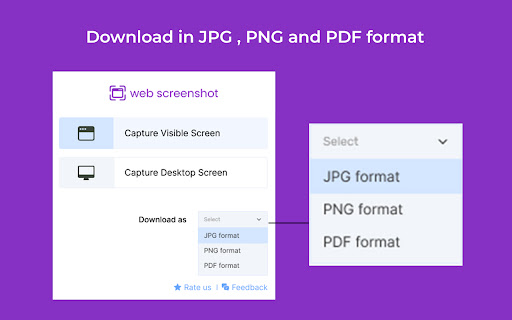
Takes Web and Desktop screenshots with a single click In 2025, capturing the perfect screenshot is simpler than ever with the Web Screenshot Chrome Extension. Use the Web Screenshot Chrome Extension to take clean-shooting screenshots of your screen, a web page, or tab. This is important when you want to capture just a particular browser tab, the desktop, or when you select a desired window, complete with its title bar. Web Screenshot offers a straightforward means of achieving all this in the quickest way possible. Multiple Capture Options: This fantastic tool can capture selected browser tabs, an active web page, or its entirety, or the whole desktop at the click of a button. It’s the best screenshot extension for Chrome for various needs. Easy File Saving: The conversion into formats can be made with the help of the ‘save as’ option where you can also change the format into JPG, PNG, or PDF. High-Quality Images: Great quality ensures that they are ideal for both professional and personal purposes. Simple Interface: The interface is friendly to allow anyone, even with no prior knowledge of how to capture and save screenshots. Free to Use: Get full features without additional costs charged to your account. The Web Screenshot Chrome Extension is mainly aimed at facilitating web and desktop capture and taking screenshots on a single click. High performance on both operating systems, MacOS and Windows, and is the perfect tool for anyone who engages in documentation, presentations, or sharing of quality screenshots that are perfectly stocked in any environment. Install the Extension: One-click installation of Web Screenshot into your Chrome browser will begin now. Select Screenshot Type: You can opt for the capture of the active screen display, capture a specific tab, or get a desktop capture. Capture and Save: Take the screenshot and then copy it in JPG, PNG, or PDF format. Download and Share: This one is easily retrieved from the device for sharing or using it for the next thing at hand whenever you want. Yes, Web Screenshot allows you to select a specific tab, window, or screen portion for more focused captures. 2. What file formats are available for saving screenshots? You can save your screenshots in JPG, PNG, or PDF formats. 3. Does this extension work on both Mac and Windows? Yes, the Web Screenshot extension is compatible with Mac and Windows platforms, ensuring high-quality captures on both. Yes, Web Screenshot is a free tool with no hidden fees, providing full functionality for capturing and saving screenshots.

Screenshot X
Screenshot X - the fastest and easiest way to take and share screenshots! Capture and Share Full-Page Screenshots with Screenshot X! Download Screenshot X for FREE to instantly capture and share full-page screenshots. Open the app, and a browser toolbar icon appears. Click the icon to grab a screenshot and save it immediately. Simplify your screenshot process with Screenshot X. A full-page screenshot is a comprehensive capture of an entire webpage or document, including all visible content from top to bottom. Unlike traditional screenshots that only capture the visible portion of the screen, full-page screenshots provide a complete representation of the entire page, ensuring no information or details are left out. With full-page screenshots, you can easily capture and share entire webpages, articles, designs, or any other content that extends beyond the visible screen area.

Screenshot Master: Full Page Capture
Easy, free and full-featured screenshot app to capture, edit and save your screenshots. An easy-to-use, yet functionally powerful screenshot tool! Lets you capture the whole page screenshot with just one click. It works just like the native feature of Google Chrome to capture screen but in a more optimized way. ✍ Advantages: ☑︎ Easy and user-friendly interface ☑︎ No restrictions on use ☑︎ Create full-page screenshot ☑︎ Create visible area screenshot ☑︎ Keyboard Shortcuts ☑︎ Best Quality, High-Resolution screenshots, PNG, JPG, and WEBP formats. Built-in image editor is an added feature of this extension. You can use the simple image editor, which offers a dozen different features. ✍ Screenshot Editor features: ☑︎ Write text ☑︎ Cropping ☑︎ Use arrows ☑︎ Include rectangular boxes or lines ☑︎ Saving in PNG, JPG, and WEBP formats.

CocoShot: Screenshot & Screen Recorder
Capture full page screenshots and record screen to MP4 with annotations. PDF export with clickable links included. 🚀 CocoShot: The Ultimate Screenshot, Screen Recorder & AI Video Editor Capture, Edit, and Record with the most powerful all-in-one productivity tool. From full page screenshots to high-definition screen recordings with AI subtitles, CocoShot does it all. 🎥 Pro Screen Recorder & AI Video Editor • High-Quality Recording: Capture your desktop, tabs, or webcam in crisp HD. Perfect for Zoom, Google Meet, and MS Teams. • AI Auto-Subtitles: Save time with our magic Auto-Caption feature. Automatically generate subtitles for your recordings with high accuracy. • Powerful Video Editor: Trim, crop, split, and merge your recordings within the browser. No external software needed! • Real-time Markup: Annotate with arrows and text while you record to create professional tutorials or bug reports. • Export to MP4: Save and share your videos in the most compatible format instantly. 📸 Advanced Screenshot & Screen Capture • Full-Page Capture: Automatically scroll and snap entire web pages perfectly. • Smart PDF Export: Convert screen captures to PDF with clickable hyperlinks preserved—ideal for research using Web Clippers. • Image Annotations: Use our robust editor to blur sensitive info, add markup, or apply professional filters to your screenshots. 🌟 Use Cases & Solutions: • Remote Meetings: Best Zoom/Google Meet recorder with AI captions for meeting minutes. • Content Creators: Record tutorials, edit videos, and add subtitles in one flow. • Developers: Record bugs with annotations for GitHub, Jira, and Slack. • Educators: Create accessible learning materials with automatic subtitles. Join thousands of users and upgrade your workflow. Get CocoShot today—the only Screen Recorder and AI Video Editor you will ever need!

Web Screenshot for Chrome
Capture the visible content of the active tab on any website Web Screenshot Taker is an easy-to-use Chrome extension designed to help users quickly capture the visible content of their active tab. Whether you need to save an image, a design element, or just remember something you found on the web, Web Screenshot Taker makes it effortless. Key features: 1. Capture visible content in just one click 2. Works on all websites 3. Downloads screenshots as .png files 4. Lightweight and unobtrusive To use Web Screenshot Taker, simply click on the extension icon, and it will automatically capture the visible content of the active tab and download it as a .png file. It's that simple!
