
ablkndimkaicojanolhcmdknlpmdnkee
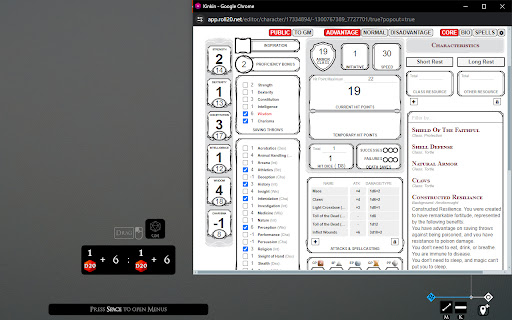

A TaleSpire companion application, used to send dice rolls from your Roll20 character sheet directly into your TaleSpire dice tray. For more information and to keep up-to-date on development items, check out the GitHub repo at: https://github.com/aptmac/roll20-to-talespire What's new in v0.0.2? Bug fixes: - Fixed a bug where the constitution modifier was not being added to hit dice rolls, see: https://github.com/aptmac/roll20-to-talespire/issues/1 - Fixed an issue where if two dice types were used in a damage roll, the output from roll20 was unparseable by TaleSpire, see: https://github.com/aptmac/roll20-to-talespire/issues/2 Motivation: My D&D group has recently made the switch from Roll20 to TaleSpire as our VTT for our new campaign. TaleSpire does a great job with so many aspects of the tabletop gaming experience, but character sheets is not one of them. While there are a handful of plugins you can install to handle character sheets, none of them (in my opinion) are on par with a Roll20 character sheet. The biggest downside of using Roll20 to handle your character sheet for a TaleSpire game is being unable to roll from Roll20 directly into TaleSpire .. which is where this application comes in! From your character sheet you can make rolls from the Core section of the character sheet. There is also support to recognize the Advantage/Disadvantage toggle, which will load up your TaleSpire dice tray with two rolls. - Open up your character sheet on Roll20 - With the character sheet window active, hover your mouse overtop the clickable label for the dice roll you want to perform. The text colour should turn from black to red. - Hit shift on your keyboard - A Chrome dialog should pop up asking if you want to open "TaleSpireUrlRelay". Yes you do, and you can toggle the option to "Always allow chrome-extension://[..]" and this dialog won't show up again. - Over in TaleSpire, your dice tray should have been populated with the roll you selected in Roll20. Pickup the dice and roll! 2. Chrome Extension Popup From the popup you can quickly send whatever roll you want into TaleSpire, as long as it is of a valid dice type supported by the game. You can toggle Advantage/Disadvantage, and even add a name for your roll that will be displayed in the VTT. - Click on the extension icon, and it will open a popup - The popup allows you to type the target dice roll, toggle advantage/disadvantage, and provide a name for your roll which will be displayed in TaleSpire - Enter your roll information, hit submit, and fire away! - Note: the popup isn't that large, and it cuts off most of the Chrome dialog asking for permission when opening the TaleSpireUrlRelay. I highly suggest hitting the "Always allow chrome-extension://[..]" checkbox before hitting the "Open TaleSpireUrlRelay" button so the dialog doesn't show up again.

Roll20 Extended
A basic extension to add some extra functionality to Roll20 and enhance the experience of managing your inventory. New Features: - Custom categories for inventory organization - Complete trait management system with categories - Visual source indicators for traits (racial, class, feat, background, item) - Drag-and-drop reordering within and between categories - Attunement tracking with visual indicators (⚡) - Collapsible items and categories for clean viewing - Edit mode toggle for quick modifications - Beautiful re-styled UI matching Roll20's design - Light and dark theme support - Auto-save to Roll20 character sheet Perfect for D&D 5e players who want better organization!

R20Exporter
Export a Roll20 Campaign with all its assets to a ZIP file. R20Exporter allows you to export a Roll 20 campaign and all of its assets into a ZIP file for backup/archiving purposes. To export your campaign go to the settings tab in the Roll20 page (the gear icon on the far right of the sidebar) and at the top you should see a button "Export Campaign to ZIP". Simply click on it, then wait until the ZIP file is generated and downloaded. While generating the ZIP file, do make sure you have the campaign tab focused in chrome (separate it in its own window if needed), otherwise the download speed of the zip will drop to very very slow transfer speeds since the javascript that generates the zip on the fly will be running as a low priority background process. The dialog that opens will show you the various steps the script is undertaking and you can click the Log button to see a more detailed log of what is happening. That dialog window will also prevent you from messing around with the campaign. It is best to let the script do its thing unhindered and to not open another campaign in another window. Once the export process is complete, that window will close on its own and the ZIP file will be downloaded automatically. To report any issues, please go to the GitHub issue tracker : https://github.com/kakaroto/R20Exporter/issues

Roll20 API and Sheet Autouploader
An extension to automate the uploading of new API and custom sheet code to the API and sheet sandbox. Do you build API scripts or character sheets on Roll20? This script will automate the upload of your code to the Roll20 sandboxes. Use your favorite code editor or IDE and let the Autouploader take care of updating the code on Roll20. Tell the extension what directory to monitor when you open a sheet sandbox game on Roll20 and it will take care of updating your HTML, CSS, and translation files in the sandbox as you save changes. This initial release only supports character sheet file upload to the sheet sandbox. The API upload functionality is in the works. PLEASE NOTE: The auto uploader is compatible with most chromium browsers, however Brave has disabled the File System Access API that powers the extension. Other chromium browsers may have also disabled this API.

Roll20 Media Sender
A extension that help you create commands for the Beyond20 extension. This extension helps you send media, such as images and gifs from D&D Beyond, through Beyond20 into Roll20. Read more here: https://github.com/Rasul-583/Roll20-Media-Sender/blob/main/README.md v2 finally released! The extension actually works as intended now.
