
hboggmcfmaakkifgifjbccnpfmnegick

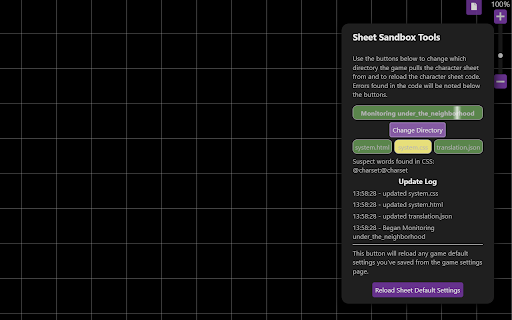
An extension to automate the uploading of new API and custom sheet code to the API and sheet sandbox. Do you build API scripts or character sheets on Roll20? This script will automate the upload of your code to the Roll20 sandboxes. Use your favorite code editor or IDE and let the Autouploader take care of updating the code on Roll20. Tell the extension what directory to monitor when you open a sheet sandbox game on Roll20 and it will take care of updating your HTML, CSS, and translation files in the sandbox as you save changes. This initial release only supports character sheet file upload to the sheet sandbox. The API upload functionality is in the works. PLEASE NOTE: The auto uploader is compatible with most chromium browsers, however Brave has disabled the File System Access API that powers the extension. Other chromium browsers may have also disabled this API.

Roll20 Character Sheet Printer
Adds a print button to the character sheet tab on Roll20. Will export the sheet to a blank page and from there the page can be printed or saved as a pdf. Works on most sheets but not guaranteed to work for every sheet.

Roll20 WebP Support
Workaround for the WebP picture format for Roll20. Fix roll20 issue related to pictures in WebP format, allows DMs to use this format for their assets without display error.

Roll20 Media Sender
A extension that help you create commands for the Beyond20 extension. This extension helps you send media, such as images and gifs from D&D Beyond, through Beyond20 into Roll20. Read more here: https://github.com/Rasul-583/Roll20-Media-Sender/blob/main/README.md v2 finally released! The extension actually works as intended now.

D&D Beyond DM-Screen
Customizable DM Screen for D&D Beyond Campaigns ~~~DM SCREEN~~~ https://dmscreen.silas.link/gmscreen Decide for yourself which information of the players should be displayed! Open the screen by going to the campaign-screen and press the "DM Screen"-Button. If a character is open under DNDBeyond, the extension's settings can be opened. Here you can customize the DM Screen. If you have any questions, visit the website or contact me via the form on the website You can add links to the screen in order to open them fast! The extension supports dark and light mode. A Defense Roll is an alternative way to shape the monster attacks. The goal is to let the player roll outside of his turn and get him more involved. Here, the player rolls to see if he can escape the monster's attack. It also often improves roleplay because by having the player make the roll, you no longer describes how the monster attacks, but rather how the player dodges. The player is the focus of the narrative. If you have any questions, visit the website or contact me via the form on the website.
