
jglihdfjglgocmijkfjpoogomlbboopm
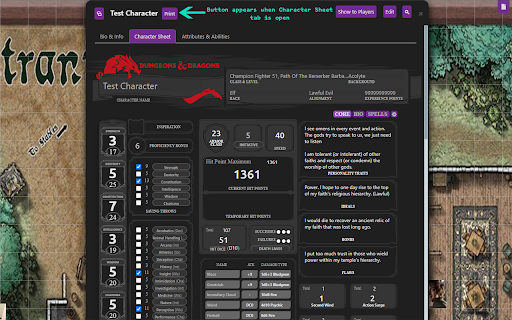

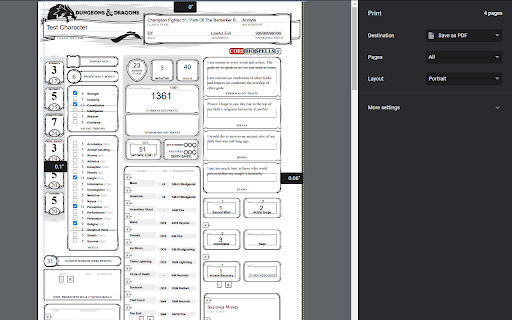
Adds a print button to the character sheet tab on Roll20. Will export the sheet to a blank page and from there the page can be printed or saved as a pdf. Works on most sheets but not guaranteed to work for every sheet.

Beyond 20
Integrates the D&D Beyond Character Sheets with Roll20 and Foundry VTT. Beyond20 integrates the D&D Beyond Character Sheet seamlessly into Roll20, Foundry VTT, and Discord. It can also provide a dice roller for rolling all your skills and attacks directly from the D&D Beyond character sheets or monster stat blocks. A roll button will be automatically added to D&D Beyond’s character sheet sidebars (abilities, skill checks, saving throws, weapon attacks, spells, class features, and more) that lets you either roll the dice directly into the Virtual TableTop chat, or display the spell card, feature or equipment item for others to see. Check out the website https://beyond20.here-for-more.info for more information about this extensions. Watch the video tour and check out the screenshots or check the full list of features. This extension is open source and released under a GPL v3 License with some parts under MIT license.

Roll20 Dice Stats
Calculates statistics for dice roll results from a Roll20 game chat Curious how you and your friends are rolling in your roll20 D&D campaign? This extension breaks down your game's history of d20 rolls into some fun stats, see who is rolling the most 1's or most 20's! Features: - Calculates natural `20` and natural `1` count, most common roll, and if the average roll is statistically significant, and more! - Allows combining character statistics if entry is for same player - Works within roll20 game window for end of session stats - Works within chat archive for entire game history - Currently only details for d20 rolls Future Plans: - track 2d6 rolls for the PbtA players - damage rolls from common attack roll templates Note: This extension does access page data to read a roll20 game log history. Nothing from the game is saved or transmitted in any way through the extension. This extension does not effect or interact with the roll20 application other than read existing roll data.

R20Exporter
Export a Roll20 Campaign with all its assets to a ZIP file. R20Exporter allows you to export a Roll 20 campaign and all of its assets into a ZIP file for backup/archiving purposes. To export your campaign go to the settings tab in the Roll20 page (the gear icon on the far right of the sidebar) and at the top you should see a button "Export Campaign to ZIP". Simply click on it, then wait until the ZIP file is generated and downloaded. While generating the ZIP file, do make sure you have the campaign tab focused in chrome (separate it in its own window if needed), otherwise the download speed of the zip will drop to very very slow transfer speeds since the javascript that generates the zip on the fly will be running as a low priority background process. The dialog that opens will show you the various steps the script is undertaking and you can click the Log button to see a more detailed log of what is happening. That dialog window will also prevent you from messing around with the campaign. It is best to let the script do its thing unhindered and to not open another campaign in another window. Once the export process is complete, that window will close on its own and the ZIP file will be downloaded automatically. To report any issues, please go to the GitHub issue tracker : https://github.com/kakaroto/R20Exporter/issues

Roll20 Made Easlier
(Indev) General tools for roll 20, in one browser plugin. (Indev) General tools for roll 20, in one browser plugin. Real-Time Turn Timer: A timer which counts how long the current turn has taken so far in real-time, displayed in the 'Turn Order' window. - Planned future features - Round number and in-game timer. E.g. "Round: 7 (1m 06s)": Round counter with in-game (not real-time) timer, displayed in the 'Turn Order' window. Timer increments in intervals of 6 seconds for each round completed, to track in-game time.
