
abfbkdogabfjekifogeacikcidnhpaej

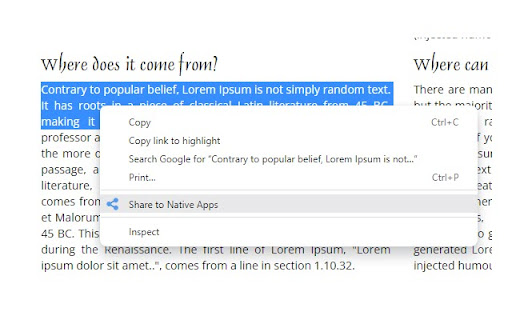
Share current tab or selected text to the supported native apps on your computer. Powered by Web Share API. Works only on secured pages, and requires Chrome 93+ on Windows and ChromeOS. Visit our home page for more details: https://browsernative.com/web-share-api-extension/

Delete Cookies and Site Data
Delete cookies, storage and cache of all websites except the whitelisted domains. Delete data stored by all websites, or the site open in the current tab. Set whitelisted domains. Opt to auto-delete site data on browser startup. Use Keyboard Shortcut: Alt + Shift + D. one click to delete cookies and other data (cache, localStorage, indexedDB, webSQL etc.) stored by websites. Visit homepage for more information: https://browsernative.com/delete-cookies-chrome-extension/

Simple Context Share
Share to Facebook, Twitter, Gmail and more using the context menu you can share the current webpage or any link on the web page from context menu. you can add/remove services to keep the menu customized to your requirement. The services provided are but not limited to: - Several social media - Imgur - GBookmarks - Gmail - Maps - Translate

Incognito Search Plus
You can use this extension in two ways: 1. Select any text and right click on it. Now, use the option in the appeared context menu. 2.Type i in the address bar of Chrome and hit the space bar. Now, type your search query. Visit for more information: https://browsernative.com/incognito-search-chrome-extension/

Share-it
"Share it" is a browser extension that allows you to easily share and copy web pages in various formats. Sharing pages during everyday web browsing can be a hassle. Manually copying titles and URLs, searching for social media share buttons, and other tasks can be time-consuming. "Share it" solves these tasks with a single click. This extension is released as open-source software under the MIT license. The source code is available on GitHub, and contributions from the community, such as bug reports, feature improvements, and pull requests, are welcome. https://github.com/psephopaiktes/share-it Features: - Simple and intuitive UI - Operable with keyboard only - Customizable sharing formats - Lightweight and fast performance Functions: - Add to Google Calendar - Add to Trello - Analyze with PageSpeed Insights - Analyze with Wappalyzer - Check in Wayback Machine - Copy link as HTML - Copy link as Markdown - Copy link as Rich Text - Copy title - Copy title & URL - Hatena Bookmark - Open shorten Amazon URL - Open with Google Translate - Post to Blogger - Post to Bluesky - Post to Buffer - Post to Hacker News - Post to Mastodon - Post to Threads - Post to Tumblr - Post to WordPress - Post to X - Post to note - Print - Save to Instapaper - Save to Pinterest - Save to Pocket - Save to Raindrop.io - Save to Raycast Notes - Save to Refind - Search RSS on Feedly - Send via Email - Send via Gmail - Send via Outlook - Send via SMS - Send with Messenger - Send with Viber - Share on Digg - Share on Facebook - Share on Flipboard - Share on LINE - Share on LinkedIn - Share on Plurk - Share on Snapchat - Share on Telegram - Share on VKontakte - Share on Weibo - Share on WhatsApp - Share with OS Extensions - Show QR code - Submit to Reddit - Send page to ChatGPT - Send page to Claude - Send page to Microsoft Copilot - Send page to Grok - Send page to Perplexity
