
leblpjbphcbikkpiildlcjjdneilgbpl
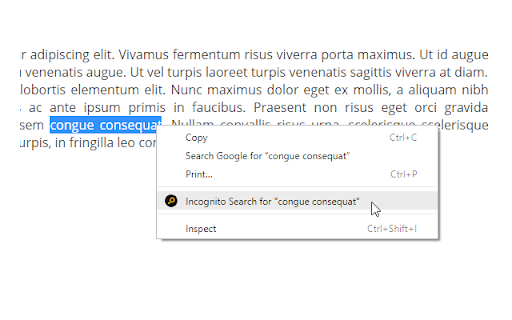

You can use this extension in two ways: 1. Select any text and right click on it. Now, use the option in the appeared context menu. 2.Type i in the address bar of Chrome and hit the space bar. Now, type your search query. Visit for more information: https://browsernative.com/incognito-search-chrome-extension/

Incognito or not
This Chrome extension enables you to switch incognito mode of current tab or link with one click, so you can switch current session easily.

Simple Privacy Settings
Easily control privacy settings of your browser. * Block JavaScript, Third-party Cookies, Notification prompts * Disable referer headers, Client-Hints HTTP Headers * Turn on Do Not Track * Block Access to Camera, Location, Microphone * Turn off network prediction * Turn off Ping, Beacon and CSP report requests * Disable Images and Web Fonts * Turn off autofill form data (address, credit card etc.) * Turn off suggestions in the omnibox (address bar) * Don't use web service to help correct spelling * Set `Accept-Language` HTTP Header to `en-US` * Strip Common Tracking Query Parameters * Disable Ads Privacy * Delete All Cookies on exit Extension by BrowserNative. Send your feedback to browsernative.apps@gmail.com.

Incognito This Tab
Want to surf the Internet in privacy? Use incognito mode to ensure the browser surfing history is not saved by Google Chrome. Our FREE Incognito This Tab is is a light-weight browser extension for Google Chrome, which enables users to easily load current tab in an incognito window. This extension is extremely light-weight and DOES NOT require any critical permission like reading your browser history etc. How to use? Incognito This Tab offers a handy keyboard shortcut: Alt + O. Hit this keys combination whenever you want to open the current tab in incognito mode. Alternatively, you can click on its toolbar button or the context menu option If you want the optional reverse functionality; i.e.; open an incognito tab in a normal window, you need to allow this extension in incognito mode. For this, visit the Extensions page (chrome://extensions) and check the “Allow in incognito” in details of extension.

Mini Browser Extension
A little project that allows you to open the website you are on into a little popup after pressing the icon!! A little project that allows you to open the website you are on into a little popup after pressing the icon!!
