
kpiamcgnkjgaindnjbceacpoepbfebok
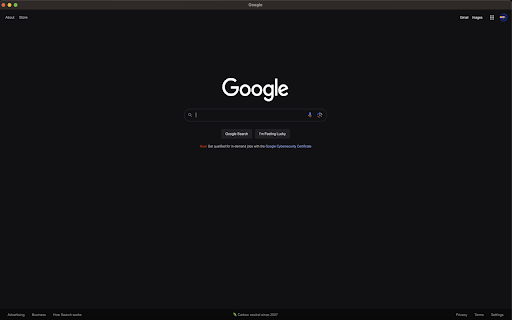
A little project that allows you to open the website you are on into a little popup after pressing the icon!! A little project that allows you to open the website you are on into a little popup after pressing the icon!!

Open link in small window.
'Open link in small window.' is a simple yet powerful Chrome extension designed to streamline your browsing experience by letting you open links in a small pop-up window instead of a full tab. With just a right-click, you can open any link in a compact window, positioned conveniently on the screen, helping you keep your workflow organized without cluttering your browser tabs. Why Install This Extension? Improve Your Productivity: Stop juggling multiple tabs. When you want to quickly view a link, this extension opens it in a small, focused window, so you don’t lose track of your main task. Seamless Multitasking: View links side-by-side with your current content. Whether you're doing research, referencing materials, or watching videos, this extension makes it easy to manage secondary content. Customizable Window Positioning: The small window can open on the right side of your screen, perfect for multitaskers who prefer keeping their workspace organized. No more losing windows behind your main application. Reduce Browser Clutter: Say goodbye to tab overload! The small pop-up window ensures that your browsing stays organized and efficient by keeping links separate from your main window. Lightweight and Easy to Use: No complicated settings. Just install, right-click, and enjoy a smoother browsing experience.

mini browser popup
Open your saved URL in a clean popup. First click opens Settings; after saving, the icon reuses the same window. Open any URL as a clean popup window (no Chrome toolbar). Configure URL, window size, and screen position. ## Features - Popup window (`type: "popup"`) for a mini‑app feel - Configurable URL, width, height, top, left - Smart URL normalization (adds `https://` if you omit it) - First‑run flow: opens Settings once; later clicks open popup directly - Minimal permissions: `storage`, `contextMenus` - No data collected, no analytics, no remote code ## How to use 1. Click the extension icon → Settings opens the first time 2. Enter your URL (e.g., `google.com`) and preferred size/position 3. Click **Save** (or **Open Now**). After that, clicking the icon opens your popup window immediately.

Open in Brave™ Browser
Send the current website, link, or all open tabs to the Brave web browser The "Open in Brave" extension simplifies opening the current tab or links within the Brave browser. With this extension, you can send links to the Brave browser without the hassle of manually copying and pasting links. Additionally, it can open all tabs in the destination browser with a single click. You can also close the tab opened in the destination browser if prefer so. If Brave is already running, the link opens in a new tab; however, if Brave is not running, a new instance is launched, then the link is directed there. Remarks: 1. To enable this extension to open links in the Brave browser, you'll need to install a native client. Installation instructions are provided upon requesting link opening. For visual guidance, there are two short video tutorials available in the screenshot section, covering installation steps for Windows, Linux, and macOS operating systems. 2. Currently, the native client only supports macOS, Windows, and Linux operating systems. Support for other operating systems is not available at this time.

Tor Browser (Unofficial port for Chrome)
Visit '.onion' sites and unlock blocked sites in one click and absolutely free. Tor Browser extension helps you to visit '.onion' sites and unlock blocked sites in one click and absolutely free. 🧅 Meet 'Tor Browser' your premier Chrome Extension for connecting to Tor Network. Immerse in an effortless internet browsing experience. Your don't need anything else. Only install extension and click Connect button. 💡 Key Features of 'Tor Browser' extension: 1. All in One. You don't need to download and configure something else. All is ready for using tor network. 2. You can ulock blocked site in one click by using this extension. 3. Direct access to '.onion' sites hosted in Tor network. 4. Fast connection. We use fast relay on the powerfull servers. 5. Secure connection. Your relay connection protected by SSL encryption. 6. [BONUS] Accessing to all OpenNIC domains zones: '.bbs', '.chan', '.cyb', '.dyn', '.geek', '.gopher', '.indy', '.libre', '.neo', '.null', '.o', '.oss', '.oz', '.parody', '.pirate'. 7. [BONUS] Acessing to '.lib', '.coin', '.emc', and '.bazar' TLDs of Emercoin project. 8. [BONUS] Providing access to any '.fur' domain. 🚀 Kickstart Your Journey with 'Tor Browser' extension: 1️. Add the 'Tor Browser' extension to your Chrome. 2️. Tap the Tor Browser icon and click Connect button to get started. 3️. Surf tor network/internet and enjoy. 4️. Done surfing? Click Disconnect button. ✅ Reasons to Pick Tor Browser extension: - User-Centric Design: 'Tor Browser' boasts a simple and intuitive interface for a breezy surfing experience. - Supreme Quality: Very wide connection and fast servers. - Multipurpose: You can unlock blocked sites, visit tor services ('.onion' sites) and exploring OpenNIC, Emercoin and FurNIC TLDs. - Privacy First: Our extension use SLL encryption and we do not store your data. ❓ Frequently Asked Questions: 🔹 Tor Browser is free? Absolutely, with Tor Browser extension you can surf sites completely free. 🔹 How does Tor Browser manage my data? We prioritize your privacy. Tor Browser doesn't retain any personal data and don't keep logs. Tor Browser shows ads for our other products. They won’t interrupt your experience or restrict anything — you can keep using all features in full. Try Tor Browser now and redefine your dark net surfing experiences!
