
pphmkfkacgdidnohnpepahgnjobofhgd
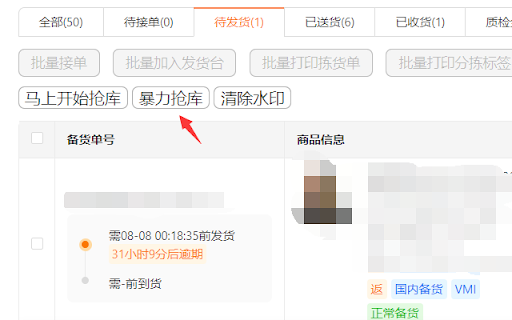
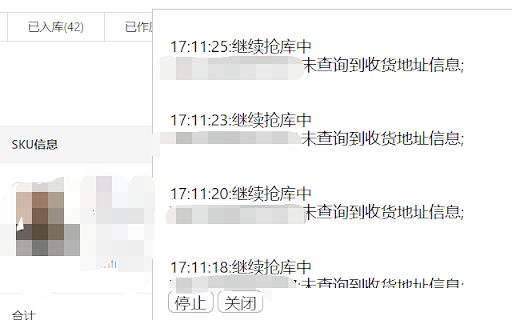
超强科技TM自动抢库助手 超强科技TEMU抢单助手 打开备货单页面: https://kuajing.pinduoduo.com/main/order-manage 点击抢库即可。 批量模式:通过模拟人工点击批量加库抢库。 暴力模式+100:通过模拟人工单个点击加库抢库。 1.新增浮动按钮可拖动; 2.打开页面时默认收起功能按钮。 新增设置抢库时延 新增指定发货单 新增一键拒绝调价 新增一键清除通知 2种模式本质上都是通过模拟人工点击,代替人工重复点击抢库,目的是解放双手。 能抢库成功的前提条件是有库存释放,并不能创造库存,无中生有。 抢库成功后需要手动创建发货单 问题反馈vx:173 2816 0491 微博:@梁栩谦 公众号:超强科技

SellerSprite - Amazon Research Tool
Join over a million sellers using SellerSprite to research, analyze, and optimize smarter — directly from your browser. Built on powerful data and AI, SellerSprite's Chrome Extension mirrors 80% of the full web app’s functionality. From product research to keyword analysis and competitor tracking, streamline your Amazon FBA business with real-time insights —all without leaving the Amazon page. In a single view, you can instantly spot high-potential products, analyze top competitors, uncover hidden keywords, and filter by sales, ratings, BSR, and more — without ever switching tabs. Key Features 📊 Deep Market Insights - Analyze subcategories with 16+ data points: demand, competition, supply/demand ratio to instantly spot high-potential niches and blue-ocean markets - Access granular BSR analytics with Top 400 rankings—track performance by parent and child ASINs, analyze variant-level sales distribution, and identify underexploited long-tail demand with precision - Customize your own product lists to batch-research trends, volume, and seasonality 🔑 Smart Keyword Tools - Discover high-converting long-tail keywords and build optimized listings - Track organic & sponsored keyword rankings in realtime - Reverse-search competitor ASINs to uncover hidden keyword strategies 🎯 Competitor Intelligence - Track BSR and sales across global sites - Detect brand infringement risks and benchmark strategies - Analyze reviews with AI and generate optimization suggestions ⚙️ Bulk Efficiency Tools - Download images, reviews, and selling points in one click - Collect ASINs and invite reviews in batches - Save hours with automation and smart scraping 💡 Why Sellers Choose SellerSprite - Feature-rich extension with 80% of full functionality — built into your browser - Real-time insights directly on Amazon pages - Trusted by over 1,400,000 Amazon sellers worldwide - Works with all major Amazon marketplaces ✅ Free to install — start exploring today! 1. Install the Extension • Download the SellerSprite Chrome Extension from the Chrome Web Store. 2. Create a Free Account • Sign up or log in. • New users get a 3 day-free trial of premium services. 3. Start Researching • Visit any Amazon product page to activate the extension. • Uncover competitor strategies, analyze product performance, and explore market trends. • Access in-depth historical data on pricing, sales, and keyword rankings to make informed decisions.

Shein选品助手 - 免费希音选品与数据分析
极鲸云旗下的官方Shein选品与数据分析工具,支持商品数据查询、历史销量价格查询、图搜同款等功能,帮助卖家洞察行业商机、高效选品。 Shein选品助手——【永久免费】的希音选品与数据分析工具。通过丰富的数据图表和实用工具,透视竞争对手,轻松发现趋势与爆款商品。 提供Shein商品历史销量/价格追踪、上架开店时间查询、以图搜图找同款、供货价预估等使用功能。 【主要功能】 1.全站点覆盖,丰富的数据&图表,透视竞争对手,轻松发现爆款 支持日/周/月/总销销量查询、日/周/月/总销售额查询、品类查询、评分/评论数查询等,让您轻松洞悉竞品情况,了解市场趋势。所有站点全面数据覆盖,每个站点数据彼此独立,看数据更精准! 2.上架时间、开店时间都能看,新款&潜力款无处遁形 支持商品上架时间查询、店铺开店时间查询,轻松地让您识别爆款新品和潜力店铺,让跟卖更简单。 3.供货价/核价预估,买手有的工具,你也要有 支持产品供货价查询,为您提供供货价参考。与Shein买手几乎同款的查价工具,让您报价有依据,核价有参考。 4.相似同款一键搜索,调查竞品So Easy 支持Shein、Temu、亚马逊平台相似同款搜索,一键调查竞争对手同款。不仅让您对商品提前有参考,更可以提前预判蓝海&红海市场,拒绝内卷! 5.全网一键图搜货源,找货源如此简单 内置图搜货源功能一键查询1688平台同款货源和Shein、Temu等平台的同款商品,帮助您快速找到价格最低货源和同款。 6.一键下载主图 内置主图下载工具,自动下载原图并打包成压缩包一键下载,使用更方便。 快来使用Shein选品助手,让您的Shein选品和数据分析更得心应手,让竞争对手没有秘密,让爆款无处遁形。 #希音选品助手 #Temu选品助手 #Shein #希音 #叠叠加 #极鲸云 #云启数据 #蜘泰数据 #卖家精灵

Temove-Temu后台辅助神器
Recent updates: - Compatible with the new version of the stocking list address and element positioning.

免费TEMU™自动抢发货台助手
使用我们的插件,您可以在temu卖家后台清除堆积如山的弹窗,一键自动上架,多店铺切换铺货,自动加入发货台 使用我们的插件,您可以在temu卖家后台清除堆积如山的弹窗,一键自动上架,多店铺切换铺货,自动加入发货台 👉 免费TEMU™自动抢发货台助手,是一款专为temu卖家后台设计的便捷工具。它拥有几大强力的功能:自动抢发货台、一键清除弹窗、一键自动上架 💻 插件直接在您的浏览器中运行,无需下载或安装额外软件。即使没有编程技能,您也可以轻松使用这款插件,提升您的工作效率。 特色💡💡💡 "免费TEMU™自动抢发货台助手"插件提供以下特色功能: * 在temu卖家后台页面注入工具按钮; * 自动抢发货台; * 一键清除堆积如山的弹窗; * 一键自动上架,多店铺切换铺货; * 帮助您提升工作效率。 🔔 如何开始使用? 1、安装插件并访问temu卖家后台; 2、点击注入的工具按钮; 3、点击移除通知按钮,一键清除弹窗 4、点击采集箱按钮,查看新建的商品信息,如果采集箱中没有商品信息,需要用户前往新建商品页面创建一批商品,插件会保存用户新建的商品信息到采集箱,用于后续自动上架商品。 5、在我的备货单页面,通过点击自动加入发货台按钮,开始自动抢发货台 感谢您选择"免费TEMU™自动抢发货台助手",让我们一起提升工作效率!
