
gbekpmgddajechkkbejdchehpmheinme
使用我们的插件,您可以在temu卖家后台清除堆积如山的弹窗,一键自动上架,多店铺切换铺货,自动加入发货台 使用我们的插件,您可以在temu卖家后台清除堆积如山的弹窗,一键自动上架,多店铺切换铺货,自动加入发货台 👉 免费TEMU™自动抢发货台助手,是一款专为temu卖家后台设计的便捷工具。它拥有几大强力的功能:自动抢发货台、一键清除弹窗、一键自动上架 💻 插件直接在您的浏览器中运行,无需下载或安装额外软件。即使没有编程技能,您也可以轻松使用这款插件,提升您的工作效率。 特色💡💡💡 "免费TEMU™自动抢发货台助手"插件提供以下特色功能: * 在temu卖家后台页面注入工具按钮; * 自动抢发货台; * 一键清除堆积如山的弹窗; * 一键自动上架,多店铺切换铺货; * 帮助您提升工作效率。 🔔 如何开始使用? 1、安装插件并访问temu卖家后台; 2、点击注入的工具按钮; 3、点击移除通知按钮,一键清除弹窗 4、点击采集箱按钮,查看新建的商品信息,如果采集箱中没有商品信息,需要用户前往新建商品页面创建一批商品,插件会保存用户新建的商品信息到采集箱,用于后续自动上架商品。 5、在我的备货单页面,通过点击自动加入发货台按钮,开始自动抢发货台 感谢您选择"免费TEMU™自动抢发货台助手",让我们一起提升工作效率!

超强科技TM自动抢库助手
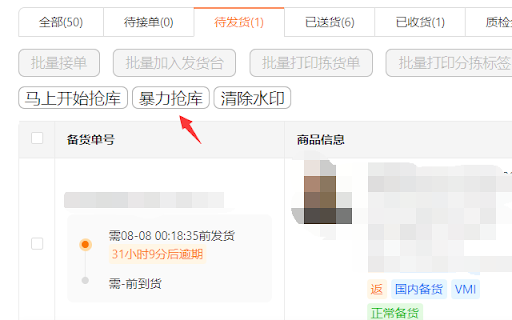
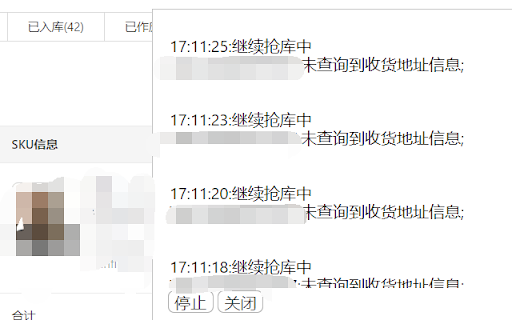
超强科技TM自动抢库助手 超强科技TEMU抢单助手 打开备货单页面: https://kuajing.pinduoduo.com/main/order-manage 点击抢库即可。 批量模式:通过模拟人工点击批量加库抢库。 暴力模式+100:通过模拟人工单个点击加库抢库。 1.新增浮动按钮可拖动; 2.打开页面时默认收起功能按钮。 新增设置抢库时延 新增指定发货单 新增一键拒绝调价 新增一键清除通知 2种模式本质上都是通过模拟人工点击,代替人工重复点击抢库,目的是解放双手。 能抢库成功的前提条件是有库存释放,并不能创造库存,无中生有。 抢库成功后需要手动创建发货单 问题反馈vx:173 2816 0491 微博:@梁栩谦 公众号:超强科技

THunt - Product Analysis Tool
👋 👋 Product data analysis tool. It helps you quickly analyze hot-selling products and make smarter decisions. You can use this plug-in to quickly compare prices and evaluate seller reputation quickly to maximize your profit margin! You can also get a better understanding of the competitive landscape and make more competitive decisions. 👋 👋 What are the main functions? 💰 1.Product research With this plugin, you can simply search by image to find similar products with lower prices and higher sales. For each product, this plugin provides: ➡️ Product overview: Includes basic information such as sales, sales volume, and listing time. ➡️ Bulk download of product images: Includes main images, specifications, and descriptions. ➡️ Product review analysis: Includes information such as rating, bad rating, and review content. ➡️ List of competitors: Includes information such as seller name, sales volume, and other competitors. ➡️ Image search for sources: Finds sources for products on platforms such as AliExpress, Taobao, and 1688 based on product images. ➡️ Ranking pages/category pages: Provides statistical charts, statistical panels, and product list data preview and export functions. 👋 👋 How to use it? ———————————————————————————————— Just install it on your Chrome browser, The extension will do it all for you automatically! 1. Install the Data analysis extension on your Chrome browser. 2. Visit website. 3. You will find the most popular charts on the home page, category page, and search results page. 4. An additional extension information panel will appear under each result you search. 5. Click on the floating icon on the product image to quickly view other source channels for the same product. ———————————————————————————————— 👋 👋 👋 👋 👋 👋 👋 👋 👋 👋 A must-have tool for your wholesale business! Download for free now and take your wholesale business to the next level!

Shein选品助手 - 免费希音选品与数据分析
极鲸云旗下的官方Shein选品与数据分析工具,支持商品数据查询、历史销量价格查询、图搜同款等功能,帮助卖家洞察行业商机、高效选品。 Shein选品助手——【永久免费】的希音选品与数据分析工具。通过丰富的数据图表和实用工具,透视竞争对手,轻松发现趋势与爆款商品。 提供Shein商品历史销量/价格追踪、上架开店时间查询、以图搜图找同款、供货价预估等使用功能。 【主要功能】 1.全站点覆盖,丰富的数据&图表,透视竞争对手,轻松发现爆款 支持日/周/月/总销销量查询、日/周/月/总销售额查询、品类查询、评分/评论数查询等,让您轻松洞悉竞品情况,了解市场趋势。所有站点全面数据覆盖,每个站点数据彼此独立,看数据更精准! 2.上架时间、开店时间都能看,新款&潜力款无处遁形 支持商品上架时间查询、店铺开店时间查询,轻松地让您识别爆款新品和潜力店铺,让跟卖更简单。 3.供货价/核价预估,买手有的工具,你也要有 支持产品供货价查询,为您提供供货价参考。与Shein买手几乎同款的查价工具,让您报价有依据,核价有参考。 4.相似同款一键搜索,调查竞品So Easy 支持Shein、Temu、亚马逊平台相似同款搜索,一键调查竞争对手同款。不仅让您对商品提前有参考,更可以提前预判蓝海&红海市场,拒绝内卷! 5.全网一键图搜货源,找货源如此简单 内置图搜货源功能一键查询1688平台同款货源和Shein、Temu等平台的同款商品,帮助您快速找到价格最低货源和同款。 6.一键下载主图 内置主图下载工具,自动下载原图并打包成压缩包一键下载,使用更方便。 快来使用Shein选品助手,让您的Shein选品和数据分析更得心应手,让竞争对手没有秘密,让爆款无处遁形。 #希音选品助手 #Temu选品助手 #Shein #希音 #叠叠加 #极鲸云 #云启数据 #蜘泰数据 #卖家精灵

Temu™ Seller Assistant
Use our plugin to clear Temu pop-ups, auto-publish products, switch stores, and add items to the shipping station with one click. 👉 Temu™ Seller Assistant is a convenient tool designed for temu sellers. It has two powerful functions: automatically add to the delivery platform and one-click clear pop-up window and one-click automatic listing 💻 The plug-in runs directly in your browser, without downloading or installing additional software. Even without programming skills, you can easily use this plug-in to improve your work efficiency. Features💡💡💡 Temu™ Seller Assistant Plugin provides the following features * Inject tool button on temu seller backend page; * automatically add to the delivery platform; * Clear the piles of pop-ups with one click; * One-click automatic listing, switching between multiple stores; * Help you improve work efficiency。 🔔 How to start using it? 1. Install the plug-in and access the temu seller backend; 2. Click the injected tool button; 3. Click the Remove Notification button to clear the pop-up window with one click 4. Click the collection box button to view the newly created product information. If there is no product information in the collection box, the user needs to go to the new product page to create a batch of products. The plug-in will save the user's newly created product information to the collection box for subsequent automatic listing of products. 5. On the My Stock List page, click the Automatically Add to Shipment button to start automatically adding to the shipment. Thank you for choosing the Temu™ Seller Backend Assistant plugin. Let us improve our work efficiency together!
