
ppgckoockdlekoeidjbkllnoggacdgab
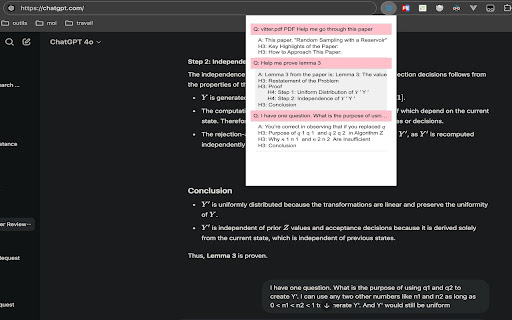
An outline for ChatGPT questions and answers, with support for displaying specific subheadings. Click an item to quickly jump. Used for ChatGPT website, show questions/answers list, hover to see full questions, click to navigate.

MetaPrompt - AI Prompt Engineer & Optimizer for ChatGPT & Claude
Transform unclear questions into expert prompts. Get better AI responses from ChatGPT and Claude with one click. Metaprompt: Your AI Whisperer Transform how you interact with AI MetaPrompt transforms your ChatGPT and Claude experience by intelligently enhancing your prompts. Powered by advanced GPT 4.1 models, our Chrome extension analyzes your questions and refines them to generate clearer, more precise AI responses - saving you time and frustration. Simple, Powerful Workflow 1. Type your question as you normally would 2. Click the MetaPrompt button to apply expert prompt engineering 3. Watch as your request transform into an optimized prompt that gets real results What Sets MetaPrompt Apart - Instant Optimization: Turn unclear questions into structured prompts that deliver exactly what you need - Seamless Integration: Works naturally within ChatGPT's and Claude's interface with zero learning curve - Universal Compatibility: Use our popup anywhere you interact with AI tools Choose Your Perfect Plan MetaPrompt Pro ($5.99/month) - 5000 monthly prompt enhancements - Access to larger, more powerful models for even better results Who Needs MetaPrompt? - Students seeking deeper explanations and research assistance - Professionals requiring accurate information for critical tasks - Writers looking for better creative input - Developers needing precise code solutions - Researchers formulating complex queries - Anyone tired of wasting time on unhelpful AI responses Stop struggling with AI miscommunications. Download MetaPrompt today and start getting the quality responses you deserve.

CollapseGPTMessages
Easily collapse and expand ChatGPT messages for faster navigation. Save your scroll, focus on what matters. CollapseGPTMessages keeps threads tidy by letting you collapse and expand individual messages — just like sections in a document. Features 1. Collapse/expand any ChatGPT message with one click 2. Persistent state: remembers your collapsed/expanded messages across refreshes 3. Keyboard shortcuts for speed: a. Expand all: Ctrl + Shift + E b. Collapse all: Ctrl + Shift + C Clean UI that blends with ChatGPT Whether you’re reviewing long code blocks, research notes, or multi-step reasoning, CollapseGPTMessages reduces scrolling and keeps you focused on what matters.

ChatGPT Automation - Auto ChatGPT on chatgpt.com
Auto ChatGPT for your prompts at scale. Batch generate and auto-download responses and images on ChatGPT.com. ChatGPT Automation is an Auto ChatGPT tool built to fully automate your workflow on OpenAI's chatgpt.com. No more manually typing prompts one by one — let ChatGPT run automatically. This extension turns ChatGPT into a batch-processing engine, allowing you to auto-submit prompts, auto-generate content, and auto-download results at scale. 🔥 What ChatGPT Automation does Auto ChatGPT prompts continuously without manual interaction Batch generate AI text, images, and visual content Automatically download results with smart file naming Handle long prompt queues safely with smart random delays 🤖 Auto ChatGPT Batch Processing Queue dozens or hundreds of prompts and let ChatGPT Automation automatically: - Submit prompts to ChatGPT - Wait for generation to complete - Move to the next prompt No clicks. No babysitting. 🎨 Image to Image Transformation Batch transform and enhance images using AI with text prompts Chain mode: automatically use the previous generated image as input for the next prompt 🧩 Ingredients to Text Mode Upload reference images and batch-process them with prompts Auto-add character images based on filename matching ⚙️ Professional Automation Controls - Smart Random Delay System to avoid rate limits - Configurable min/max delay between prompts - Auto Download once generation completes with custom folder organization - Auto-rename files based on prompt content - Max Retries on failure — automatically retry failed prompts - Multiple outputs per prompt (1–4) 📊 Real-time Queue Monitoring - Live prompt queue with per-prompt status (Queued → Running → Completed) - Visual progress tracking inside the Side Panel - Retry counter per prompt ✅ Perfect for - Content creators and copywriters - AI image and visual producers - Automation & productivity users - Anyone who wants to Auto ChatGPT at scale

ChatGPT Sheets – Use ChatGPT for Sheets
Boost your Google Sheets with ChatGPT! Get instant answers, copy-paste solutions, and easy shortcuts with ChatGPT Sheets! Looking to elevate your business using ChatGPT for Google Sheets?🚀 The ChatGPT Extension for Google Sheets revolutionizes your workflow. HOW DOES ChatGPT HELP YOUR BUSINESS? ➡️Get instant results. ⏱️Our ChatGPT for Sheets extension enables a swift conversation window. ➡️Efficient copy-paste solutions. 🗓️ChatGPT for Google Sheets easily transfers new knowledge to your spreadsheet. ➡️User-friendly shortcuts. 🎯Every feature of ChatGPT for Sheets was implemented with YOU in mind. Wait no longer to boost your business! Let our ChatGPT in Google Sheets Extension let your productivity soar!🚀📈 In today's digital age, businesses are constantly in need of seamless tools and technologies that can simplify data handling and analytics. Amidst a plethora of available extensions and tools, the ChatGPT Extension for Google Sheets stands out as a beacon of innovation. Let's dive deeper into what makes this extension a game-changer for professionals across industries.🌟 MAIN FEATURES AND ADVANTAGES OF ChatGPT: 1. Seamless Integration🔗: The data analytics landscape is constantly evolving, making it essential for businesses to be equipped with tools that enable smooth transitions. Enter ChatGPT Extension for Google Sheets. This tool allows users to seamlessly integrate AI capabilities into their Google Sheets environment, eliminating the hassles of shifting between platforms and ensuring effortless information interpretation. 2. Dynamic Data Conversations💬: Gone are the days when you had to manually interpret complex data. With the ChatGPT Google spreadsheet, real-time interactions with your data are now possible. Imagine having an intelligent conversation with your spreadsheets, asking questions and receiving answers in real-time. This revolutionizes data understanding, making it more intuitive and actionable. 3. Collaboration Made Easy🤝: Modern businesses thrive on teamwork. The ChatGPT Extension for Google Sheets acts as a bridge, connecting team members and enabling them to derive insights from shared data effortlessly. It fosters a collaborative environment where numbers tell a story that everyone can understand. 4. Top-Tier Security🔐: Data security is a top concern for businesses today. With the ChatGPT Chrome Extension, there's no need to compromise on safety. Your data remains under stringent protection protocols, ensuring that you can analyze, share, and interpret your data with total peace of mind. The age of AI-powered solutions is here. These intelligent systems are not just about automation; they redefine how we perceive and interact with data. Among the forefront of these advancements is the ChatGPT Extension for Google spreadsheets. HERE'S HOW: 🎯Tailored AI Responses: GPT for Google spreadsheets isn’t just another tool. It actively learns and provides customized answers, ensuring precision, relevance, and clarity in every response.🌠 ♟️Broad Compatibility: In a diverse data landscape, the GPT for Sheets Extension stands out with its ability to accept a wide range of data formats and structures. This versatility ensures that no matter how your data is structured, the tool can handle it. 📊 🏄🏻♂️User-Centric Design: Beyond its technical prowess, every facet of the ChatGPT Extension for Google tables has been meticulously crafted with users in mind. The design emphasizes a user-friendly experience, ensuring that even those without a technical background can harness its power effortlessly. 👤 WHY EMBRACE ChatGPT FOR GOOGLE SHEETS? 🤔 In an era where data is the new gold, having tools that streamline its analysis is invaluable. The ChatGPT Extension offers: 1. Intelligent Data Processing: This isn’t just another analytics tool. The AI for Google Tables delves deep, offering not just numbers, but valuable insights that can shape business strategies. 🧠 2. Plug and Play: Simplicity is at the core of the ChatGPT plugin for Google Sheets. Without any complex setups, it integrates smoothly into your workflow. ⚙️ 3. Diverse Use Cases: Whether you’re a budding startup or a multinational corporation, ChatGPT for Google Sheets adapts to your unique requirements, proving its versatility across varied business landscapes. CONCLUSION: 💡 We stand on the brink of a new era in information analytics. Integrating AI with traditional spreadsheet tools like Google Sheets isn't just about staying updated; it's about anticipating the future. By investing in the ChatGPT for spreadsheets extension, you’re not just enhancing your data interpretation abilities; you’re also paving the way for unprecedented insights and business growth. 🚀 Dive into the realm of advanced data analytics with ChatGPT for Google Sheets. Embrace the future, redefine your data journey, and witness the revolution. Join the revolution. Download and use with pleasure!🔥📥
