
ppejgllbljogfbmanhgcgdheckimfino
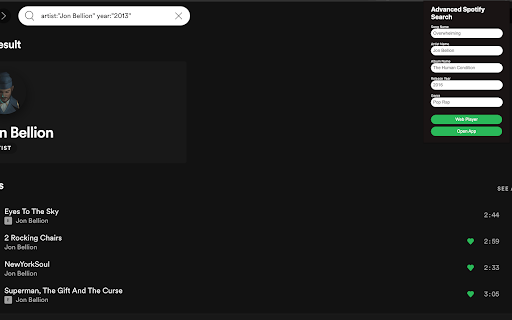

You can search by Song, Artist, Album, Release Year, Genre, or any combination of those.

Tubify - YouTube to Spotify
Tubify supports all languages and is the most accurate extension for adding a song on YouTube to your Spotify playlist with a single click of a button. 1. After installation, click the Extension puzzle icon in your Chrome browser next to your profile picture. 2. Pin the extension 3. Find your favorite song on YouTube, click the Tubify extension, then click the "Add to Spotify Playlist" button. 4. Song is added to your "Tubify" playlist on Spotify.

YouTube to Spotify with Paradify
WHAT? - Transfer YouTube playlist to your Spotify. - Transfer a SINGLE song from YouTube / Youtube Music to your Spotify. How? - SINGLE song transfer: Open a song in YouTube / Youtube Music, click on Spotify icon, and add. FREE/Pro Plan. - YouTube Playlist transfer to Spotify: Visit paradify.com.

Spotify Friend Activity
View your friends' activity in Spotify's web player. This extension adds a panel to Spotify's web player that displays your friends' listening activity. Setup: 1. Add Spotify Friend Activity to your Chrome browser. 2. Open a new tab and navigate to https://open.spotify.com/ 3. Login with your Spotify account. 4. Make sure: - You are following the Spotify users that you want to see the activity of. - Your friends have the "Share my listening activity on Spotify" setting enabled in the Spotify desktop app. - Your friends have listened to music on the desktop app sometime in the last week. 5. If the issue persists, please report it here: https://bit.ly/sfa-report Request new features for the extension here: https://bit.ly/sfa-feature

Nice Playlist Generator
Makes Spotify playlists from rateyourmusic.com and sonemic.com charts or lists If you like this add-on, spread the word. Help us by liking or sharing our Facebook page. Do you want to find new music? Are you interested in this year's releases, are you trying to get into a new genre or get to know 1993's field recordings of melting ice? Would you like to do this without the tediousness of searching single songs and making playlists of them? Do you like simple and functional things? If so, Nice Playlist Generator might be just what you want. Useful data gathered by rateyourmusic.com users in the form of charts and lists can be turned into Spotify playlists in a few easy steps. In your browser, navigate to a rateyourmusic.com's chart or an user submitted list. Click the Nice Playlist Generator icon in your address bar. If the add-on finds at least one item representing an album (or other kind of release) on the current page, the "Get spotify links" button activates. After you click it, the search on Spotify is started. You are informed about the amount of releases successfully found on Spotify and about the ones that could not be found. After the search finishes the "Copy playlist to clipboard" button activates. When you click it, you can go to the Spotify desktop application and choose a newly made or existing playlist you want to add the new tracks into. Click into the content pane of the playlist and paste the tracks found by Nice Playlist Generator into it by pressing Ctrl + V
