
odjcdeedkbdeggimbfhpablpgmdphaem
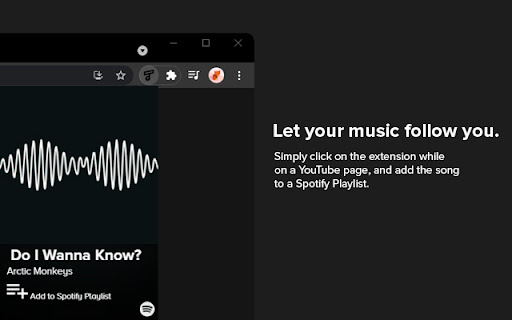
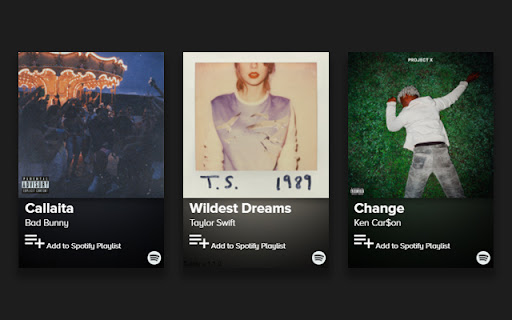
Tubify supports all languages and is the most accurate extension for adding a song on YouTube to your Spotify playlist with a single click of a button. 1. After installation, click the Extension puzzle icon in your Chrome browser next to your profile picture. 2. Pin the extension 3. Find your favorite song on YouTube, click the Tubify extension, then click the "Add to Spotify Playlist" button. 4. Song is added to your "Tubify" playlist on Spotify.

SPOT
SPOTTED a song on the web? Add it to your cross-platform playlists - on the spot! SPOT allows you to add any song 'spotted' on your browser, to your Spotify playlists on the spot! Features: * Say you're listening to a song on YouTube. You really like it and want to add it to one of the playlists you maintain on Spotify. SPOT reduces the manual steps required in order to achieve this, by directly querying the current playing video on your youtube tab, querying and displaying the results within the extension * You are scrolling through Instagram/Reddit/(any other website for the matter) and stumble across the name of a song in the caption/post and would love to check the song out. SPOT allows you to highlight this 'SPOTTED' text and find the best matching results on Spotify via the extension - by simplying triggering a search on right click, or by using the hotkeys 'CTRL + SHIFT+ S' You can scroll through all the top matches found, preview the selected song and add it to multiple playlists, all from within the browser - without changing any tabs/windows!

SpoPlus - Edit Spotify Theme & Settings
2026 Spotify extension that allows you to set up new themes, fonts, remove annoying notifications, popups, and more! Hide Spotify "Now Playing" View, disable albums, change themes, fonts, or block images / videos to reduce bandwidth usage with SpoPlus. Take control of your Spotify experience and customize it according to your preferences. Features: 1. Focus Mode: Enable this mode to make the Spotify interface more compact, focused, and minimalist. 2. Element Visibility Control: Hide the header buttons to create a cleaner interface that focuses solely on your music. 3. Navbar: Make the Navbar bigger for improved visibility and easier navigation. 4. Static Aside Menu Width: Keep the width of the aside menu static, ensuring a consistent and comfortable browsing experience. 6. "Now Playing" View Control: Disable the "Now Playing" view to simplify the interface and focus solely on your playlist. 7. Choose from a range of themes and fonts to further customize your Spotify experience: * Themes: - Default - Light Green - Dark Purple - Kittens - Dark Blue - Dark Yellow - Dark Red - Light Pink ... and more * Fonts: - Noto Sans - Pixelify - Montserrat - Poppins ... and more 8. Square Mode: Apply a square design to Spotify elements for a consistent, visually appealing aesthetic. 9. Traffic Optimization: Block videos and/or images to reduce bandwidth usage. ----- Note: Spotify is a registered trademark of Spotify AB. This extension is not affiliated with or endorsed by Spotify AB. ## Version 3.1.0 - Stable Release - Fixed `Focus Mode`: top bar, aside section, and other related issues - Fixed `Fullscreen` navigation bar and `Make navbar bigger` option clipping - Fixed DOM changes in (`Light Purple`, `Light Pink`, `Light Pink Dimmed`, and other themes) - Updated `Bring back classic heart button` option states (like, unlike, on-unlike, on-like) masks and fixed disappearing icons in lists and modals - Updated `premium-page` styles in **light-type** themes - Added support for new modals (add button, blend playlists) - Fixed placeholder images in **light-type** themes - Added two new features: `Hide Video Cards` and `Hide "Episodes you may like"` - Added `Friends Activity` button hiding to the `Hide Header App Buttons` option, as it’s **not supported in the web version** - Fixed shadows and dark placeholder user profiles in **light-type** themes - Improved style injection time - Fixed `Queue` and `Connect to a device` not working properly when the `Disable Now Playing View` option was enabled - Other minor improvements and fixes **Full Changelog**: https://github.com/ptjaworski/spoplus-extension/compare/v.2.8.0...v.3.1.0 ## Version 2.8.0 - Stable Release - Fixed aside menu modal window in light themes. - Fixed Focus Mode issue where aside menu items were misaligned. - Fixed Lyrics page background and contrast across light themes. - Fixed navigation bar visual issues on themes: Kimbie Dark, Comfy Red, Light Green, and others. - Improved fullscreen mode behavior on desktop viewport. - Fixed “For Fans” blocks section in light mode. - Other minor improvements and fixes. Full Changelog: https://github.com/ptjaworski/spoplus-extension/compare/v.2.7.0...v.2.8.0 ## Version 2.7.0 - Stable Release - Fixed the aside menu overflow issue. - Fixed footer styling in themes: Kimbie Dark, Comfy Red, and others. - Resolved a visual bug causing the collapsed menu to appear unevenly aligned. - Updated the Bring back the classic heart button feature. - Fixed the Support popup appearance frequency and delay, as some users reported it appeared too often. - Added support for new features: Clips, Fullscreen mode. ...and other changes Full Changelog: https://github.com/ptjaworski/spoplus-extension/compare/v.2.6.0...v.2.7.0 ## Version 2.6.0 - Stable Release - Fixed "Keep Aside Width Static" option (#11) not working properly - Fixed incorrect tone in (#9) skeleton loader - Resolved visual bug causing (#4) incorrect tone in aside menu on press state - Fixed incorrect tone in (#3) "Add to Playlist" modal - Adjusted (#10) Kimbie Dark on-hover slider colors - Fixed (#8) scrollbar appearing on some elements (Windows) - Resolved (#7) overflow in Focus mode - Corrected (#6) incorrect tone in Search modal - Fixed (#9) incorrect tone in "Now Playing" section > "Connect to a Device" Full Changelog: https://github.com/ptjaworski/spoplus-extension/compare/v.2.5.2...v.2.6.0 ## Version 2.3.0.0 - Current Release - Fixed heart button: Improved visibility for pending requests and resolved related issues. - Light themes: Enhanced shadows and fixed several bugs. - Updated Focus mode (Search bar, Navigation bar). - Fixed an issue where the rate-me popup appeared more than twice. ## Version 2.2.0 - Stable Release - Fixed multiple issues in Focus Mode, including compact view and transcript display errors. - Resolved problems with heart icons feature not functioning correctly. - Fixed progress bar issues in "Your Episodes" for light themes. - Fixed fullscreen mode issues across light themes. - Corrected overflow issues with some tippyjs tooltips. - Fixed layout issues on the Premium page when using light themes. - Updated placeholders to reduce GPU usage. - Resolved resizing problems when the "Aside" section is set to static. - Fixed color issues with lyrics display in light themes. ...and other minor improvements ## Version 2.1.0 - Stable Release - Fixed the issue where Inter font was not displayed properly on some devices. - Updated light themes: Light Green, Light Purple. - Fixed the issue where active buttons were baseline color in active or mixed state. - Improved general stability and state validation. - Added low-end PC optimization feature. - Added new themes (x4): Kimbie Dark, Comfy Red, Light Pink, Light Pink Dimmed. - Added better SVG animation color-swapping support. - Added changelog button functionality. ...and other changes ## Version 1.2.4 - Stable Release - Added Belarusian and Arabic i18n support - Improved themes: Dark Purple, Dark Red, Dark Yellow, Light Purple and Light Green - Fixed the issue when aside "collapse" in Fixed Mode - Added "Contribute" menu option - Fixed window.reload issues caused by a faulty event handler - Added better "Add Button" animation & color - Fixed Amoled Theme issue when the old background persist - Fixed the overflow issue in aside when "List mode" view was selected - Fixed "Hide header buttons" functionality - Added RTL Support - Improved "Focus Mode" ...and other changes ## Version 1.2.0 - Stable Release - Added i18n languages (x7) support - Added new themes: Amoled, Amoled Night - Improved themes: Dark Purple ...and other issues ## Version 1.1.7 - Stable Release - Improved themes: Dark Purple, Green Light, Kittens - Fixed Welcome page appearing at every update ...and other issues ## Version 1.1.5 - Stable Release - Added Firefox & Microsoft Edge Support - Extension Popup Dark Mode - Toggle-All Functional Button - Added New Fonts (x6) - Imp. Support page & Others - Fixed: Light theme, Cyrillic Support, Re-render bugs, etc. ...and other issues ## Version 1.0.4 - Stable Release - Stability Improvements - Better popup visuals - Added license changes ...and other issues ## Version 1.0.2 - Stable Release - Stability Improvements - Fixed font issue after "Classic mode" toggle ...and other issues ## Version 1.0.0 - Stable Release - Added Themes: Light Green, Dark Purple, Kittens - Added Fonts: Poppins, Playfair, Noto Sans & others - Fixed Aside collapsing - Fixed "now playing view" app crash ...and other issues ## Version 0.2 - Beta Release - Added Classic Mode - Fixed Aside width functionality - Images disabling to reduce bandwidth usage ...and other issues

Spotube - Youtube to Spotify extension
A two-click extension for easily adding YouTube songs to your Spotify playlists. The easiest and quickest tool for adding songs to your Spotify playlists. Ever heard a song that you love on YouTube or SoundCloud? Ever wanted to add that song to your own playlist in two clicks? Well now you can! With Spotube you can add songs to your playlists easier than it's ever been. You don't even have to do any of the searching!

Youfy - YouTube to Spotify
Youfy is a quick and easy way to transfer YouTube songs and playlists to your Spotify account without leaving YouTube! With Youfy, you can quickly and easily transfer your favorite YouTube songs and playlists to your Spotify account without ever leaving YouTube. Our extension is simple to use - just navigate to any YouTube video or playlist page, click on our extension icon from your extensions list, and start converting your music. You can even export YouTube playlists as .txt files. Plus, with Youfy, you can open YouTube songs on Apple Music and Amazon Music. Try it out today and see how easy it is to move your music to your preferred platform! Features: 🌟 Add any YouTube song to your Spotify account 🌟 Transfer any YouTube playlist to your Spotify account (up to 50 videos per playlist) 🌟 Open YouTube songs on Apple Music and Amazon Music 🌟 Export any YouTube playlist as a .txt file Q: Am I required to pay to use any feature of the extension? A: No, our extension is completely free to use. Q: Do I need to provide any personal information? A: No, we do not store or ask for any personal information from our users. The only requirement is for users to log in to their Spotify account. Q: How many songs can I transfer at once? A: Currently, our extension allows up to 50 songs per playlist to be transferred at once. This number might increase in the near future. Q: Can I transfer any type of playlist? A: Since we don’t require users to log in to their YouTube account, users can only transfer public and unlisted playlists. If you wish to transfer a private playlist, we suggest making it public or unlisted beforehand. Don't miss out on the convenience and ease of use that Youfy offers - try it today and start transferring your favorite YouTube songs and playlists to your Spotify account in just a few clicks! With Youfy, you can take your music with you wherever you go and never miss a beat. Plus, our extension is constantly being updated with new features and improvements, so you can always enjoy the best possible experience. Give Youfy a try now and see the difference it can make for your music collection! v1.1.1 - Changed Spotify URLs to use open.spotify.com again because spotify: URLs don't work when the user doesn't have the desktop app installed v1.1.0 - Minor bug fixes - Changed Spotify URLs to use Spotify encoding instead of open.spotify.com - Changed Spotify playlist page to show only collaborative or owned playlists If you enjoy using Youfy, would you mind taking a moment to rate it? Thanks for your support!
