
bkdmpkmdoncbkipfnmhhmhklcchbjeon


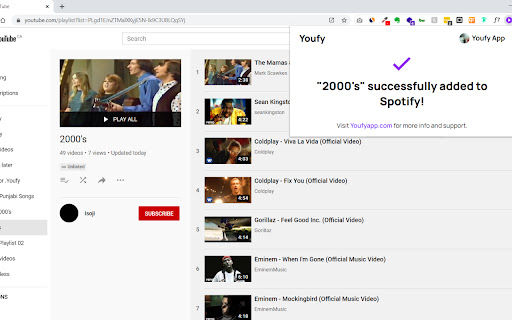
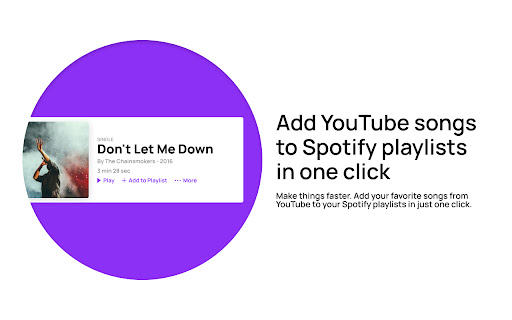

Youfy is a quick and easy way to transfer YouTube songs and playlists to your Spotify account without leaving YouTube! With Youfy, you can quickly and easily transfer your favorite YouTube songs and playlists to your Spotify account without ever leaving YouTube. Our extension is simple to use - just navigate to any YouTube video or playlist page, click on our extension icon from your extensions list, and start converting your music. You can even export YouTube playlists as .txt files. Plus, with Youfy, you can open YouTube songs on Apple Music and Amazon Music. Try it out today and see how easy it is to move your music to your preferred platform! Features: 🌟 Add any YouTube song to your Spotify account 🌟 Transfer any YouTube playlist to your Spotify account (up to 50 videos per playlist) 🌟 Open YouTube songs on Apple Music and Amazon Music 🌟 Export any YouTube playlist as a .txt file Q: Am I required to pay to use any feature of the extension? A: No, our extension is completely free to use. Q: Do I need to provide any personal information? A: No, we do not store or ask for any personal information from our users. The only requirement is for users to log in to their Spotify account. Q: How many songs can I transfer at once? A: Currently, our extension allows up to 50 songs per playlist to be transferred at once. This number might increase in the near future. Q: Can I transfer any type of playlist? A: Since we don’t require users to log in to their YouTube account, users can only transfer public and unlisted playlists. If you wish to transfer a private playlist, we suggest making it public or unlisted beforehand. Don't miss out on the convenience and ease of use that Youfy offers - try it today and start transferring your favorite YouTube songs and playlists to your Spotify account in just a few clicks! With Youfy, you can take your music with you wherever you go and never miss a beat. Plus, our extension is constantly being updated with new features and improvements, so you can always enjoy the best possible experience. Give Youfy a try now and see the difference it can make for your music collection! v1.1.1 - Changed Spotify URLs to use open.spotify.com again because spotify: URLs don't work when the user doesn't have the desktop app installed v1.1.0 - Minor bug fixes - Changed Spotify URLs to use Spotify encoding instead of open.spotify.com - Changed Spotify playlist page to show only collaborative or owned playlists If you enjoy using Youfy, would you mind taking a moment to rate it? Thanks for your support!

Spotube - Youtube to Spotify extension
A two-click extension for easily adding YouTube songs to your Spotify playlists. The easiest and quickest tool for adding songs to your Spotify playlists. Ever heard a song that you love on YouTube or SoundCloud? Ever wanted to add that song to your own playlist in two clicks? Well now you can! With Spotube you can add songs to your playlists easier than it's ever been. You don't even have to do any of the searching!

Advanced Spotify Search
You can search by Song, Artist, Album, Release Year, Genre, or any combination of those.

Spotify Ad Blocker - Blockify
It is an effective Spotify Ad Blocker, specifically designed for removing audio ads using proven Spotify adblock technology. Do you wish you could enjoy your songs & playlists without constant ads and interruptions? Blockify is here to save the day! It greatly enhances your Spotify web player experience by blocking and removing all those cringy, frustrating, & embarrassing audio ads. Say goodbye to disturbing interruptions and enjoy uninterrupted music streaming today using Blockify- the best ad blocker for Spotify! Our algorithm has been specifically designed to work seamlessly with the Spotify web player, ensuring that you can listen to your favorite music without any disruptions. Update v1.8.7: Good news! Blockify now also supports ad-blocking on Twitch and Hulu! 1. Ad-free listening: Blockify blocks and removes audio ads from the Spotify web player, allowing you to enjoy your music without any annoying interruptions. 2. Easy to use: Simply install the Blockify Chrome extension, and the ad-blocking will automatically get applied as soon as you visit open.spotify.com, no complicated settings or configurations are required. 3. Lightweight and efficient: With less than 400 kb package size, Blockify is designed to be lightweight & efficient, ensuring that it doesn't slow down your browser or consume excessive resources. 4. Regular updates: Our team is constantly working to improve Blockify and ensure that it stays up-to-date with the latest changes in the Spotify's algorithm. This means that you can always enjoy an ad-free listening experience. 5. Privacy-focused: Blockify is committed to protecting your privacy. We do not collect any personal information or track your browsing habits. Your data stays safe and secure. 6. Browser-based: Enjoy music streaming using your browser, no desktop-based 3rd party software installation required. 7. Your choices, your control, complete transparency: From blocking ads across the web, to excluding (& enabling) ad-blocking on sites you love and support - users have complete control. Check your ad-blocking stats from the menu and tweak accordingly. To get started, simply install the Blockify adblocker Chrome extension and enjoy an ad-free audio listening experience. Whether you're working, studying, or just relaxing, our Spotify ad remover ensures that your music streaming is always smooth and uninterrupted. Blockify offers a dual layer of ad-blocking mechanism that improves its effectiveness and efficacy. It also offers automatic ad-muting as a fallback to handle rare instances when the ad-blocking algorithm fails to block or remove audio ads- helping the users with a more consistent and enjoyable experience. Please note: the algorithm packaged in this browser extension is an IP of ImpactEngine Digital LLP, and any direct or indirect theft of our IP will directly result in a strict legal action along with a DMCA strike. Upgrade your music and audio streaming experience today with Blockify. Download now and enjoy uninterrupted music streaming on open.spotify.com!

SPOT
SPOTTED a song on the web? Add it to your cross-platform playlists - on the spot! SPOT allows you to add any song 'spotted' on your browser, to your Spotify playlists on the spot! Features: * Say you're listening to a song on YouTube. You really like it and want to add it to one of the playlists you maintain on Spotify. SPOT reduces the manual steps required in order to achieve this, by directly querying the current playing video on your youtube tab, querying and displaying the results within the extension * You are scrolling through Instagram/Reddit/(any other website for the matter) and stumble across the name of a song in the caption/post and would love to check the song out. SPOT allows you to highlight this 'SPOTTED' text and find the best matching results on Spotify via the extension - by simplying triggering a search on right click, or by using the hotkeys 'CTRL + SHIFT+ S' You can scroll through all the top matches found, preview the selected song and add it to multiple playlists, all from within the browser - without changing any tabs/windows!
