
poojkbildhfolockjaecmcbmemfcligd
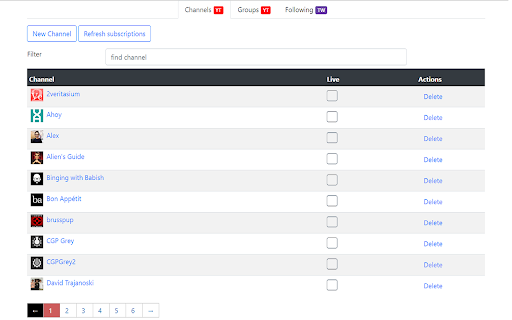
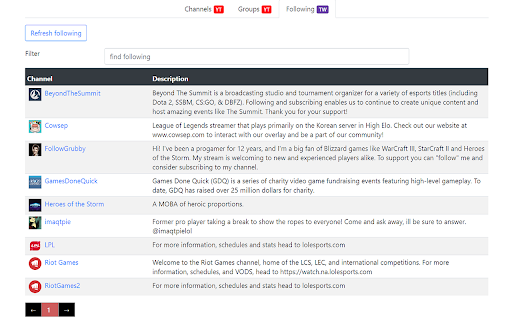


Enhance your web video experience. View live videos from YouTube and Twitch, and filter your YouYube subscriptions based on groups. Enhance your web video experience with Live Video Plus. Link to your YouTube and Twitch accounts and turn on live checking to channels you are following. This will enable them to be monitoring for live and upcoming videos and show in the extension popup. Within the YouTube subscription page you can filter videos by custom groups. Simply go to the settings page through the popup, create a group and add some channels. Now when selecting a group in the YouTube subscriptions page only videos from channels within that group will be visible. 2.3.1 (24/10/2022): YouTube connection is now opt in. Clean up UI some more for new users. 2.2.6 (29/08/2020): Options page UI improvements 2.2.5 (23/08/2020): Fixed small bug with some twitch urls 2.2.0 (26/04/2020): Added Twitch connectivity. You can now get notifications based on channels you follow in Twitch. 2.1.6 (10/04/2020): Fixed bug with large amount of subscriptions 2.1.5 (07/04/2020): Clean up popup UI and update filter logic on youtube subscription page 2.1.4 (29/03/2020): Add some extra help text to help with adding new channel manually 2.1.1 (21/03/2020): Fix release bugs with announcements and pagination. 2.1.0 (20/03/2020): Added groups. Ability to filter YouTube subscriptions page based on custom groups. 2.0.1 (31/12/2018): Bug fix with non logged in users and not accepting permissions 2.0.0 (30/12/2018): Rewrite of whole application. Live video popup redesign, settings page redesign. Subscription filtering next release.

InstantView for YouTube™
Makes browsing YouTube quicker by opening videos in a popup when their thumbnails are clicked. InstantView also helps reduce the amount of YouTube tabs opened at a given time by allowing you to watch videos on the current page without the fear of losing your place. Features • Popup to quickly view videos, playlists, comments, and descriptions • Mini player (picture in picture) • Visualizations • Many different options to customize look and behavior • Open Source (https://github.com/afrmtbl/InstantView) Latest Update: v4.7.0 FIXES - Allowing InstantView access to your YouTube account is now possible again through the sign in button in the options page CHANGES - Removed the ratings bar now that YouTube now longer provides access to the dislikes count The full version history can be found on GitHub. If you find any bugs, let me know and I'll fix them as soon as I can :) * Requires Chrome 64+ * * Google translate was used for translation. Please email or create a new support issue for any corrections that should be made! * * If you would like another language added, either create a feature request or email me and I will add it as soon as I can * PERMISSIONS • Read and change your data on: googleapis.com and youtube.com • googleapis.com: to retrieve information about the video for the popup (title, channel, likes, dislikes, etc..) • youtube.com: so the popup can open on YouTube • Storage • Save user preferences • Identity (optional) • Used to subscribe to channels and rate videos

YouTube™ on Hover Preview
Watch YouTube videos instantly by hovering your mouse over any YouTube link on a webpage. "YouTube™ on Hover" extension displays a floating panel player once your mouse is over a YouTube link. This is useful to preview YouTube links without the need to open them in separate tabs. To hide the floating player, just click somewhere inside the page. For your convenience there are some options: 1. You can either place the player at the center of the screen or just beneath the YouTube link with custom offset. 2. For the player to appear, keep hover over a link for 1 second. This option is useful to bypass YouTube links that are accidentally been hovered 3. Once a link is previewed, it will be stroked-through to be distinguished from other YouTube links that are still not visited. Note that the strike-though is not permanent. Reloading the page will remove all the decorations. 4. As of version 0.1.4, you can watch previews in "Turn of the Light" mode. Open options page to change this setting. For FAQs please visit: http://add0n.com/youtube-hover.html For reporting bugs please use: https://github.com/schomery/youtube-hover/issues Permissions: Storage: to store internal preferences. This permission allow the extension to have access to chrome.storage API which is used for saving user preferences. History: This one is used to mark previewed links as visited. This is useful to prevent multiple preview of a single link Tabs: to open FAQs page Change Logs: 0.1.8 1. It is now possible to close the preview with ESC key 2. Clicking outside player is now blocked (to prevent accidental link redirect) 0.1.9 1. Supports start time 2. Fixes the youtube player is not accepting fullscreen attribute 3. Preview panel can now be activated on youtube.com as well (disabled by default)

Highlights for YouTube
View highlights on the video player, that are generated from timestamps found in the description and top comments. ✨ UPDATE: Added controls for navigating between highlights. 🎬 See chapters or interesting moments without the need to scroll to the comment/description section. You can toggle the highlights directly from the video player options. ⚠️ Not all videos will have highlights on them since they are generated from timestamps. 🔗 Open Source: View code and report issues on GitHub: https://github.com/Ermag/yt-highlights-chrome 💭 Feedback is greatly appreciated!

youstyle - simplified Youtube UI
Reorgnize the layout of youtube, tablize the comments/recommendation/... The ui modual of youtube is reorganized. * For the Style Tight, the Comments, the Related and the List are tabulated into right sidebar. So you can watch video while watching the comments,related video or list. * Automatically click the "Skip" button when it appears for advertisements. * Add Loop button near the play button.
