
podohfbphpajppjcjimjmjjiilpbiigf

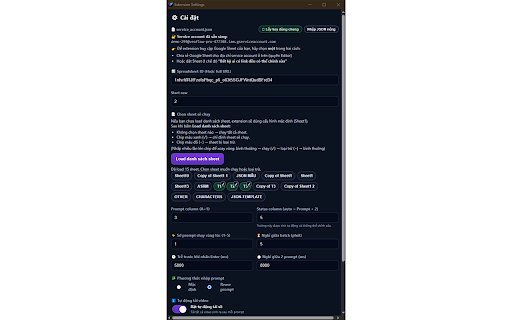


VeoFlow Pro là Chrome Extension kết nối trực tiếp Google Sheets với VEO3 Labs. Gửi prompt từ Sheet, tự phát hiện render, tự tải MP4 và cập nhật trạng thái 2 chiều ngay trên Google Sheets — nơi mọi team chuyên nghiệp đều vận hành công việc mỗi ngày. Dù bạn là người mới, freelancer hay một agency hàng chục người, VeoFlow Pro biến Google Sheets thành trung tâm điều phối sản xuất video cho cả đội.

Auto Flow
Auto Flow generation queue for Google Flow. Auto Flow is a workflow tool for Google Flow that helps creators run image and video generation batches from a side panel. Use it to queue prompts, attach reference images, map references to specific prompts, monitor live progress, and download finished media with organized filenames. Auto Flow supports text-to-image, text-to-video, frame-to-video, and ingredients-to-video workflows for users who create many Flow outputs and need faster batch control.

DARK MEDIA GROUP VEO3
🇺🇸 ENGLISH 🎬 DARK MEDIA GROUP VEO3 — Bulk AI Video Automation for Google Flow Stop generating videos one by one. Paste your prompts, click Start, and DARK MEDIA GROUP handles everything — typing, submitting, waiting, and downloading all your videos automatically with the correct file names, organized into folders. 💎 PREMIUM EXTENSION (24H FREE TRIAL) This is a professional automation tool. Upon installation, you get an automatic 24-hour Free Trial to test all features with zero restrictions. After the trial period, a PRO License is required to continue using the extension. ⚡ Dual Submission Engine (NEW v37!) • Classic Mode: Types prompts character-by-character into the Slate editor — reliable and battle-tested. • API Mode: Submits prompts directly via Google Flow's REST API — dramatically faster, skips the typing step entirely. Choose the best mode for your workflow in Config. 🛡️ DOM Contracts — Self-Healing Selectors (NEW v37!) • Google changed their UI? No problem. All CSS selectors are centralized in a smart contract system with multi-strategy fallbacks. • The extension automatically tries alternative strategies if one breaks — zero downtime when Google updates Flow. • Built-in Diagnose tool validates all contracts in real-time. 🎭 Character Consistency (NEW v37!) • Select a persistent character from Flow's Characters tab — your character stays consistent across ALL prompts. • Characters come with embedded voices, so the same person speaks throughout your entire video batch. • Works seamlessly with Ingredients for maximum visual consistency. 🎙️ Integrated Audio Mode • No more external voice tools: Your videos come straight out of Veo 3 with the speech already perfectly attached! • Voice Selection: Choose from dozens of voices categorized by type (Male, Female, Neutral), each with specific tones (deep, soft, upbeat, etc). • Voice Testing: Exclusive button to test the voice and find the perfect vibe before spending your generation credits. 📝 Bulk Prompt Automation • Paste multiple prompts separated by a blank line or import from .TXT files • Auto-types and submits each prompt using a 2-phase pipeline: sends all prompts first, then scrolls and downloads • Configurable delay between prompts (default: 5s) • Supports 200+ prompts per session — battle-tested with real production batches 🧬 Ingredients — Reference Images (v2) • Use 1, 2, or 3 reference images for visual consistency across all prompts • Automatically selects your chosen images before each prompt • Smart detection: use [1], [2], [3] markers in your prompt text to control how many images per prompt • Use [-] to skip ingredients on specific prompts • Test button to verify ingredient selection before starting 📁 Organized Downloads • Set a custom folder name in Config — all videos download into one subfolder • Example: set "vid_11" → Downloads/vid_11/PROMPT_001.mp4, PROMPT_002.mp4... • No more scattered files across your Downloads folder ⬇️ Smart Auto-Download with ETA • Automatically downloads all generated videos after submission • Intelligent numbering: PROMPT_001.mp4, PROMPT_003.mp4... (skips failed ones!) • Real-time ETA display showing estimated time remaining • 3-pass scroll system to catch all videos even on large batches • Never downloads duplicates — tracks unique video IDs across sessions 📊 Real-Time Video Dashboard • Visual grid showing which prompts generated videos and which failed • Live stats: Generated / Failed / Downloaded counts • See exactly which prompt numbers are missing — no more guessing! 🆘 SOS Mode — Emergency Recovery • Power outage? Connection drop? Recover your videos manually • Click Capture → scroll the Flow page → click Download • Captures all visible videos with correct prompt numbering • Failure report: shows exactly which prompts were NOT generated by Veo 3 ⚡ Full Session Control • Stop at any time — then Resume Downloads to grab what's ready • Real-time progress bar with percentage and ETA • Detailed execution log with timestamps • 🔔 Audio notifications: success chime when done, warning tone for partial failures • Auto-reinjects content script if connection drops • One-click Reset to restart all prompts 📊 Error Handling & Recovery • Failed prompts tracked with specific error reasons • Dedicated error panel with one-click Retry All • Copy failed prompts to clipboard or export as .TXT • Built-in Diagnose tool to check page state and troubleshoot issues 🌍 Bilingual Interface • Full Portuguese (PT-BR) and English support • Switch language anytime in Config — instant UI rebuild 🔒 Privacy & Security • Zero data collection — nothing leaves your browser • Everything runs 100% locally • No external servers, no analytics, no tracking Go to labs.google/fx/tools/flow Open the DARK MEDIA GROUP VEO3 side panel Add your prompts (paste or import .TXT) (Optional) Select a Voice or Character (Optional) Set a download folder in Config (Optional) Enable Ingredients and select reference images Click ▶ Start Automation — Phase 1 sends all prompts, Phase 2 downloads all videos! 💡 Perfect For • Content creators generating videos in bulk (YouTube, TikTok, Reels) • Video production pipelines with 50-200+ clips per session • AI video enthusiasts who want full automation

Isfahan Auto Flow
Isfahan Auto Flow - Automation for VEO AI Isfahan Auto Flow is a powerful browser automation extension designed to simplify and accelerate your workflows with VEO AI and modern web tools — without writing code. Whether you’re a creator, marketer, researcher, or operations professional, Isfahan Auto Flow helps you automate repetitive browser actions, streamline prompt execution, and manage AI-powered workflows efficiently from your browser. • Automate repetitive browser actions with one click • Trigger and manage VEO AI workflows directly from your browser • Save, reuse, and organize prompt-based automation flows • Reduce manual work and improve productivity • Works seamlessly in the background with minimal performance impact • Clean, lightweight, and easy-to-use interface • No coding required — designed for both beginners and power users 🎯 Who is this for? • AI creators and prompt engineers • Digital marketers and growth teams • Operations and automation professionals • Anyone who wants to save time on repetitive web tasks Most automation tools are either too technical or too limited. Isfahan Auto Flow strikes the perfect balance — powerful enough for advanced automation, simple enough for everyday use. You stay focused on outcomes. The extension handles the repetition. Isfahan Auto Flow does not collect, sell, or share your personal data. All automation runs locally inside your browser unless you explicitly connect external services. Install the extension Open the Isfahan Auto Flow panel Configure or load your automation flow Click run — and let automation do the rest 🛠 Support & Feedback We’re continuously improving Isfahan Auto Flow. If you have feedback or feature requests, we’d love to hear from you. Save time. Reduce friction. Automate your browser. Install Isfahan Auto Flow and turn repetitive work into one-click workflows.

Auto Flow Pro - Automation for VEO AI
Automate video generation on Google Flow with batch processing. Free tier: 50 videos/day. Developed by Flow Automation. Auto Flow Pro is the most reliable bulk automation extension for Google Flow (VEO AI). Generate hundreds of Veo 3.2 videos and Nano Banana Pro images automatically — set it once, walk away, come back to a downloaded library. Built by a registered software company in Dhaka, Bangladesh. Trusted by content creators, agencies, and YouTubers worldwide. ✅ TRUST & TRANSPARENCY: - Built by a registered software company (Mamun Software Solutions) - Real website with full Terms, Privacy, and Refund policies - Stripe-secured payments — no card data stored - Human support via WhatsApp, email, and website - Chrome Web Store "Good Record" badge 🚀 WHAT AUTO FLOW PRO DOES: Auto Flow Pro fully automates Google Flow workflows at labs.google.com/fx/tools/flow. It submits prompts, monitors progress, handles retries, and downloads completed videos to organized folders — all without any manual clicking. Process 10 prompts in parallel for true bulk speed. ⚡ KEY FEATURES: ✅ Bulk batch processing — up to 10 prompts simultaneously ✅ Auto Veo: Text-to-Video, Frames-to-Video, Ingredients-to-Video ✅ Auto image generation with Nano Banana, Nano Banana Pro, Imagen 4 ✅ Import prompts from TXT, DOCX, and JSON files ✅ Auto-download with organized folder structure and clean naming ✅ Real-time progress tracking with detailed logs ✅ Pause, resume, stop, or skip individual prompts ✅ Smart retry logic for failed generations ✅ Resume any interrupted batch from any task number ✅ Session management with unique download folders ✅ Modern, clean side-panel UI with dark mode PRO plan: - Unlimited videos per day - Unlimited batch processing - Unlimited outputs per prompt - Priority queue - Priority email and WhatsApp support 🎯 PERFECT FOR: - YouTubers generating Shorts at scale - Marketing agencies producing client video content - Dropshippers creating product videos - TikTok creators batching vertical content - Educators producing course material - Anyone tired of manually clicking "Generate" 1,000 times 🌍 WHY USERS SWITCH TO AUTO FLOW PRO: - Newer model support (Veo 3.2 + Imagen 4 — most competitors stuck on Veo 3.1) - True parallel batch (10 prompts at once) - Real company, real website, real human support - Consistent updates, the day Veo ships new features - Modern UI built for power users 📲 HOW TO START: 1. Click "Add to Chrome" 2. Create a free account at flowautomation.store 3. Open Google Flow (labs.google.com/fx/tools/flow) 4. Add your prompts (paste, import file, or upload images) 5. Configure batch settings and click Start 6. Watch your video library fill up automatically 🔐 PRIVACY & PERMISSIONS: We take privacy seriously. The extension stores all your prompts and queue data locally on your device. Only your email is collected (for account login). No prompts, no videos, no personal data are shared with third parties. All server traffic uses HTTPS. Permissions: - activeTab — interact with Google Flow pages - downloads — save generated videos to your computer - storage — save your settings and queue locally - sidePanel — display the extension UI - notifications — alert you when batches finish - scripting — automate Flow's interface 🚀 VERSION 3.0.0 — May 4, 2026 Major release. Completely rewritten from the ground up. NEW: ✅ 4 Creation Modes: Text-to-Video, Frames-to-Video, Create Image, Ingredients-to-Video ✅ 6 AI Models supported: Veo 3.1 Fast, Veo 3.2 Quality, Nano Banana, Nano Banana Pro, Imagen 4 ✅ Redesigned modern UI with glass-morphism side panel and dark mode ✅ In-app announcements for important updates ✅ Pro version now available — unlimited videos, unlimited batch processing IMPROVED: ✅ Batch processing up to 10 concurrent prompts ✅ Rolling window processing for large queues (500+ prompts) ✅ Multi-format prompt import: TXT, DOCX, JSON ✅ Smart queue controls — pause, resume, stop, skip ✅ Automatic retry on failed generations ✅ Real-time progress monitoring per prompt VERSION 2.0.0 — March 15, 2026 ✅ Account system with OTP email verification ✅ Pro version introduced with unlimited daily videos ✅ Usage tracking and daily limits VERSION 1.0.0 — February 1, 2026 ✅ Initial release with text-to-video automation on Google Flow 📌 IMPORTANT: - This is a third-party tool, not affiliated with Google or Veo. - Video generation runs on Google's servers; Auto Flow Pro automates the interface only. - Requires an active Google account with Flow access. - Works only on labs.google.com/fx/tools/flow. Install Auto Flow Pro today and turn hours of clicking into minutes of setup. Free plan available — try before you upgrade.
