
poadogbppaepbjmllhodbnpcefpcjkgb

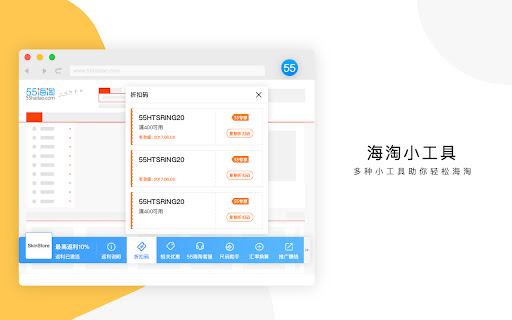
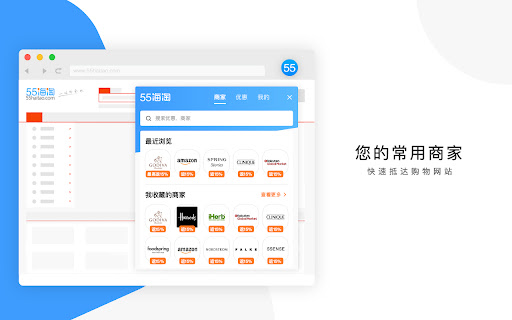

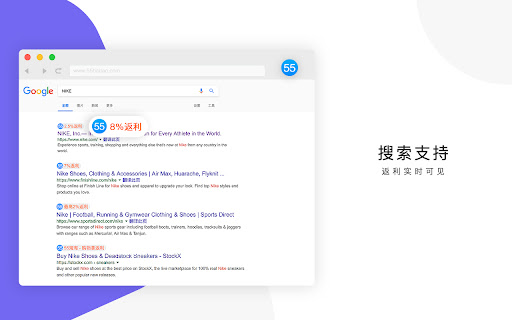
55海淘返利助手:一键激活返利模式,再也不用担心忘走返利链接! 当您在跨境购物时自动帮你获取订单返现,返现将自动发放至您55海淘账户.55海淘网是目前值得信赖的专业海淘站,包括美国主流的海淘网站,详尽的海淘网址大全,更是目前国内早期的中文海淘返利网,让海淘族尽享海淘购物乐趣; 使用本插件默认同意55海淘用户隐私协议https://www.55haitao.com/help-6.html

云神价-购物点点
访问主流电商商品页面时会全自动购物比价、库存查询、历史价格、降价推送、同款搜索、优惠计算等诸多功能为一身的网购必备浏览器插件 1、修复已知问题 主要功能: 1、访问主流电商商品页面库存查询、历史价格比价、优惠信息、神价客最优购买计算等功能 2、京东订单列表页面自动换算商品单价功能 3、京东影子商品判断并显示主品价格及连接 4、京东活动凑单页显示神价客信息且根据折扣不同显示不同颜色背景 5、划词搜电商功能,在任何网页鼠标划词后右键选择电商即可 6、快捷键截图时自动隐藏收货地址栏信息 7、云神价的神价格、白菜价商品弹窗提醒功能 8、云关注功能对京东的任何商品可以设置价格及库存的关注,由云端负责监控达到条件则会第一时间通过邮件及浏览器弹窗的形式进行通知。 9、搜同款、快复制功能 (当鼠标移至插件范围内则自动显示相关快捷操作菜单)且支持任何网页中的图片点击右键均可按该图在淘宝搜索同款商品

TopCashback USA Get Cash Back & Coupons
Join over 25m members worldwide and earn money back when you shop online with the TopCashback browser extension! What are you waiting for? Shop and earn cashback at over 7,000 online stores with the highest cashback rate guaranteed. Our TopCashback browser extension is the go-to money-saving tool that helps you: ⦿ Earn cash back Shop directly from your favorite store and activate the cashback rate by clicking the TopCashback hummingbird logo at the top of your browser. You’ll never miss a chance to save or earn cashback again. ⦿ Get notified of cashback rates directly in your favorite search engine When you're browsing the web on Chrome or Firefox, you’ll be able to see which stores offer cashback and/or have coupons available right in the search results. ⦿ Easily view and search your favorite stores Not sure if you can score cashback at a specific store? Simply click the TopCashback hummingbird logo at the top of your browser and search for your favorite retailer. If we offer cashback, it will automatically populate with the store name which you can click and then shop and earn cashback. ⦿ Score coupons and deals And while you’re viewing your favorite stores, you can even snag some of the best deals around. Take a look under “Best Deals” for some of our favorites, or if you’re already shopping at your favorite store, click the TopCashback hummingbird logo at the top of your browser to view store-specific sales and coupons to help you save even MORE money. ⦿ PLUS Auto Coupons When you get to a store’s checkout page you may receive a notification that we found a coupon for you and can automatically add it to your basket. This’ll make it even easier for you to save money while you shop. By clicking “Add to Chrome,” you agree to the additional TopCashback Browser End User License Agreement: https://www.topcashback.com/Dyn/notifier-EULA How does the cash back process work? We use affiliate programs to provide you with cash back. So, when you click through to a retailer advertised on our site or browser extension, we're in effect acting as an advertising agent for the retailer by sending it online customers and traffic. In return for this, the retailer (and its tracking agency) pays us commission. It's this commission that we pay to you as cash back. Because we hope to gain your loyalty and repeat business to continue building an even bigger and better site. We're proud to say we've already built up a hugely successful U.S. site and brand, which means we're currently earning and passing on to you the highest levels of cash back available.

迅雷下载支持
迅雷下载支持 该扩展用于实现迅雷接管Chrome浏览器的下载请求,方便的“多选下载”模式可以快速下载网页中的多个链接,并支持下载网页中的在线视频。 【注意】 1、非迅雷X官方客户端可能会无法使用! 2、如有问题及建议请加QQ群:578739634 【更新信息】 .2025-10.29 更新至3.52.14,修复已知问题 .2025-09.02 更新至3.52.13,插件接管下载后,允许用户返回浏览器下载 .2025-08.26 更新至3.52.12,解决自动开启多选快捷键shift+D带来的快捷键冲突问题 .2025-08.13 更新至3.52.11,解决个别站点自动触发下载问题 .2025-03.31更新至3.52.10:支持 Huggingface 魔搭 等大模型文件的一键批量下;支持wiki内的磁力链接支持唤起迅雷 .2024-12-27更新至3.52.9:修复bug .2024-12-25更新至3.52.8:优化在线视频站点适配 .2024-11-18更新至3.52.7:优化使用代理后插件失效的问题 .2024-11-18更新至3.52.6:优化插件小文件下载体验,修复已知问题 .2024-10-24更新至3.52.5:优化下载流程,修复已知问题 .2024-09-05更新至3.52.4:修复已知bug .2024-09-04更新至3.52.3:修复已知bug .2024-07-31更新至3.52.1:修复已知bug .2024-04-23更新至3.51:修复PC卸载后点击下载链接无反应 .2024-04-03更新至3.50:修复PC卸载后点击下载链接无反应 ·2024-02-27更新至3.49:修复了部分已知问题 ·2024-01-03更新至3.48:修复了部分已知问题 ·2023-12-29更新至3.47:【下载视频】兼容新视频格式 ·2023-12-18更新至3.46:修复了部分已知问题 ·2023-12-12更新至3.45:修复了部分已知问题 ·2023-12-07更新至3.44:修复了部分站点【存云盘】样式错误 ·2023-11-17更新至3.43:修复了Mac端空白标签页无法接管下载的问题 ·2023-10-20更新至3.42:修复了部分已知问题 ·2023-09-07更新至3.41:修复了部分已知问题 ·2023-08-30更新至3.40:上线老用户回归礼遇活动 ·2023-08-21更新至3.39:修复了部分已知问题 ·2023-08-08更新至3.38:支持网页链接【存云盘】,存云盘功能需与迅雷12客户端(12.0.0及以上版本)联动使用 ·2023-08-02更新至3.37:修复了部分站点无法调起下载的问题 ·2023-06-12更新至3.36:修复了部分已知问题 ·2023-04-21更新至3.35:优化了部分下载体验 ·2023-02-09更新至3.34:支持【投屏在线视频】,投屏功能需与迅雷11客户端(11.4.2及以上版本)联动使用 ·2022-09-19更新至3.33:优化了部分下载体验 ·2022-08-31更新至3.32:插件修复页面失活时,点击插件图标出现弹出失败;修复部分页面接管异常等BUG;修复下载结果异常的问题 ·2022-08-12更新至3.31:插件支持window平台chrome和mac平台chrome;修复取消接管异常功能及扩展升级MV3协议 ·2022-04-29更新至3.30:修正部分文件下载乱码的问题,优化下载接管 ·2021-07-16更新至3.29:新增【图片批量下载】功能 ·2021-03-19更新至3.27:继续修正影响网页样式的问题 ·2021-03-19更新至3.26:修正影响网页样式的问题 ·2021-03-15更新至3.25:采用重新设计的未安装迅雷对话框 ·2021-02-04更新至3.24:修正在【飞书文档】中按下Shift+D误触发【多选下载】的问题 ·2020-10-22更新至3.23:修正部分下载请求无法接管的问题 ·2020-05-26更新至3.22:新增“多选下载”快捷键开关 ·2020-01-06更新至3.20:鼠标焦点处于编辑框时,不触发多选下载快捷键。 ·2019-11-28更新至3.19:默认下载接管更加可靠了,因此移除强力接管功能。并修正部分邮箱附件无法下载的问题。 ·2019-11-19更新至3.18:继续修正部分站点Cookie传递错误的问题。 ·2019-11-19更新至3.17:修正在视频元素上点右键进入“多选下载模式”后,无法退出该模式的问题 ·2019-11-18更新至3.16:新增“多选下载”模式(快捷键Shift+D)。修正部分站点Cookie传递错误的问题。 ·2019-11-08更新至3.15:修正先安装扩展,后安装迅雷X时,无法接管下载请求的问题。 ·2019-10-22更新至3.14:实时同步迅雷X的不接管站点列表。 ·2019-10-15更新至3.13:修正无法接管左键点击下载请求的问题。 ·2019-10-12更新至3.12:优化“在线视频检测”功能的兼容性。 ·2019-10-10更新至3.11:新增“在线视频检测”功能,可在工具栏菜单中关闭。 ·2019-07-23更新至3.10:修正某些302跳转无法捕获下载的问题。修正某些页面引用页为空,导致无法取消接管的问题 ·2019-05-17更新至3.8:优化默认接管实现方法,大幅提升未“开启强力接管”时的接管成功率 ·2019-04-02更新至3.6:修正无法接管百度搜索结果列表中的下载请求的问题 ·2019-03-27更新至3.5:恢复更新,兼容迅雷X、迅雷9,解决老版本的一些问题 ·2014-08-08更新至3.1:采用Native Messaging API实现,支持最新版本Chrome浏览器,包括64位版本。支持按Ctrl键点击下载地址时不拉起迅雷。 ·2014-05-22更新至2.12:在2.10版本基础上,解决弹出“true”提示的问题 ·2014-05-16更新至2.11:临时更新到2.11,代码回退至2.9,解决弹出“true”提示的问题 ·2014-05-16更新至2.10:地址栏右侧“迅雷”图标增加“监视动态链”选项(即“Chrome Downloads API”的支持开关)。解决可能栈溢出引起崩溃的问题 ·2014-04-17更新至2.9:修正Chrome更新至34之后,地址栏右侧迅雷图标中菜单点击无效的问题。 ·2014-04-02更新至2.8:扩展所包含dll加数字签名。 ·2014-03-18更新至2.6:采用Chrome Downloads API实现下载请求监视,大幅提升监视准确性! ·2013-10-11更新至2.5:在Chrome工具栏增加迅雷扩展的入口,可设置“启用迅雷Chrome支持、本页面不关联迅雷、本网站不关联迅雷”并增加反馈建议的菜单项。 ·2013-08-28更新至2.4:优化动态链接监视逻辑,只监听常用下载站点的动态链 ·2013-06-25更新至2.1:支持动态链接的监视。支持从迅雷7客户端的监视设置中获取监视文件类型 ·2013-02-04更新至1.11:修正右键使用迅雷下载时,Cookie参数格式不正确的问题 ·2013-01-04更新至1.10:支持Cookie参数传递 (例如:使用Chrome浏览器拉起迅雷下载“迅雷快传”上的文件,将获得更快的下载速度) ·2012-09-19更新至1.9:支持最新版本Chrome

BP Proxy Switcher
Change your proxies with one click With our Chrome proxy addon, you can easily load your proxy list from the clipboard or a URL and switch between them with a single click. Display the country for each proxy.Clear the cache before switching to a new proxy. Automatically reload the current tab when changing proxies. Rotate proxies automatically at intervals you specify. Exclude certain URLs from using the proxy. Block specific URLs from loading. Note: Due to Chrome's limitations, it's not possible to set a different proxy for each tab. The proxy will be applied across the entire Chrome profile.
