
pnpkddhaeadgjpmmcahamnicmplobkci
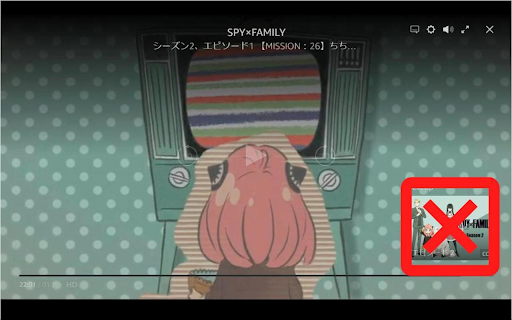
Hides next up card and other obtrusive elements of Amazon Prime Video. The following features are implemented: ◆Hide next up card ◆Skip ads ◆Hide reactions (like/not for me) ◆Hide featured items ◆Hide skip intro button ◆Hide rating ◆Prevents darkening when overlay display is enabled - You can also add black outlines for texts and icons ◆Hide X-Ray ◆Hide various text and buttons - (While holding down the show key and operating the mouse, it will become temporarily visible) - title - episode title - close button - various buttons in the top right - seek bar - playback time - control buttons in the bottom center - next episode button ◆Monitor and modify network activity - Force playback at highest resolution - Remove ad related data - Change autoplay flag to true - Disable featured items - Disable reactions (like/not for me) - Play the next episode if the video is automatically closed at the end of the video An options icon will be added in the upper right corner of the video that allows you to open the options dialog. (It is also possible to open the options dialog from the context menu.) The options dialog allows you to enable/disable the above features. The options dialog can also be opened by pressing `Alt + P / Option + P`. (Shortcut keys can be changed) If you change the options, please reload the page. This extension runs on primevideo.com and on Amazon in all countries. However, it has only been tested on amazon.co.jp.

Clean-Spam-Link-Tweet
ツイート(返信)から悪質なリンクが記載されたツイートを可視化してナイト系スパム等のリンクを踏む事を阻止します。 FireFox版もあります!: https://addons.mozilla.org/ja/firefox/addon/clean-spam-link-tweet/ iOS/iPadOS版もあります!: https://apps.apple.com/jp/app/clean-spam-link-tweet/id6503911724 Twitter上に良く出現するbnc[.]lt等の「ナイト系」等と呼ばれる悪意のあるスパムリンクを分かりやすく可視化する事により、リンクを踏んでしまう事を未然に防ぐことや画面上から消し去る事ができる拡張機能です。 990種類以上のスパムリンク阻止が可能です。 アラビア文字が含まれた「インプレ稼ぎ(ゾンビ)」と呼ばれる悪意のある返信も設定次第である程度消し去ることができます。 搭載機能 ・スパムリンク阻止 ・スパムリンク非表示機能

Flow Chat for YouTube Live
Chrome Extension for Flow Chat Messages on YouTube Live. - Flow messages over the video. - Change color, size and speed for messages. - Show author and avatar on messages. - Show super chats and super stickers. - Filter banned words. - Add helper menu buttons on the chat list.

Control Panel for Twitter
Gives you more control over Twitter and adds missing features and UI improvements Control Panel for Twitter is a browser extension for Twitter - its main goals are to reduce the amount of algorithmic content you see, give you more control over your timeline and make the UI less distracting. By default, your Home timeline will be the reverse-chronological "Following" timeline, which will only contain tweets and quote tweets from the people you follow. The algorithmic "For you" timeline will be hidden, and Control Panel for Twitter will keep you on "Following" if Twitter tries to automatically take you off it. Everything is configurable, so start by opening the options popup and customizing to your liking. Changes you make in the options will be applied immediately. • Use the "Following" (chronological) timeline by default • Hide the "For you" (algorithmic) timeline • Retweets • Show in separate tab / Hide • Quote Tweets • Show in separate tab / Hide • Enable muting of Quote Tweets • Hide "See new Tweets" • Hide "Who to follow", "Follow some Topics" etc. in the timeline • Hide inline prompts in the timeline • Full-width timeline content • Hide the sidebar and let timeline content go full-width • Add "Add muted word" to the "More" menu • Fast blocking (skips confirm dialog) • Hide quotes and replies to blocked and muted accounts • Hide Retweets in user profiles • Retweets in Lists • Default to "Latest" tab in Search • Hide the quoted tweet when viewing Quote Tweets • Redirect to twitter.com • Tweak new layout • Hide Toggle navigation • Replace X branding changes • Hide Views under tweets • Hide "Verified" Notifications and Followers tabs • Restore headlines under external links • Restore Quote Tweets link under Tweets • Restore other links under Tweets • Default sorting of replies • Latest / Likes • Premium blue checks • Replace with Twitter Blue logo / Hide • Hide Premium blue check replies • Hide Premium upsells • Hide Grok • Hide Jobs • Hide Subscriptions • Don't use the Chirp font • Disable bold and italic text in tweets • Use normal text font style in navigation bar • Navigation density • Comfortable / Compact • Use normal font weight in dropdown menus • Uninvert Follow / Following buttons • Monochrome / Themed • Unblur sensitive content • Hide sidebar contents • Hide Explore page contents and use it only for searching • Hide "Discover more" tweets • Hide metrics • Reduced interaction mode • Hide the action bar under tweets – replies are now the only means of interacting • Hide the Compose Tweet button • Disable the home timeline • Find yourself wasting too much time on Twitter? Try preventing use of the home timeline • Notifications • Hide badges only / Hide Hide UI items you don't use • Bookmark button under tweets • Share button under tweets • "View post engagements" under your tweets • Tweet box in timeline • Account switcher • Messages drawer • Explore • Communities • Hide "More" menu items you don't use TWITTER, TWEET and RETWEET are trademarks of Twitter Inc. or its affiliates

Prime Video Enhancer
Enhance your Amazon Prime Video experience Prime Video, without the distractions. Hide X-Ray, stop autoplay, fix your subtitles — all with a single key press, no account, no data collection. X-Ray spoiling the cast reveal before you're ready. Autoplay jumping to the next episode before the credits end. Subtitles the wrong size, the wrong colour, impossible to read. Prime Video Enhancer turns every one of those frustrations off. Changes apply instantly. Nothing leaves your device. YOUR FIRST 60 SECONDS Install, refresh Prime Video, and press: 1 — Hide the title overlay 2 — Hide episode and season info 3 — Hide X-Ray 4 — Hide the control overlay Four key presses. A completely clean Amazon Prime Video player. Every other feature works the same way: instant, reversible, no page refresh needed. • Hide X-Ray — Prevent cast names, trivia, and scene information from appearing on hover before you are ready to see them • Hide Title Overlay — Remove the video title bar that covers the picture during playback • Hide Episode Info — Remove episode descriptions that reveal upcoming plot points before you have watched them • Hide Control Overlay — Remove the playback controls for immersive, cinema-style viewing • Hide Play/Pause Buttons — Conceal the large center play, pause, and skip buttons • Hide Settings Menu — Remove the top-right configuration menu so nothing competes with the picture • Hide Progress Bar — Remove the scrub bar and time indicators for a completely clean screen • Hide Next Episode — Remove the Next Episode button and auto-advance card so series never jump ahead without you • Hide Next Up — Block Next Up overlays during end credits so you decide when the next episode starts • Manage episode transitions and credit interruptions independently for full control over your watch session • Custom colours — presets, colour picker, and hex input • Font size — increase or decrease with live preview • Font family — multiple options for legibility and personal preference • All subtitle settings persist automatically across viewing sessions • Eight speed options from 0.25x to 2.0x with smooth transitions • Fine-tune with +/- buttons and on-screen feedback for every change • Enable or disable the speed feature from the Speed tab — your preference persists across videos • Hold / during playback to see every available shortcut • Press ? for a persistent shortcuts panel that stays visible • Number keys 1-9 toggle features without opening the popup • Ctrl+Shift+Up/Down adjusts subtitle size; Ctrl+Shift+Left/Right cycles subtitle colours • All shortcuts can be disabled if you prefer mouse-only control • No personal data collected or transmitted • No access to your Amazon account or viewing history • All settings stored locally on your device only • No external analytics, tracking pixels, or third-party services • Network activity limited to Chrome Web Store update checks Compatible with all Prime Video regions worldwide. Runs on Chrome, Edge, Brave, and every Chromium-based browser across Windows, Mac, Linux, and Chrome OS. BUILT WITH COMMUNITY FEEDBACK • Hugo Lobato — Settings menu and progress bar toggles • Taketo Yanaka — International region support including Prime Video Japan • Suleman & John — Overlay display fixes after Prime Video updates • Seti KirhenNeiNar — Subtitle visibility improvements • Lloyd M — Hide Next Episode overlay control • Teodoro Cesar — Subtitle translucency fix Your feedback shapes what gets built next. Visit pvenhancer.com to suggest features or report issues. Install in seconds. Open the player, press a number key — changes apply instantly. Restore defaults anytime with one click. PVE is free and supported by users who choose to contribute. An optional "♥ Support" link in the popup opens pvenhancer.com/support — voluntary, never required. The extension itself collects no payment or personal data; payments are handled by Lemon Squeezy as a separate Merchant of Record. Prime Video Enhancer is an independent tool and is not affiliated with Amazon. Prime Video is a trademark of Amazon.com, Inc. This extension enhances your viewing experience through interface customisation and does not modify Amazon's service.
