
pnllkkbkkjkhebaeocnbfdcchnpfbbaa
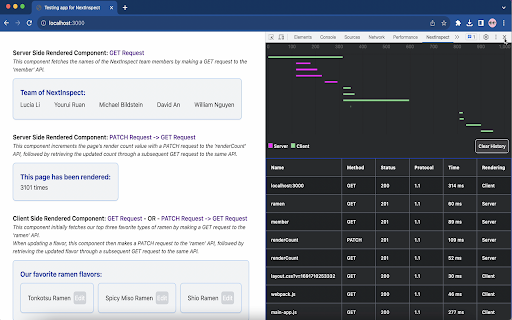
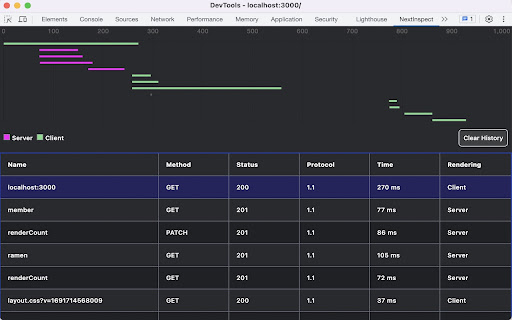
Network observability tool for Next.JS NextInspect is a developer tool that allows Next.js developers to see network request metrics in Server Side Rendered(SSR) components. Metrics are displayed in a format similar to the native Chrome network devtools, so onboarding and usage is a breeze. Metrics for network requests made in Client Side Rendered components are also shown, eliminating the need to click back and forth between the native Chrome devtools and NextInspect. Please also install the NPM package for NextInspect onto your Next.js app.

NextScraper
Easily view & export data from Next.js/React sites. Generate snippets in multiple languages to jumpstart your web scraping project. 🚀 NextScraper - Supercharge your web-scraping project! 🚀 NextScraper helps you analyze and export data from Next.js and React websites, so you know exactly how to build your next web-scraping project. Use the generated code snippets to jumpstart your next scraping project, scraping pure JSON data from pages without the overhead of loading a headless browser! 📊 Scrape Data from React/Next.js Sites: Extract information from dynamic web applications instantly. Analyze and explore it right in NextScraper. 💾 Export Data: Export data from Next.js and React sites with ease. Download JSON files in one click. ✍️ Code Snippet Generator: Save time by letting NextScraper create fast code snippets that allow you to scrape data without loading a headless browser. Your data stays secure within your browser. NextScraper does not collect any analytics, and the source code is openly available on GitHub. Build it yourself with the instructions below for peace of mind. Read our Privacy Policy on Github for more details. 🌐 Connect with Me! If you like this extension, connect with me on X, follow me on LinkedIn, check out my GitHub, or buy me a coffee! ☕

Next DevTools
Quickly check the props of a NextJS website, inspect all props on hover. Add a badge icon to indicate when the page props for a… Quickly check the props of a NextJS website, inspect all props on hover. Add a badge icon to indicate when the page props for a given page are too heavy in NextJS. It will only works for first page load. When using the `Link` component you may consider have a look at the "NextJS DevTools" panel that this extension is adding in the DevTools. Icons are from the CoreUI Icons set (see https://github.com/coreui/coreui-icons?ref=iconduck.com).

RSC Devtools
This is a tool that lets you record streaming data from React Server Components to then visualize and explore it. You can see how your components and data are loading and in what order and it lets you travel back in time by dragging the timeline slider.

Apollo Client Devtools
GraphQL debugging tools for Apollo Client. Apollo Client Devtools is a Chrome extension for the open-source GraphQL client, Apollo Client. This extension has 4 main features: 1. A built-in version of the Apollo Studio Explorer that allows you to make queries against your GraphQL server using your app's network interface directly (no configuration necessary). 2. A query watcher that shows you which queries are being watched by the current page, when those queries are loading, and what variables those queries are using. 3. A mutation inspector that displays the mutations made to your Apollo Client application data. 4. A cache inspector that displays your Apollo Client cache data. You can explore the cache through a tree-like interface, and search for specific field keys and values. Code for this extension can be found at: https://github.com/apollographql/apollo-client-devtools
