
kjlhnflincmlpkgahnidgebbngieobod
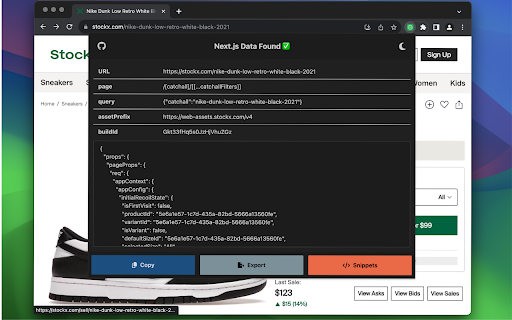


Easily view & export data from Next.js/React sites. Generate snippets in multiple languages to jumpstart your web scraping project. 🚀 NextScraper - Supercharge your web-scraping project! 🚀 NextScraper helps you analyze and export data from Next.js and React websites, so you know exactly how to build your next web-scraping project. Use the generated code snippets to jumpstart your next scraping project, scraping pure JSON data from pages without the overhead of loading a headless browser! 📊 Scrape Data from React/Next.js Sites: Extract information from dynamic web applications instantly. Analyze and explore it right in NextScraper. 💾 Export Data: Export data from Next.js and React sites with ease. Download JSON files in one click. ✍️ Code Snippet Generator: Save time by letting NextScraper create fast code snippets that allow you to scrape data without loading a headless browser. Your data stays secure within your browser. NextScraper does not collect any analytics, and the source code is openly available on GitHub. Build it yourself with the instructions below for peace of mind. Read our Privacy Policy on Github for more details. 🌐 Connect with Me! If you like this extension, connect with me on X, follow me on LinkedIn, check out my GitHub, or buy me a coffee! ☕

HTML to React
The fastest and smartest way to analyze HTML elements and generate full React component representations. HTML to React is an extension that helps you convert any website element into a React component. It analyzes HTML semantics, CSS style sheets and compiles the selected DOM element into JSX code. It is in open beta, so expect more features coming soon!

React Click To Component
React Click To Component, a Chrome extension to open a React component in the editor by clicking on it. React Click To Component, is a Chrome extension to open a React component in the editor by clicking on it. `Option + Click` (on MacOS) or `Alt + Click` (on Linux/Windows) takes you to the code editor The extension also supports TurboPack builds where the project root is not exposed. You'll just need to setup the project root file when prompted. The updated value can be manipulated on the localStorage as required. To see how this works, checkout the repo at and raise any issues on the extension at the GitHub repository. And if you like the extension, star the repo too! Features - Option + Click or Alt + Click on a component to open the file in an editor - Highlight the component name when hovering over it with Option/Alt key pressed - Supports Turbopack builds with manually defined project roots (that can be changed simply by updating the localStorage key clickToReact-projectPath-{HOST}) - Now the extension copies the path to clipboard instead of opening the file, for editors that doesn't support opening file:// URLs. You can set the editor with clickToReact-editor-{HOST} localStorage key.

NextInspect
Network observability tool for Next.JS NextInspect is a developer tool that allows Next.js developers to see network request metrics in Server Side Rendered(SSR) components. Metrics are displayed in a format similar to the native Chrome network devtools, so onboarding and usage is a breeze. Metrics for network requests made in Client Side Rendered components are also shown, eliminating the need to click back and forth between the native Chrome devtools and NextInspect. Please also install the NPM package for NextInspect onto your Next.js app.

React code finder
Chrome extension for React Developer Activate the extension in your development environment and [right-click] to find and modify the component's source code right away! ## Intro React Code Finder is a powerful development tool extension designed for Chrome. This extension aims to help React developers inspect, interpret, and edit code more efficiently and swiftly right from the web browser. ## Features - Code Tracking: Just by pointing your mouse, you can track any React component on your web page. This tool will highlight the exact location of the source code file, down to the specific line and column of the component. - Live Code Editing: An editor built into the dev tools panel allows for instant code alterations. You can apply the code changes directly within your browser, eliminating the need for a separate text editor or IDE. ## Who Will Benefit React Code Finder is incredibly useful for: - Developers who are working with web development using React - Developers who want to quickly locate parts of their code - Developers who wish to edit code in real-time and see the changes within the web browser ## Install Adding React Code Finder to Chrome is simple. Just head over to the Chrome Web Store and click on the 'Add to Chrome' button. The extension will then be ready for use. ## How to Use In order to get the most out of React Code Finder, you'll need a command-line interface (CLI). Here are the steps: 1. Install the CLI: Run the command `npx react-code-finder-server` to execute the necessary CLI for React Code Finder. (If you want to use specific port, add -p flag. ex. `-p 8080`) 2. Launch React Code Finder: Once you have the CLI running, you can launch React Code Finder via your Chrome browser. 3. Start Navigating and Editing: Navigate to the web page you wish to inspect. Now you can start tracking and directly editing the React components using the dev tools panel editor. With React Code Finder, I aim to facilitate a smoother and more efficient development process. Experience a more productive development environment with React Code Finder today! Does not work with React server components (RSC). This extension works based on cross-references between state node(HTMLElement) and ReactElement. 2.2.0 (2024.10.16) - New: Added auto on/off feature: react-code-finder is now automatically enabled/disabled when you open or close it in devtools. - Added the ability to open the IDE even if the react-code-finder-server is not running. Preferred IDE can be modified on the options page (default: vscode) 2.1.0 - Fixed bug with 2 or more react rootFIber conflicts - Added a viewer to see the props of the current source
