
pniegmhajhkebcalmfalpjjhmgfipibc

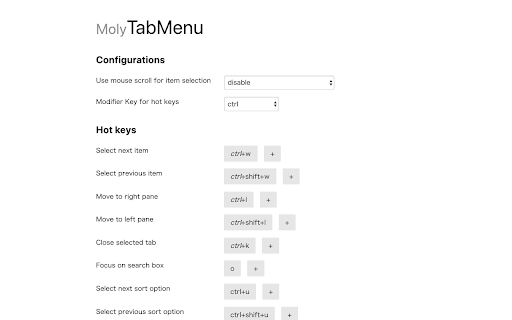
Moly Tab Menu enables you to look up opening tabs and jump into one of them effortlessly. You can navigate between tabs using keyboard shortcuts and/or mouse scroll. It is quick to jump into a recently opened tab because tabs are arranged in the activated order by default. Other sort orders are also available for better navigation according to use cases. You can also type some characters to filter tabs by its name. It not only offers the opening tabs view but also recently closed tabs view and page history view. These views enable you to find and open whatever tabs/pages efficiently. All keyboard shortcuts are customizable in the options page.

Awesome Button Bar
Button bar, combining downloads, bookmarks, extensions, history, view source, print, and more from a single button. Awesome! Extensions, history, downloads, bookmarks, view source, options, new window, and print are all here. Recently added buttons are duplicate tab, second home, and refresh all tabs. Showing each button on the bar is optional so you don’t have to have them all if you don’t want them all. Also, each button can be configured to open either in the current window or in a new window. Note: print to a new window now works too!

tabtiles
Control your tabs with tiles - useful for large monitors and full screen (F11) browsing. This extension displays a window's tabs in a bar along the top or bottom of the screen, useful for when browsing in full screen (F11) mode. The tiles are larger, so easier to click on than the usual browser tabs. Now includes touch support if you have a device with touch capability. It also allows navigating through the tabs using the keyboard, using the left and right keys. Press Enter to select a tab. Type-to-search: start typing to enter keywords in the tabtiles address bar, press Enter to search. Choose when to display the bar: for normal restored windows, when maximized or in full screen mode. And / or auto-hide when not in use. Customize the size of the bar, to a percentage of the window height. Show popup hints, containing the full title and address of the page. Check out my other extension - search the web store for Last Tab Back. 0.9.5 Fix an issue where closing a tile removes the tab but not the tile until a later refresh has occurred 0.9.4 Added a setting to configure the main homepage (left click new tab or home), in a similar way to the alternate (right click new tab or home) 0.9.3 Added touch support to allow scrolling left and right through tabs. Also re-enabled lasttabback integration after some fixes 0.9.2 Disable lasttabback integration for now 0.9.1 Update to Manifest V3 and add bug fixes 0.9.0 Hide when viewing some media players full screen 0.8.13: Changed to allow clicking through to the page in areas where there aren't any tabs; now shows Untitled for pages with no title, and PDF Document for .pdf files - to allow the pdf viewer buttons to be clicked more easily 0.8.12 - Manually disable type-to-search or keyboard tab navigation; now allows 1-pixel activation height for auto-hide mode; set interval for hiding or switching back to mini mode; middle mouse button closes tab. 0.8.11 - Selected tab now has extra highlighting to make it easier to quickly locate. Fixed a bug where mouse clicks outside of the bar sometimes select a different tab when the button is released (i.e. when the mouse button was held down and then released at a different location). 0.8.10 - Changed to allow specifying the percentage size of mini mode compared to normal; also to allow setting the popup hint to "centered" 0.8.9 - The first (leftmost) button now shows the time and date in a hint. When using the wheel to move through tabs, mouse movement is deactivated until moved by a small amount. 0.8.8 - Added a history button within the address bar. Delete can now be pressed to close non-selected tabs when in keyboard navigation (left / right) mode. Fixed a bug that was preventing selecting tabs correctly if somehow no tab was selected 0.8.7 - Minor fixes for the new pinning integration 0.8.6 - Disabled displaying when printing the page (ie. on paper) 0.8.5 - Added support for pinning tabs - right click twice to do this 0.8.4 - Fixed minor zoom bug (not related to standard chrome zoom) 0.8.3 - Fixed a bug that caused the bar to go off screen at some chrome zoom levels 0.8.2 - Fixed bug in hide when right clicking the address bar close button 0.8.1 - Moving the mouse will cause the bar to be displayed, if it hasn't already. This helps with delays caused when the page being viewed tries to refer to slow / offline third party sites. Also, minor bug fixes 0.8.0 - Updated the button layout; click to close now snaps partly off-screen tiles to edges; fixed bugs relating to the bar not being displayed on some sites, and being damaged by chrome's translate feature 0.7.4 - Now allows address bar navigation to a new tab for both URL and search keywords; click-to-close message for selected tab is smaller for narrow tabs; fixed minor bugs 0.7.3 - Fixed a problem resizing tiles after some are closed (and auto-hide is enabled) 0.7.2 - Corrected issues regarding switching between mini and normal mode - wasn't re-sizing as intended 0.7.1 - Fixed bug where right-hand item does not correctly focus 0.7.0 - Initial release

MyMenu
Your personal menu ! Former name: Customize Menu. A collection of chrome pages with additional functions v1.3.0 customize font size fix edit item and delete item button v1.1.1 new feature: Cloud sync It is disabled for old user. (Because you may have different setting in different computer) To enable it, just go to Backup tab and check "Synchronous Setting". new feature: a lot of panels related functions Unless you use dev or canary channels, you should go to "chrome://flags/#enable-panels" and Enable Panels to make them work. v1.0.0 Chrome Style option page Remove Task Manager Remove script and custom item support(because of new chrome extension rule)

TabPlus
The most feature-packed tab manager. Save & organize your tabs, sync across devices! Tab++ allows you to save your tabs for later. You can organize, categorize, and name them, then restore individual tabs or tab groups at any time. You can even sync them across devices! Tab++ is inspired by similar extensions like OneTab, only with WAY more features... Like folders, cloud-syncing, easy backup and restore, and more! # Note: Usage help can be found in the options page. # NEW IN v1.7.3 - Dark mode, woot! - Implemented more settings in the options page - Confirmation prompt before clearing all data - Don't save pinned tabs by default (configurable) - Bug fixes & improvements to automatic corruption recovery
