
pnhffcbmfokemolmmdfdagcfmpibkabp
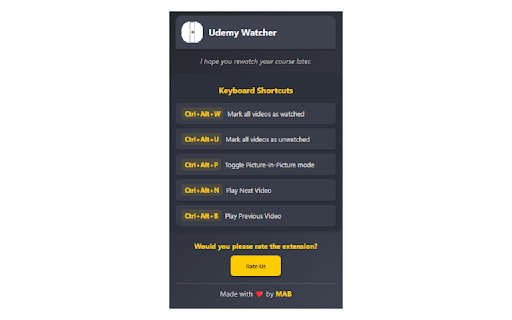

Udemy Watcher: Enhance Your Udemy Learning Udemy Watcher is a lightweight browser extension designed to streamline your Udemy learning experience. It simplifies course management, boosts productivity, and improves efficiency. - One-Click Video Management: Instantly mark videos as watched or unwatched. - Picture-in-Picture Mode: Watch lectures in a floating window while multitasking. - Course Progress Tracking: Monitor completed/total minutes with a visual progress bar. - Export Udemy Notes as PDF: Save your Udemy notes as a PDF file for easy access and reference. - Display Course Creation Date: Adds the original "Created At" date to course pages for better relevance assessment. - Keyboard Shortcuts: Control features with quick commands (e.g., mark watched or toggle PiP). - Enhanced UI: Sleek popup for easy navigation. - Multilingual Support: Available in 8 languages, including English, Spanish, and Japanese. - Seamless Integration: Works flawlessly with Udemy’s interface. - Optimized Performance: Reduces distractions for focused learning. Transform your learning journey with Udemy Watcher save time, stay organized, and complete courses faster.

Udemy Course Downloader
Download videos and text content from Udemy courses 🎓 Udemy Course Downloader - Your Ultimate Learning Companion Download and save your purchased Udemy courses for offline viewing! This powerful extension helps you maintain access to your educational content anytime, anywhere. ✨ KEY FEATURES: • One-Click Downloads: Instantly download individual lecture videos • Batch Downloads: Save entire course sections or complete courses • Smart Organization: Automatically creates course folders with proper naming • High Quality: Downloads videos in the best available quality • Progress Tracking: Monitor download progress and statistics • User-Friendly: Clean, intuitive interface that integrates seamlessly with Udemy 🚀 HOW IT WORKS: 1. Install the extension 2. Navigate to your purchased Udemy course 3. Click the download button that appears on video lectures 4. Choose your preferred save location 5. Access your downloaded content offline! 📚 PERFECT FOR: • Students with unreliable internet • Frequent travelers • Offline learning enthusiasts • Backup of purchased courses • Efficient study planning ⚡ TECHNICAL HIGHLIGHTS: • Fast and efficient downloads • Organized folder structure • Automatic file naming • Download progress monitoring • Download queue management • Lightweight and resource-friendly 🔒 PRIVACY & SECURITY: • Works only with your purchased courses • No data collection • No advertisements • No third-party tracking • Requires minimal permissions 💡 PRO TIPS: • Download entire courses for offline access • Organize videos by sections • Save space with selective downloads • Keep your favorite lectures accessible offline • Create your personal learning library 📝 NOTE: This extension is designed for personal use with your legally purchased Udemy courses. It respects Udemy's terms of service and helps you make the most of your course investments. 🌟 WHY CHOOSE US: • Regular updates and improvements • Active development and support • Clean, bloatware-free design • Focus on user experience • Reliable performance ⚠️ IMPORTANT: This extension only works with courses you have purchased on Udemy. It is designed to enhance your learning experience while respecting content creators' rights. Keywords: Udemy downloader, course download, offline learning, video downloader, educational tools, e-learning, online courses, Udemy tools, chrome extension, learning management

Udemy Course Completion
Effortlessly mark all sections of your Udemy courses as complete with a single click. Effortlessly mark all sections of your Udemy courses as complete with a single click! This extension is perfect for users who want to quickly navigate through their courses and ensure all sections are marked as completed. Features: Works for both business and personal Udemy accounts. One-click button to mark all sections of a Udemy course as complete. Certificate of completion will be received on the user's email ID. How to Use: Install the extension from the Chrome Web Store. Open any Udemy course page and ensure the course content panel is open. Click on the extension icon to open the popup. Click the "Complete course" button. Watch as all sections are marked as complete! If all sections are not marked complete in one go, try the same steps again. Permissions: Access to active tab to execute the script on Udemy course pages. Note: This extension is not affiliated with or endorsed by Udemy.

Udemy Remaining Time Calculator
Udemy Remaining Time Calculator: Optimize Udemy learning with real-time progress updates. Features: • See time left for entire course. • Track section progress effortlessly. • Works with any Udemy business account • Ultra lightweight Chrome extension focused only on essentials. No tracking, no analytics, no unnecessary background work. Just fast and clean performance. • Fully open source and community driven. If you have an idea, improvement, or want to contribute, feel free to jump in and help shape the project together 💙 Hey everyone! 🌟 Exciting news! 🚀 We've got an awesome extension to share with you - it's all about keeping track of your Udemy course time! 🕒✨ But guess what? It's not just an extension, it's a cool, open-source project that's ready to grow with YOUR help! 🌱💻 Join us on this amazing journey by contributing to the project on GitHub: https://github.com/edenizk/udemyRemainingTimerExtention🤝🌐 Your coding skills are super welcome, but don't worry if coding isn't your thing! 🙌💡 Drop your fantastic ideas here: https://github.com/edenizk/udemyRemainingTimerExtention/issues/new 🚀🌈 Let's make this extension even more awesome together! 🚀🎉 #OpenSourceMagic ✨🌟 Features: Real-Time Section Progress: Keep tabs on your course advancement with the ability to see the exact time remaining for the current section. Stay in control and make informed decisions on your study strategy. Holistic Course Countdown: Plan your learning journey effectively by accessing the total time left for the entire course. Gain a comprehensive overview and manage your schedule efficiently to meet your academic goals. Visual and Text generated by AI 🙂 Disclaimer: This extension is not developed or endorsed by Udemy. It is an open-source tool created independently. This extension is not affiliated with, supported by, or connected to Udemy in any way. Be aware that any issues or concerns related to its functionality are the sole responsibility of the extension's developers. If you have any questions, concerns, or if you wish to request the removal of this extension, please contact us via email at edenizk.work.sub@gmail.com. We will promptly address your inquiry and take appropriate action.

Udemy Progress Reset and Completer
# Udemy Progress Reset and Completer A Chrome extension to reset and complete your courses on Udemy. If you want to restart or… # Udemy Progress Reset and Completer A Chrome extension to reset and complete your courses on Udemy. If you want to restart or finish your Udemy courses but couldn't find an extension for it, this one is for you. I created it to reset my course progress and mark courses as completed. 1. Open a Udemy course where you have made some progress. 2. Ensure the **Course Content** panel is open. 3. In the extension popup, click the "Reset Progress" button. 4. The panels will expand and then close, resetting your progress to 0. This visual feedback confirms that the reset is working. 5. Enjoy starting over with a clean slate! 1. Open a Udemy course where you have made some progress. 2. Ensure the **Course Content** panel is open. 3. In the extension popup, click the "Complete Progress" button. 4. The panels will expand and then close, marking your progress as 100%. 5. Celebrate your course completion! Enjoy managing your Udemy courses with ease!
