
hfkchfjmlhncoaidcoondhaifllmcefj
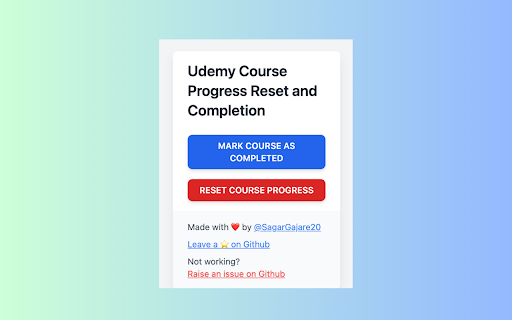
# Udemy Progress Reset and Completer A Chrome extension to reset and complete your courses on Udemy. If you want to restart or… # Udemy Progress Reset and Completer A Chrome extension to reset and complete your courses on Udemy. If you want to restart or finish your Udemy courses but couldn't find an extension for it, this one is for you. I created it to reset my course progress and mark courses as completed. 1. Open a Udemy course where you have made some progress. 2. Ensure the **Course Content** panel is open. 3. In the extension popup, click the "Reset Progress" button. 4. The panels will expand and then close, resetting your progress to 0. This visual feedback confirms that the reset is working. 5. Enjoy starting over with a clean slate! 1. Open a Udemy course where you have made some progress. 2. Ensure the **Course Content** panel is open. 3. In the extension popup, click the "Complete Progress" button. 4. The panels will expand and then close, marking your progress as 100%. 5. Celebrate your course completion! Enjoy managing your Udemy courses with ease!

Udemy Reset Progress
Udemy Reset Progress Web Extension Reset or mark complete your Udemy course progress with a single click. Whether you want to re-watch a course from scratch or mark everything as done — Udemy Reset Progress handles it instantly. Some users experienced unexpected logouts when resetting large courses. Version 2.0 introduces smart pacing that adjusts speed based on your course size, so Udemy never sees suspicious activity: • Auto — Automatically picks the best speed for your course. Recommended for most users. • Turbo — Fastest speed for small courses (under 50 lectures). • Balanced — Reliable speed with batch cooldowns. Great for medium courses. • Safe — Slowest and most reliable. Best for large courses (200+ lectures). • Custom — Full control over delay, batch size, and cooldown timing. 1. Open any Udemy course page 2. Click the extension icon in your toolbar 3. Choose "Clear Progress" to reset or "Mark All Complete" to finish 4. Done — progress updates instantly on the page • Two actions — Reset all progress or mark every lecture complete • Smart pacing — Auto-adjusts speed to avoid rate-limiting and session issues • Custom mode — Fine-tune delay (50–1000ms) and batch size (5–50) for full control • Lightweight — Under 85 KiB total, no background scripts, no bloat • Private — Zero data collection, zero analytics, zero tracking, zero network requests • Open source — Full source code on GitHub (AGPL-3 license) • Cross-browser — Works on Chrome, Firefox, and Edge If you experience unexpected logouts or errors, open Settings (gear icon) and switch to Safe mode or increase the delay in Custom mode. This gives Udemy more time to process each request. Questions or feedback? Visit our GitHub page: github.com/Shramkoweb/udemy-reset-progress

Udemy Course Auto Completion
# Auto complete Udemy Course A Chrome extension to auto complete your courses on Udemy. If you want to finish your Udemy courses… # Auto complete Udemy Course A Chrome extension to auto complete your courses on Udemy. If you want to finish your Udemy courses but couldn't find an extension for it, this one is for you. I created it to auto complete my course. 1. Open a Udemy course where you have 2. Ensure the **Course Content** panel is open. 3. In the extension popup, click the "Progress Course" button. 4. The progress bar will run until the course is 100% complete. 5. Reload your page 6. Enjoy! Enjoy managing your Udemy courses with ease!

Udemy Time Remaining
Chrome extension that modifies the Udemy course page, displaying the time remaining after each section Supercharge your time management within the Udemy platform! Expand the Udemy interface to display for each section and lecture, how much time is left to finalize the course. The extension also visually marks the section progress with progress bars, and highlights which sections have already been completed, so that they can be easily distinguished, in case you go through the course in a non-linear order. Additionally it adapts to the playback speed updating the times accordingly. This extension is designed to seamlessly integrate with, and react to the Udemy interface. Features: * Display the time-based course progress inside Udemy's progress popup. * Display accurate course, section, and lecture durations. * Display remaining time for each section, and lecture. * Display remaining time for each section and lecture, considering the user progress. * Display remaining time for each section and lecture, considering the playback speed. * Display a progress bar for all sections or just the current section. * Highlight completed sections in a distinguishable color. * Fully configurable settings, so that you can toggle or tweak all the features. The way this extension works is, for every section and lecture, using that section or lecture as the point of reference, it displays how much time is left on the section and the course, from that reference point downwards. Considering or not considering the completed lectures underneath (in case you are completing the course in a non-linear manner) depending on whether or not that feature is enabled. Otherwise, if you are just interested in your current progress, and time left in the entire course, you can either check it any time, by checking Udemy's progress popup, or enable the "focus on current lecture only" mode, which will display the time left in the course and section, only in the current lecture. You can read the release notes in the Extension settings popup, to know more about these features. Notes: * This extension does not currently work with Udemy for business, it only supports standard Udemy. If you're a business interested in the extension, and can provide access to the Udemy for business product, please reach out to us, and we'll be happy to implement support for it. * Please bear in mind that Udemy's native interface rounds the estimated durations of the lectures, but this extension calculates the remaining times based on the real accurate estimated durations (to the seconds) of the lectures as reported by Udemy's API. The extension can optionally show the real estimated duration of each lecture and section through the extension settings. * The extension underwent a massive update in order to make it more functional. If you detect any issues with it please let us know in the email indicated at the Extension Details section below, or using the extension settings' "contact us" link, so that we can address it. Dislaimer: * This extension is not associated with, nor endorsed by Udemy. All product and company names are the registered trademarks of their original owners. The use of any trade name or trademark is for identification and reference purposes only and does not imply any association with the trademark holder of their product brand.

Udemy Reset
An extension used to reset the progress of a course on the Udemy website. Instructions for usage: 1. Navigate to a course on Udemy that you already have some progress on. 2. Ensure that the Course Content panel is open (it's okay if you're on the mobile or desktop view). 3. Click on the Reset Progress button on the extension popup. 4. You'll see a slight animation (it's user feedback to let you know it's working!), and the panels will expand and then close, leaving your progress at 0. 5. Enjoy the fresh start! Looking to contribute and/or check out the source?
